12 EN
air cooler PAE 49 / PAE 50
Operation
• Avoid open doors and windows.
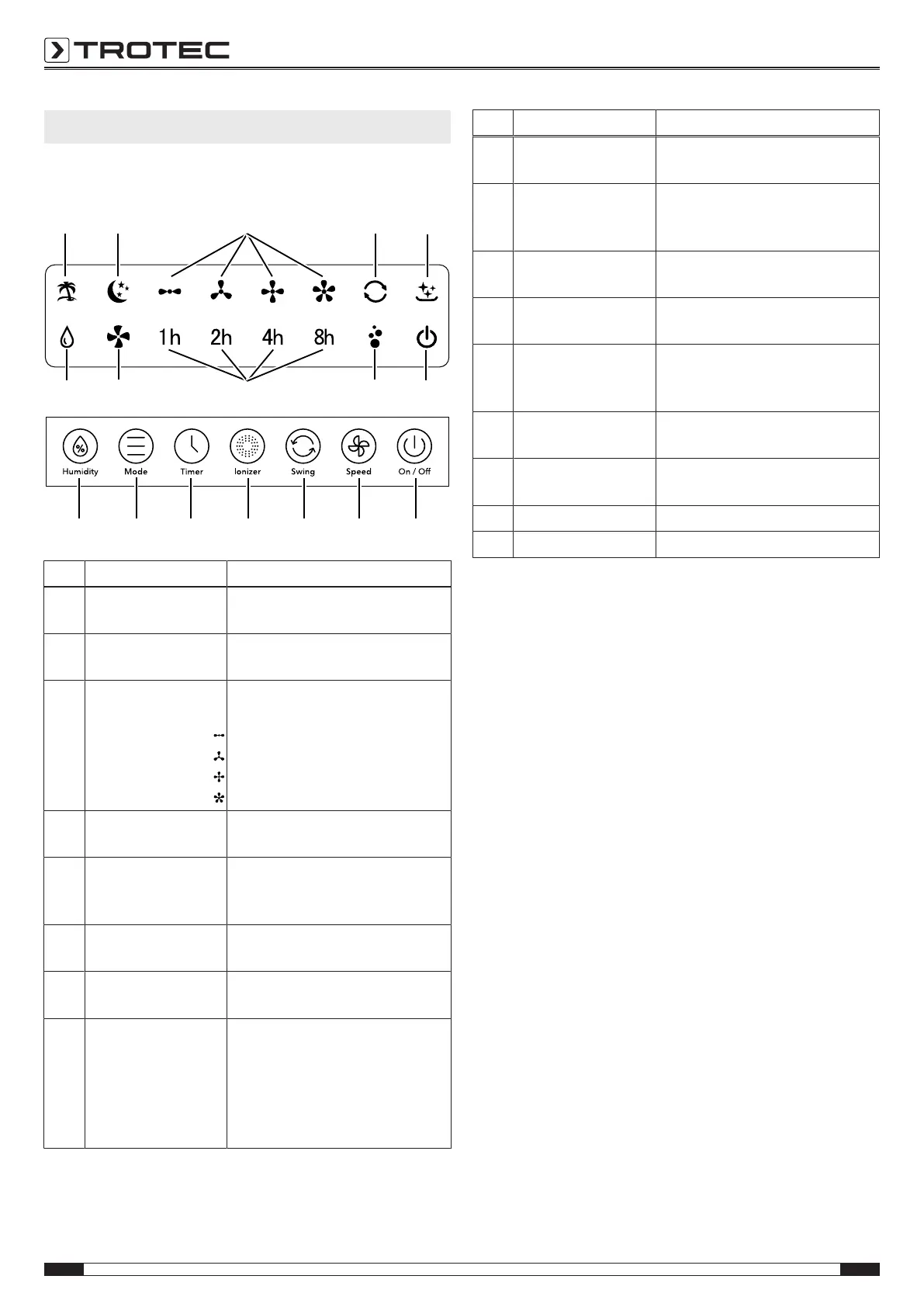
Operating elements
18 19
20
21
22
232425
26
27
28 29 30 31 32 33 34
No. Designation Meaning
18 Air freshening LED Illuminated in white when air
freshening mode is activated
19 Night mode LED Illuminated white when night
mode is activated
20 Fan stage LEDs Fan speed indication is illuminated
in white:
Stage 1 = low
Stage 2 = medium
Stage 3 = high
Stage 4 = maximum
21 Swing function LED Illuminated white when swing
function is activated
22 Filter reset LED Flashes red as a reminder to clean
the filters after 200operating
hours
23 On / Off LED Illuminated red when the power
cable is connected
24 Ionizer LED Illuminated white when ionizer
function is activated
25 Hours LEDs Illuminated white when timer for
automatic switch-on or switch-off
is activated
Indication of the number of hours
of the activated timer 1h, 2h, 4h
and 8h
No. Designation Meaning
26 Ventilation LED Illuminated in white when
ventilation mode is activated
27 Humidity LED Illuminated white when air cooling
mode is activated
Flashes when water tank is empty
28 Humidity button Switching the air cooling mode on
or off
29 Mode button Selection button for air freshening,
ventilation and night mode
30 Timer button Switching the timer function on or
off:
1h, 2h, 4h, 8h
31 Ionizer button Switching the ionization mode on
or off
32 Swing button Switching the swing function on
or off
33 Speed button For setting the fan speed
34 On / Offbutton Switching the device on or off
Switching the device on
Once you have completely installed the device as described in
the Start-up chapter, you can switch it on.
1. Press the On / Off button(34).
ð The device starts in ventilation mode at fan stage1.
ð The LEDs ventilation(26) and fan stage1(20) light up
white.
ð The On/ Off LED(23) is illuminated in red.
Setting the operating mode
The device comes with the following operating modes:
• air cooling
• air freshening
• ventilation
air cooling
The Air cooling mode can be switched on in addition during all
other operating modes.
During air cooling the pump is switched on and the water is
distributed over the evaporation filter to cool the circulating air.
If the water tank is empty, the Humidity LED (27) flashes.
Please proceed as follows to activate Air cooling:
1. Press the Humidity button(28).
ð The Humidity LED(27) lights up white.
ð The pump starts.
2. Press the Speed button(33) to set the desired fan stage
(1 to4).


 To Next Page