14 EN
air cooler PAE 49 / PAE 50
Remote control
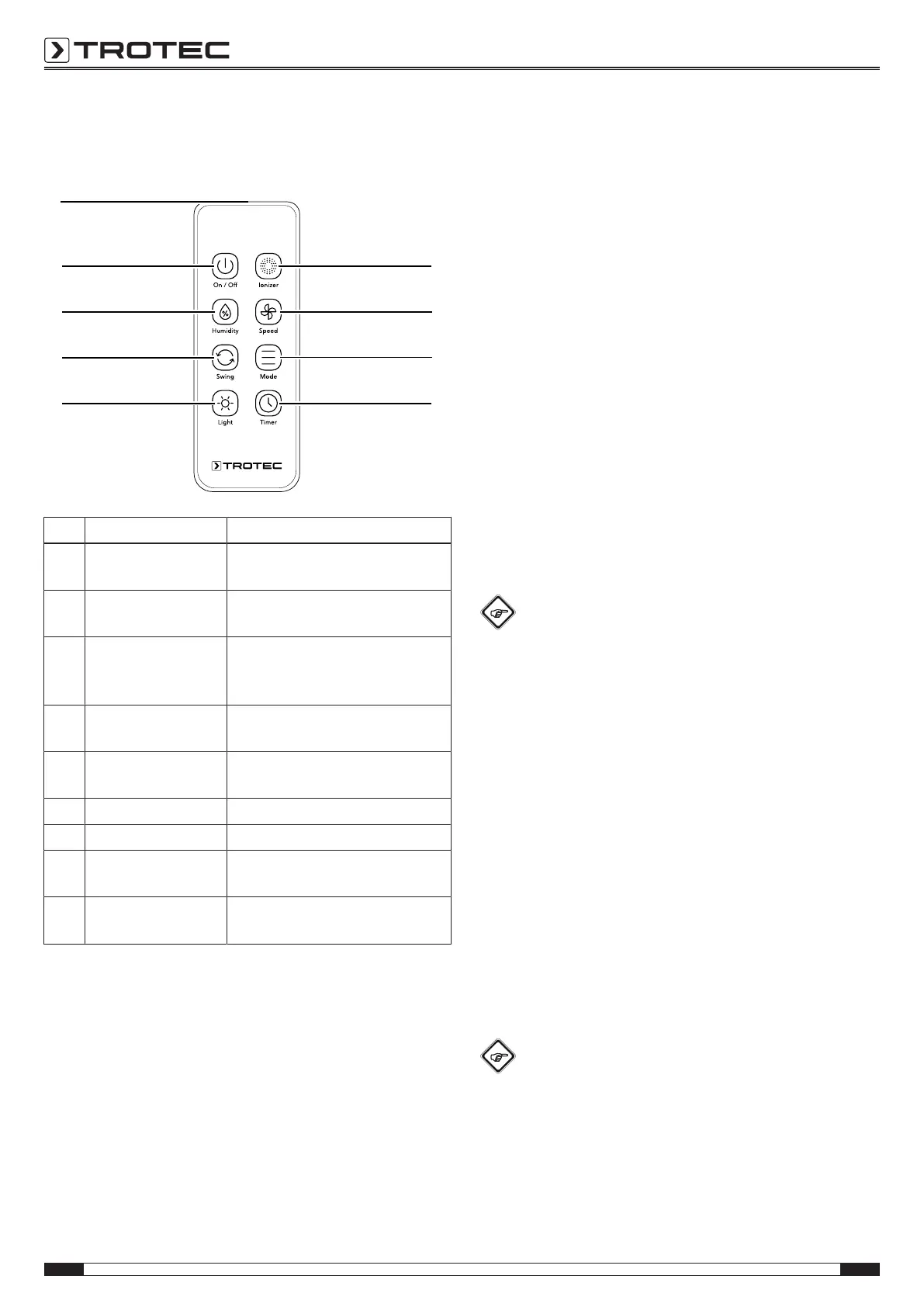
All settings of the device can also be made using the remote
control included in the scope of delivery.
No. Designation Meaning
28 Humidity button Switching the air cooling mode on
or off
29 Mode button Selection button for air freshening,
ventilation and night mode
30 Timer button Switching the timer function on or
off:
1h, 2h, 4h, 8h
31 Ionizer button Switching the ionization mode on
or off
32 Swing button Switching the swing function on
or off
33 Speed button For setting the fan speed
34 On / Offbutton Switching the device on or off
35 Remote control
transmitter/receiver
For infrared transmission to the
device
36 Light button Switching the display illumination
on or off
Swing function
The swing function can be switched on in any operating mode if
required.
Behind the horizontal ventilation flaps, there are vertical air flaps
integrated in the device. By means of the swing function, these
air flaps are moved automatically and thus ensure continuous
air circulation.
1. Press the Swing button(32) to switch the swing function
on or off.
Ionization
Ionization can be switched on as needed. The device will then
release ions for additional air purification. The released ions
remove pollen, dust, viruses and bacteria from the room air.
Ionization can be switched on in any operating mode.
1. Press the Ionizer button(31) to switch ionization on or off.
ð When ionization is activated, the Ionizer LED(24) is
illuminated.
Illumination
The LEDs on the operating element can be switched on or off.
1. Press the Light button(36) to switch the backlight on or
off.
Info
If you press a button while the backlight is switched
off, the corresponding LEDs will be illuminated for
approx.45s and then switch off again.
Memory function
If you switch the device back on from standby mode, the
settings selected for the operating mode are saved. Any
activated timer or night mode will not be saved in the device.
Adding water
An empty water tank is indicated by the device with a flashing
Humidity LED(27). In this case, the water tank must be refilled.
Observe the following when using the ice packs:
• Put the ice packs into a freezer for at least 4hours before
use.
• Put the ice packs into the water tank before filling water
into the tank.
• Only place the ice packs into the designated compartment
in the water tank, otherwise the pump will not function
properly.
Info
When using ice packs at high outside temperatures,
condensation may form at the water tank and drip onto
the floor.


 To Next Page