8 EN
dehumidifier TTK 120 E / TTK 122 E
Operation
Notes:
• Avoid open doors and windows.
• After being switched on, the device operates fully
automatically.
• The fan permanently runs in dehumidification mode even
after the set nominal value has been reached until the
device is switched off.
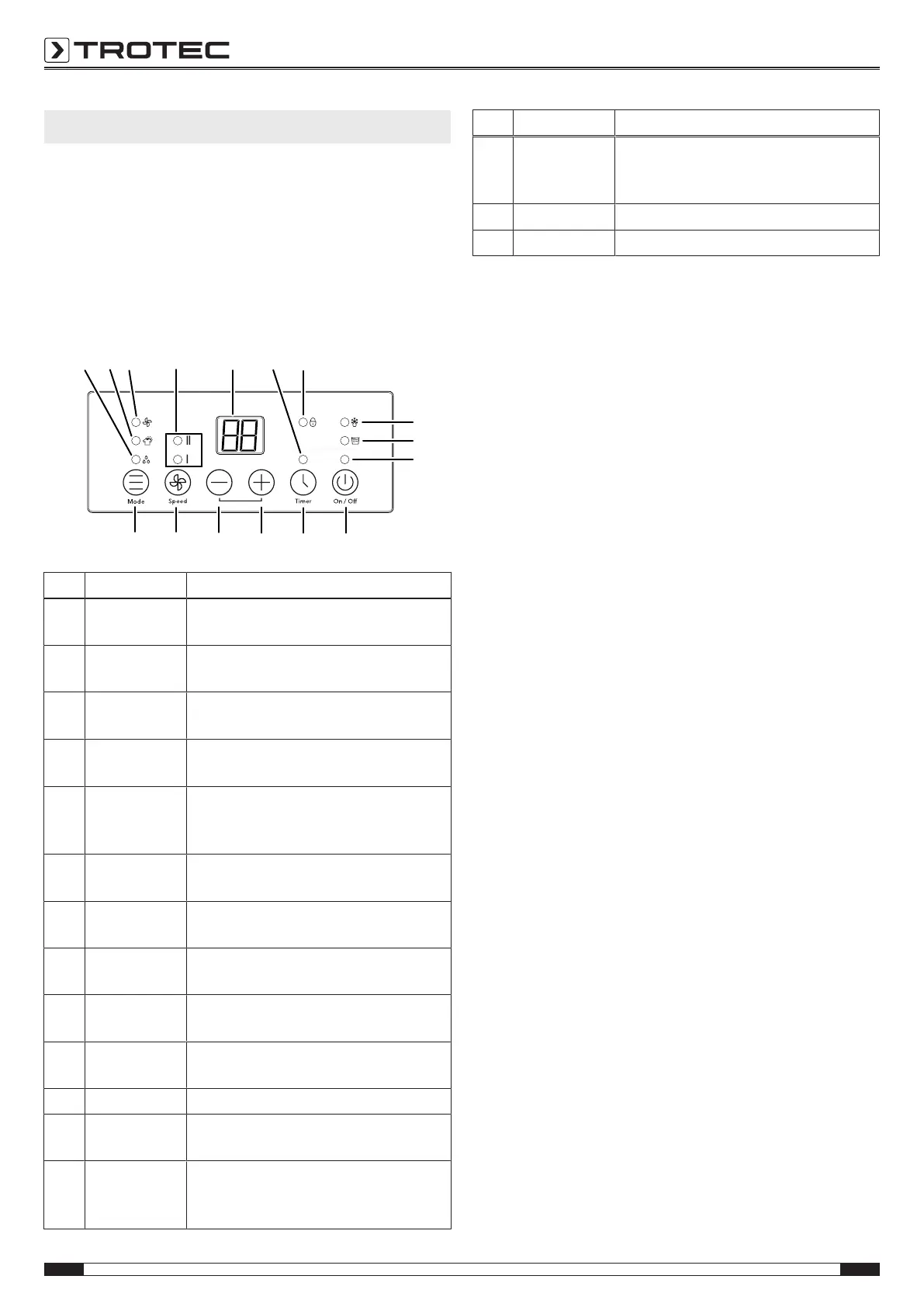
Operating elements
9 10 11
12
13
14
15
16
17
18
19
20
2122
23
24
No. Designation Meaning
9 Dehumidifica-
tion LED
Is illuminated when dehumidification
mode is activated.
10 Laundry drying
LED
Is illuminated when laundry drying mode
is activated.
11 Ventilation LED Is illuminated when ventilation mode is
activated.
12 Speed LEDs
II = Fan stage2
I = Fan stage1
13 Control panel Indicates the current room temperature,
the relative room humidity level and the
number of hours of the timer
14 Timer LED Is illuminated when the timer is
activated.
15 Locking
function LED
Is illuminated when the control panel is
disabled.
16 Automatic
defrost LED
Illuminated when automatic defrost is
carried out.
17 Condensation
tank full LED
Illuminated in red when the
condensation tank is full.
18 On/Off LED Illuminated when the device is switched
on
19 On/Off button Switching the device on or off
20 Timer button Switching the timer function on and off:
1 h to 24 h
21 Plusbutton Increases the value for the desired room
humidity level (adjustable
from 30%– 90%) by5%.
No. Designation Meaning
22 Minus button Decreases the value for the desired
room humidity level (adjustable
from 30%– 90% ) by5%.
23 Speed button Increase or decrease fan speed
24 Mode button Changing the operating mode
Switching the device on
Once you have completely installed the device as described in
the chapter Assembly and start-up, you can switch it on.
1. Press the On/Off button(19).
ð The On/OffLED(18) is illuminated.
ð The device starts to dehumidify.
Setting the operating mode
• Dehumidification
• Continuous operation
• Drying laundry
• Ventilation
dehumidification
The device keeps running until reaching the desired relative
room humidity. Then the compressor switches off and the fan
keeps running. Once the desired relative room humidity is
exceeded, the compressor switches back on.
The desired relative room humidity can be set at any time within
a setting range of30% to90%.
You can choose between low and high fan speed (laundry drying
function).
Please proceed as follows to activate the dehumidification
mode:
1. Press the Mode button(24) until the dehumidification
LED(9) is illuminated.
2. Press the Speed button(23) to set the desired fan stage.
ð If the fan speed is set to a low level, the Speed LED(12)
of stage1 is illuminated.
ð If the fan speed is set to a high level, the
SpeedLED(12) of stage2 is illuminated.
Setting the desired relative room humidity
1. Use the plus(21) or minus(22) buttons to select the
desired relative humidity value. Setting is possible in the
range between30% and90%.
ð The desired relative room humidity is shown on the
control panel(13) for approx.5seconds. Then the
current relative room humidity is displayed again.



 To Next Page