EN 8
Operating manual – dehumidifier TTK 28 E
Inserting the condensation tank
• Ensure that the float inside the condensation tank is
inserted correctly.
• Ensure that the condensation tank is empty and inserted
correctly.
Connecting the power cable
• Insert the mains plug into a properly secured mains
socket.
Info
When connecting the power cable, the LEDs in the
control panel briefly light up in red or green.
Operation
Notes:
• Avoid open doors and windows.
• After being switched on, the device operates fully
automatically.
• The fan permanently runs in dehumidification mode until
the set nominal value is reached. The fan keeps running
for approx. 3minutes and then switches off.
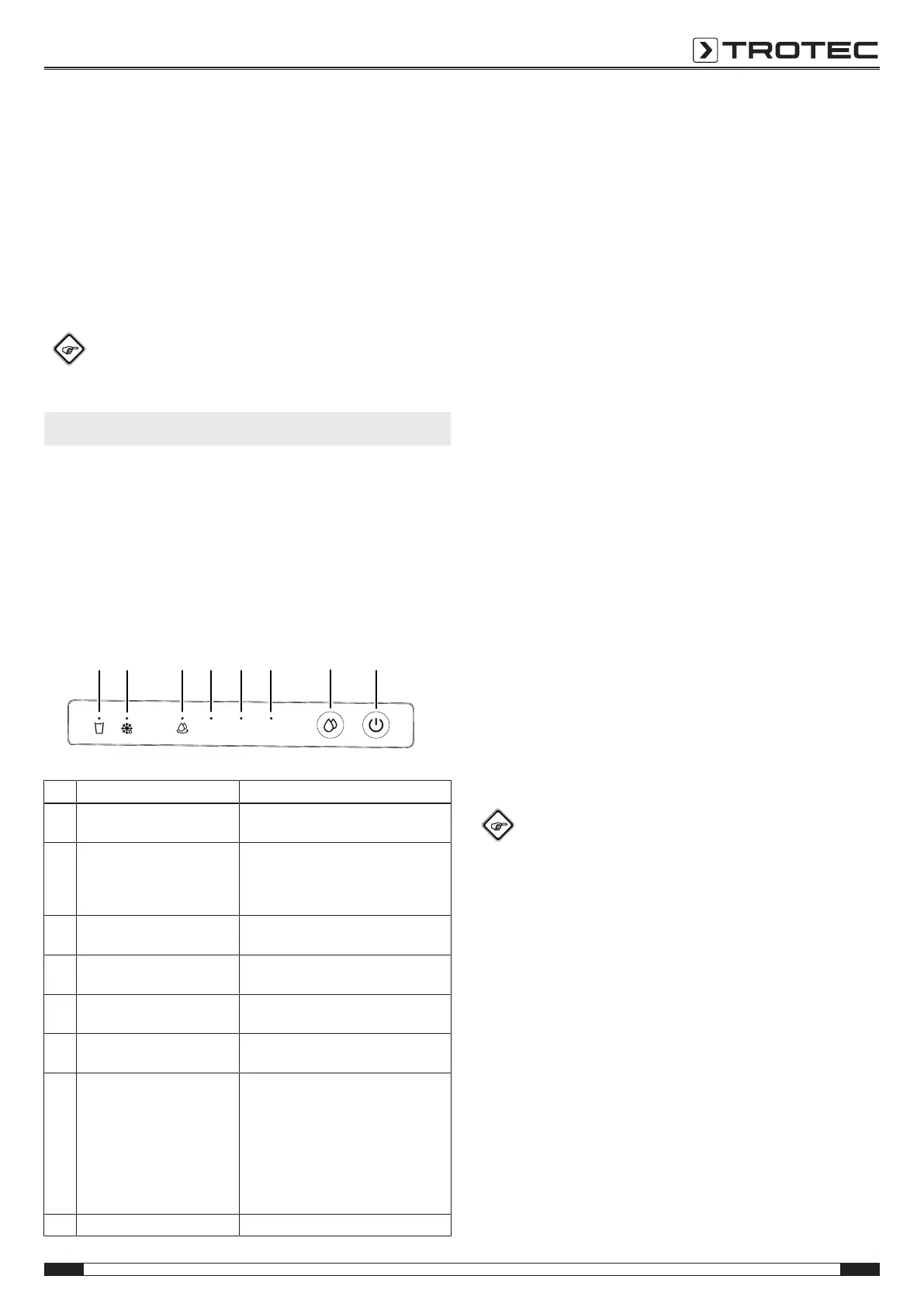
Operating elements
No. Designation Meaning
12 Condensation tank full
indication
Is displayed when the condensation
tank is full or not installed correctly
13 Automatic defrost indication Is displayed when automatic defrosting
is in progress
Flashes if an error has occurred at the
device
14 Continuous operation
indication
Illuminated during continuous operation
15 Relative humidity 40%
indication
Illuminated during dehumidification
(relative humidity 40%)
16 Relative humidity 50%
indication
Illuminated during dehumidification
(relative humidity 50%)
17 Relative humidity 60%
indication
Illuminated during dehumidification
(relative humidity 60%)
18 Operating modes button Selection button for operating modes:
Continuous operation
Dehumidification (relative humidity
40%)
Dehumidification (relative humidity
50%)
Dehumidification (relative humidity
60%)
19 Power button Switching the device on or off
Switching the device on
Once you have completely installed the device as described in
the Start-up chapter, you can switch it on.
1. Press the power button(19).
Setting the operating mode
Setting the desired relative room humidity
The desired relative room humidity can be preselected at any
time.
1. Press the operating modes button(18) to set the desired
room humidity. The setting range covers 40%, 50% and
60%.
Dehumidification
The device keeps running until reaching the desired relative
room humidity. Once the desired relative room humidity is
exceeded, the compressor and fan switch back on.
The desired relative room humidity can be set at any time, the
setting range covers 40%, 50% and 60%.
1. Press the operating modes button(18) until the desired
room humidity is displayed.
ð The indication for the desired relative humidity
level(15, 16, 17) is illuminated.
ð The desired relative room humidity is selected.
Continuous operation
The device dehumidifies the air constantly and regardless of the
relative room humidity.
The desired relative room humidity cannot be adjusted in this
operating mode.
1. Press the operating modes button(18) until the continuous
operation indication(14) is illuminated.
ð Continuous operation(14) is selected.
Info
For continuous operation the condensation drain hose
can be connected in order to continuously drain the
accumulating condensate.
Memory function
After a power failure during operation the device will
automatically be switched back on. The selected settings are
saved.
If the device was disconnected from the mains for a longer time,
the device starts in continuous operation mode when it is
switched back on.
Auto stop function
If the water tank is full, not inserted correctly or the relative
room humidity has been reached, the device will stop
automatically.



 To Next Page