EN 7
dehumidifier TTK 65 E
Operation
Notes:
• Avoid open doors and windows.
• After being switched on, the device operates fully
automatically.
• The fan runs permanently in dehumidification mode until
the set nominal value is reached or the device switched
off.
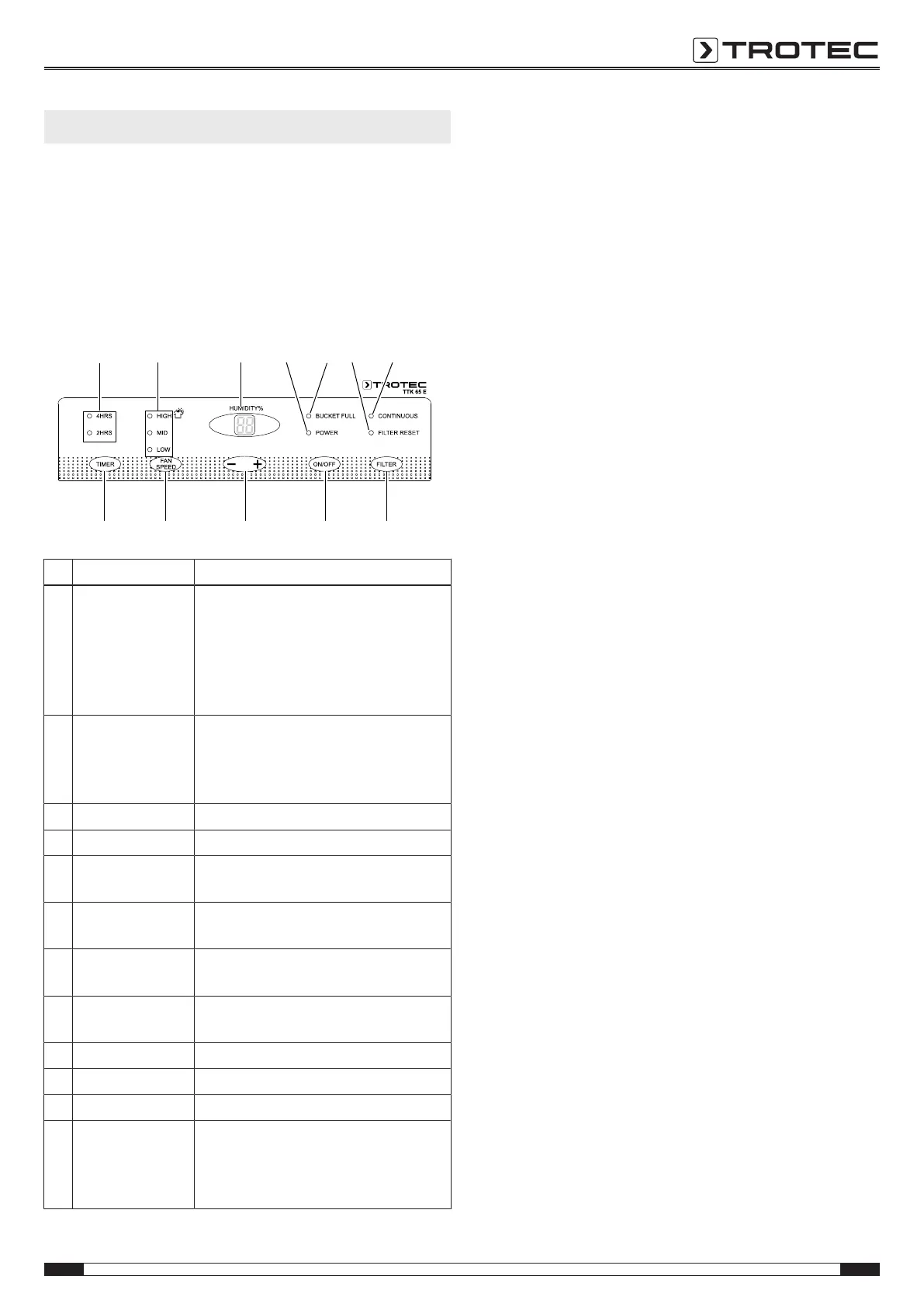
Operating elements
9
10 11 12
13
14 15
20 19 18 17 16
No. Designation Meaning
9 TIMER LEDs Illuminated when the TIMER is
activated.
2HRS = Device automatically switches
on or off after 2hours.
4HRS = Device automatically switches
on or off after 4hours.
10 Fan speed LEDs Indicate the fan speed:
LOW
MID (medium)
HIGH
11 Segment display Indicates the target humidity value.
12 POWER LED Illuminated when the device is running.
13 BUCKET FULL LED Illuminated when the condensation
tank is full.
14 FILTER RESET
LED
Illuminated when the filter needs to be
cleaned.
15 CONTINUOUS LED Illuminated during continuous
operation.
16 FILTER button For resetting the FILTER RESET
indication
17 ON/OFF button For switching the device on or off
18 +/-button For setting the desired humidity value
19 FAN SPEED button For setting the fan speed
20 TIMER button Automatic switch-on timer function
after 2 or 4hours
Automatic switch-off timer function
after 2 or 4hours
Switching the device on
Once you have completely installed the device as described in
the Start-up chapter, you can switch it on.
1. Press the ON/OFF button(17).
ð The fan switches on.
ð The compressor switches on after a period of approx.
3minutes and the device starts the dehumidification
process.
Setting the desired relative room humidity
The desired relative room humidity can be preselected at any
time.
Press the +/-button(18) in order to set the desired value for
relative room humidity (in increments of 5% ranging between
35% and 80%).
Setting the fan speed
Repeatedly press the FAN SPEED button(19) until the LED(10)
for the desired fan speed LOW, MID or HIGH lights up.
Setting continuous operation
The device dehumidifies the air constantly and regardless of the
relative room humidity.
The relative room humidity and the fan speed cannot be set in
this operating mode.
1. Repeatedly press the -button(18) until CO is indicated on
the display.
ð The CONTINUOUS LED(15) is illuminated.
ð The device operates at the highest dehumidification
performance until the condensation tank is full or, when
using a condensation drain hose, until the device is
switched off.
Setting the timer
The timer has two modes of operation:
• automatic switch-on upon expiry of a preset number of
hours
• automatic switch-off upon expiry of a preset number of
hours
The number of hours can be set in increments of 2hours (2h or
4h).
Note
Do not leave the operating device unattended in a
freely accessible room with an activated timer.



 To Next Page