8 EN
dehumidifier TTK 75 E
Operation
Notes:
• Avoid open doors and windows.
• After being switched on, the device operates fully
automatically.
• The fan permanently runs in dehumidification mode even
after the set nominal value has been reached until the
device is switched off.
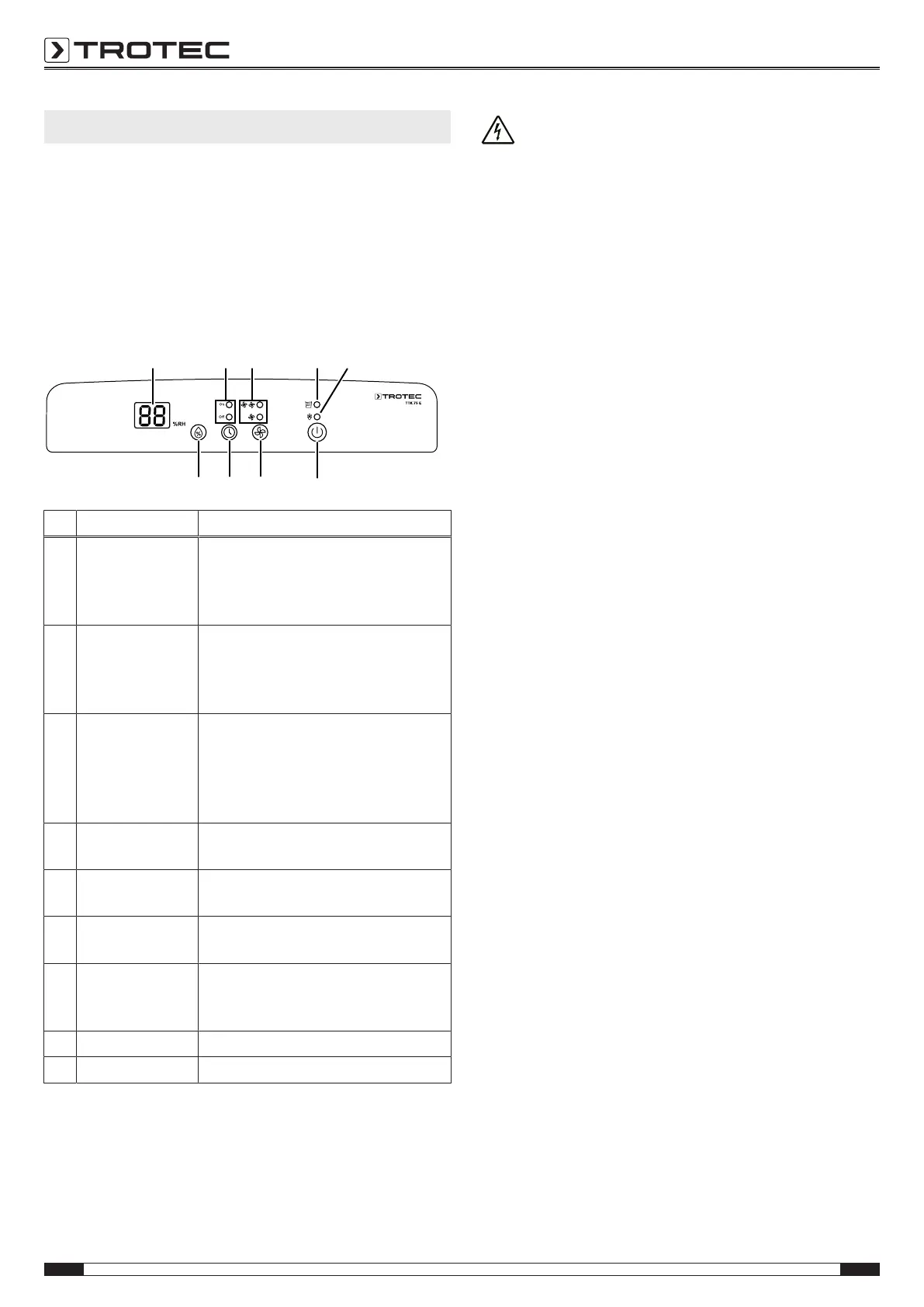
Operating elements
No. Designation Meaning
9 Segment display Indicates the desired relative room
humidity during setting
Indicates the number of hours during
timer programming.
10 Indicator lights On
and Off
Illuminated when the timer function is
activated:
On: Automatic switch-on is activated
Off: Automatic switch-off is activated
11 Indicator lights
Fan speed
Indicate which fan speed is
preselected.
Level 1: Slow fan speed
Level2: High fan speed (function for
drying laundry)
12 BUCKET FULL
indicator light
Is displayed when the condensation
tank is full or not installed correctly
13 DEFROST
indicator light
Is illuminated at low temperature
Device switches into defrost operation
14 HUMIDITY
SETTING button
Setting the humidity
15 TIMER button Switches the timer function on or off.
For setting the number of hours for the
timer (1h to 12h)
16 FAN SPEED button For setting a high or low fan speed
17 POWER button For switching the device on or off
Warning of electrical voltage
Risk of electric shock!
The device does not have the appropriate protection
class for use in wet rooms.
There is a risk of electric shock!
Never use the device in wet rooms (e.g. in bathrooms
and laundry rooms) and never immerse the device in
water!
Switching the device on
Once you have completely installed the device as described in
the chapter Assembly and start-up, you can switch it on.
1. Press the POWER button(17).
ð The device starts to dehumidify.
Setting the operating mode
Setting the desired relative room humidity
Setting is possible in the range between 30% and 90%. We
recommend a room humidity of 60%.
1. Adjust the humidity level by pressing the HUMIDITY
SETTING button(14) until the desired humidity is
displayed.
ð The desired relative room humidity will be indicated on the
humidity/timer display(9).
Setting the fan speed
You can choose between low and high fan speed (laundry drying
function) at any time.
1. Press the FAN SPEED button(16) to select either low or
high fan speed (function for drying laundry).
ð The indicator light for low or high fan speed(11) will be
illuminated.
Dehumidification
The device keeps running until reaching the desired relative
room humidity. Then the compressor switches off and the fan
keeps running. Once the desired relative room humidity is
exceeded, the compressor switches back on.
The desired relative room humidity can be set at any time within
a setting range of30% to90%.
You can choose between low and high fan speed (laundry drying
function).



 To Next Page