Need help?
Do you have a question about the Trotec TTK 99 HEPA and is the answer not in the manual?
Explanation of warning symbols used in the manual.
Read all safety warnings and instructions carefully before use.
Outlines required qualifications for device users.
Dangers and safety precautions for R290 refrigerant.
Warnings and precautions regarding electrical voltage.
Warnings for untrained users, children, and packaging risks.
Lists items included in the package.
Instructions for unpacking the device safely.
Detailed instructions for setting up and starting the device.
Identifies and explains the device's control panel elements and indicators.
Details the dehumidification operating mode and its function.
How to set the target relative humidity level.
Instructions for activating night mode for quieter operation.
How to adjust the fan speed in ventilation mode.
Instructions for using automatic switch-on and switch-off timers.
Information on saved settings and automatic shutdown when tank is full.
Explanation of the automatic defrost function.
Further details and tips for using the device for drying laundry.
Steps for safely switching off and shutting down the device.
Information regarding the device's refrigerant system and safety.
Instructions to check and maintain safety signs and labels.
How to clean the exterior of the device properly.
Guide to cleaning and replacing the HEPA filter.
Detailed technical specifications and parameters of the TTK 99 HEPA.
A numbered list of all available spare parts for the device.
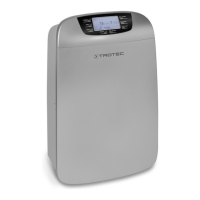
This document outlines the operation and maintenance of the TTK 99 HEPA dehumidifier, a device designed for drying and dehumidifying room air. It can also be used as a clothes dryer for wet laundry in living and working spaces. The dehumidifier is suitable for use in various environments such as living rooms, bedrooms, basements, holiday homes, camper vans, storage spaces, archives, laboratories, garages, and changing rooms, helping to maintain dryness.
The TTK 99 HEPA dehumidifier operates on the principle of condensation. A fan draws damp room air through an air inlet, an air filter, a HEPA filter, an evaporator, and then a condenser. The air is cooled at the cold evaporator to below its dew point, causing water vapor to condense or form rime on the evaporator fins. The dehumidified, cooled air is then slightly warmed at the condenser and blown back into the room. This drier, conditioned air mixes with the room air, gradually reducing the humidity as the device continuously circulates air.
The device is equipped with an integrated HEPA filter, which removes pollen, viruses, dust mite residues, mold spores, and other allergens from the air with an efficiency of 95%. This contributes to improved air quality in the operating environment.
Condensed water either drips continuously or during a defrost phase into a condensation tank located below the evaporator. The tank features a float mechanism to measure the filling level. When the maximum filling level is reached or if the tank is not installed correctly, an indicator light on the control panel illuminates, and the device automatically switches off. The device will only resume operation once the condensation tank has been emptied and reinserted. For continuous operation, a condensation drain hose can be attached to the device to continuously drain accumulated condensate.
The dehumidifier can reduce the relative humidity of a room to approximately 30%. Due to the heat generated during operation, the room temperature may experience a slight increase.
The device is operated via a control panel and features a color LED display that indicates the current relative room humidity using three different colors: blue (below 50%), green (50-70%), and red (70% or above).
At low ambient temperatures, ice may form on the evaporator. The device will automatically initiate a defrost cycle, during which dehumidification is briefly interrupted, but the fan continues to run. The duration of this process varies. It is important not to switch off the device or remove the mains plug during automatic defrost. An indicator on the segment display illuminates during this process.
Regular maintenance ensures optimal performance and longevity of the device.
The manual provides a list of common errors and faults, along with steps to diagnose and resolve them, such as checking power connections, air filters, condensation tank seating, and room temperature. If issues persist, contact customer service or a specialist company for repair.
 General
| Model | TTK 99 HEPA |
|---|---|
| Type | Dehumidifier |
| Weight | 12.5 kg |
| Working Range Temperature | 5 - 35 °C |
| Refrigerant | R290 |
| GWP Factor | 3 |
| Air Filter | HEPA filter |
| Working Range Humidity | 30 - 80 % RH |
| Input Voltage | 220-240 V |

 To Next Page