EasyManua.ls Logo

Troy-Bilt 47330 - Troubleshooting Chart; Engine Does Not Start; Engine Runs Poorly; Engine Overheats

Troy-Bilt 47330
27 pages
Print Icon
To Next Page IconTo Next Page
To Previous Page IconTo Previous Page
Loading...
Section
5:
Maintenance
23
j
Before
inspecting,
cleaning
or
servicing
the
machine,
shut
off
engine,
wait
for
all
moving
parts
to
come
to
a
complete
stop,
disconnect
spark
plug
wire
and
move
wire
away
from
spark
plug.
Failure
to
follow
these
instructions
can
result
in
serious
personal
injury
or
property
damage.
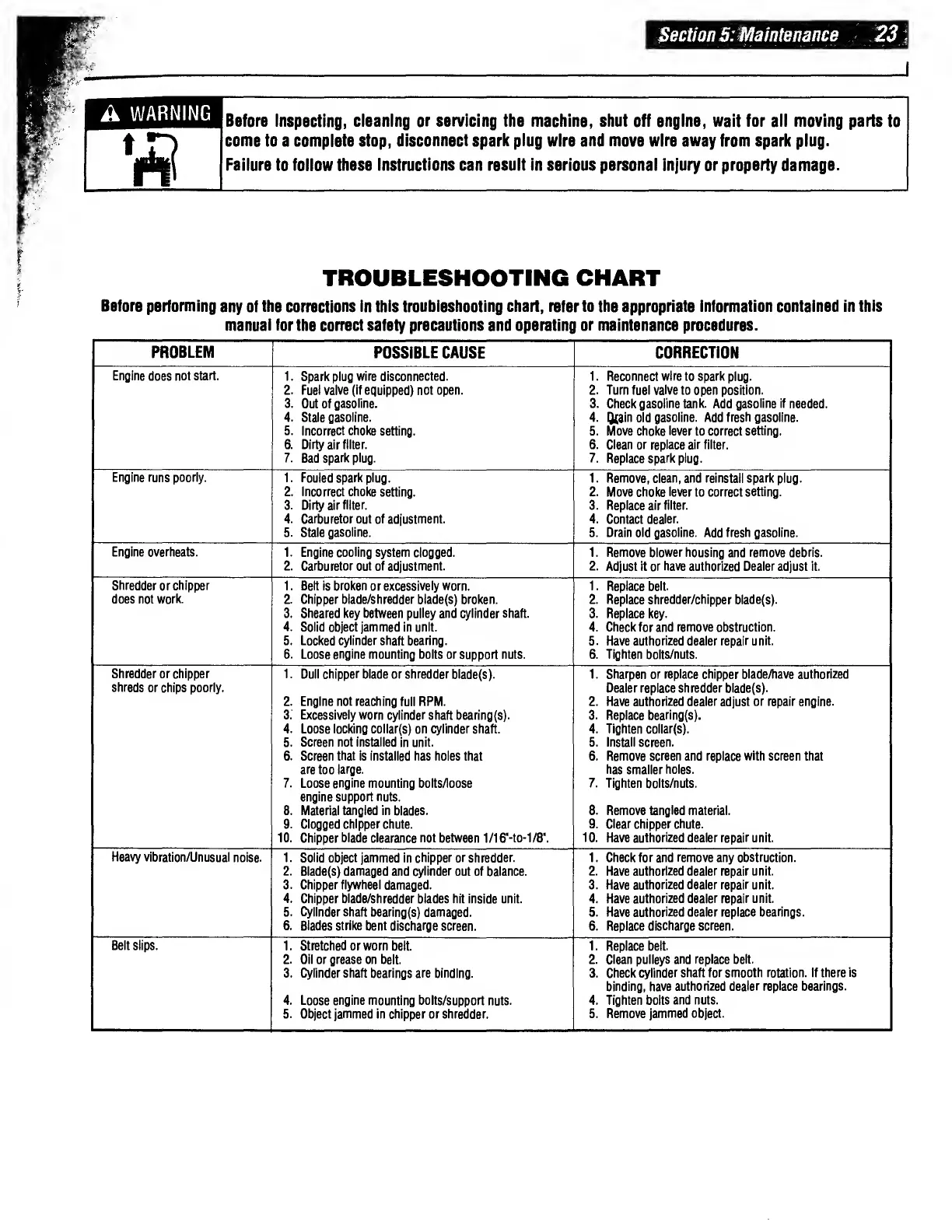
TROUBLESHOOTING
CHART
Before
performing
any
of
the
corrections
in
this
troubleshooting
chart,
refer
to
the
appropriate
information
contained
in
this
manual
for
the
correct
safety
precautions
and
operating
or
maintenance
procedures.
PROBLEM
POSSIBLE
CAUSE
CORRECTION
Engine
does
not
start.
1.
Spark
plug
wire
disconnected.
2.
Fuel
valve
(if
equipped)
not
open.
3.
Out
of
gasoline.
4.
Stale
gasoline.
5.
Incorrect
choke
setting.
6.
Dirty
air
filter.
7.
Bad
spark
plug.
1.
Reconnect
wire
to
spark
plug.
2.
Turn
fuel
valve
to
open
position.
3.
Check
gasoline
tank.
Add
gasoline
if
needed.
4.
Qcain
old
gasoline.
Add
fresh
gasoline.
5.
Move
choke
lever
to
correct
setting.
6.
Clean
or
replace
air
filter.
7.
Replace
spark
plug.
Engine
runs
poorly.
1.
Fouled
spark
plug.
2.
Incorrect
choke
setting.
3.
Dirty
air
filter.
4.
Carburetor
out
of
adjustment.
5.
Stale
gasoline.
1.
Remove,
clean,
and
reinstall
spark
plug.
2.
Move
choke
lever
to
correct
setting.
3.
Replace
air
filter.
4.
Contact
dealer.
5.
Drain
old
gasoline.
Add
fresh
gasoline.
Engine
overheats.
1.
Engine
cooling
system
clogged.
2.
Carburetor
out
of
adjustment.
1.
Remove
blower
housing
and
remove
debris.
2.
Adjust
it
or
have
authorized
Dealer
adjust
it.
Shredder
or
chipper
does
not
work.
1.
Belt
is
broken
or
excessively
worn.
2.
Chipper
blade/shredder
blade(s)
broken.
3.
Sheared
key
between
pulley
and
cylinder
shaft.
4.
Solid
object
jammed
in
unit.
5.
Locked
cylinder
shaft
bearing.
6.
Loose
engine
mounting
bolts
or
support
nuts.
1.
Replace
belt.
2.
Replace
shredder/chipper
blade(s).
3.
Replace
key.
4.
Check
for
and
remove
obstruction.
5.
Have
authorized
dealer
repair
unit.
6.
Tighten
bolts/nuts.
Shredder
or
chipper
shreds
or
chips
poorly.
1.
Dull
chipper
blade
or
shredder
blade(s).
2.
Engine
not
reaching
full
RPM.
3.
Excessively
worn
cylinder
shaft
bearing(s).
4.
Loose
locking
collar(s)
on
cylinder
shaft.
5.
Screen
not
installed
in
unit.
6.
Screen
that
is
installed
has
holes
that
are
too
large.
7.
Loose
engine
mounting
bolts/loose
engine
support
nuts.
8.
Material
tangled
in
blades.
9.
Clogged
chipper
chute.
10.
Chipper
blade
clearance
not
between
1/16"-to-1/8\
1.
Sharpen
or
replace
chipper
blade/have
authorized
Dealer
replace
shredder
blade(s).
2.
Have
authorized
dealer
adjust
or
repair
engine.
3.
Replace
bearing(s).
4.
Tighten
collar(s).
5.
Install
screen.
6.
Remove
screen
and
replace
with
screen
that
has
smaller
holes.
7.
Tighten
bolts/nuts.
8.
Remove
tangled
material.
9.
Clear
chipper
chute.
10.
Have
authorized
dealer
repair
unit.
Heavy
vibration/Unusual
noise.
1.
Solid
object
jammed
in
chipper
or
shredder.
2.
Blade(s)
damaged
and
cylinder
out
of
balance.
3.
Chipper
flywheel
damaged.
4.
Chipper
blade/shredder
blades
hit
inside
unit.
5.
Cylinder
shaft
bearing(s)
damaged.
6.
Blades
strike
bent
discharge
screen.
1.
Check
for
and
remove
any
obstruction.
2.
Have
authorized
dealer
repair
unit.
3.
Have
authorized
dealer
repair
unit.
4.
Have
authorized
dealer
repair
unit.
5.
Have
authorized
dealer
replace
bearings.
6.
Replace
discharge
screen.
Belt
slips.
1.
Stretched
or
worn
belt.
2.
Oil
or
grease
on
belt.
3.
Cylinder
shaft
bearings
are
binding.
4.
Loose
engine
mounting
bolts/support
nuts.
5.
Object
jammed
in
chipper
or
shredder.
1.
Replace
belt.
2.
Clean
pulleys
and
replace
belt.
3.
Check
cylinder
shaft
for
smooth
rotation.
If
there
is
binding,
have
authorized
dealer
replace
bearings.
4.
Tighten
bolts
and
nuts.
5.
Remove
jammed
object.