............ www.truemfg.com ............
True Food Service Equipment, Inc.
18 18
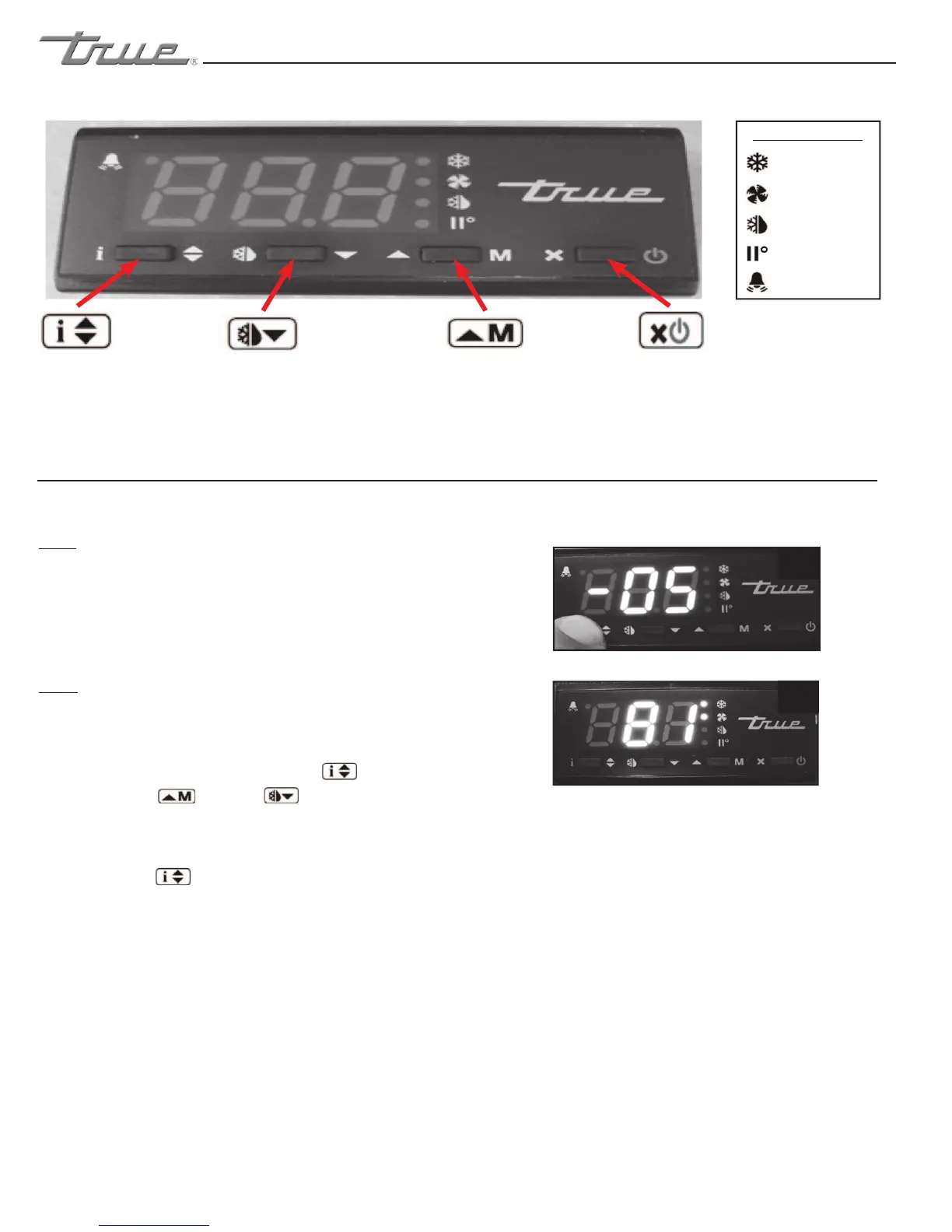
LAE Electronic Control
Info/Set Point
Button
Manual Defrost/
Down Button
Manual Activation/
Up Button
Stand-By
Button
HOW TO CHANGE THE “SET POINT”
1
2
May need to unlock control.
Compressor
Running
Activation of 2nd
Parameter Set - NA
Alarm - NA
Cabinet in Defrost
Evaporator Fan
Running
LAE Control Icons
WHY:
THE SET POINT IS THE TEMPERATURE AT WHICH THE
COMPRESSOR WILL SHUT OFF.
Please note that the “set point” IS NOT the cabinet
holding temperature.
HOW:
A. To see the set point, press and hold the info button.
See image 1.
B. While still holding the info button ,
press the up or down button to change
the “set point”.
C. Once the “set point” has been set correctly release the
info button .
e display will show temperature. See image 2.
press the up or down button to change
press the up or down button to change
While still holding the info button ,


 To Next Page