EasyManua.ls Logo

TRUEFORM Trainer - User Manual

TRUEFORM Trainer
12 pages
Print Icon
To Next Page IconTo Next Page
Loading...
OWNERS MANUAL
Question and Answer IconNeed help?

Do you have a question about the TRUEFORM Trainer and is the answer not in the manual?

Summary

About TrueForm Trainer

Safety Precautions

Heart Rate Guidance

Measuring Your Heart Rate

Instructions on how to manually measure pulse during workouts and calculate BPM.

Know Your Maximum Heart Rate

Formula and recommendations for determining maximum heart rate for exercise.

Heart Rate Chart

A chart detailing target heart rate zones based on age and fitness level.

Assembly Instructions

Unpacking and Initial Setup

Steps for unpacking the trainer, removing boxes, and rolling it off the pallet.

Handrail Preparation and Installation

Guide to loosening bolts and preparing to insert the handrails.

Connecting Handrails and Cables

Steps for connecting the right and left handrails, and the display cable.

Installing the Top Handrail

Procedure for placing and securing the top handrail onto the side rails.

Mounting the Display Unit

Detailed steps for disassembling, wiring, and reassembling the display.

Finalizing Display and Inserting Batteries

Tucking wires, securing the display, and inserting batteries to complete setup.

Display Operation

Changing Units of Measure

Guide to changing the unit of measure (km/miles) on the display.

Setting Intervals

Instructions for setting time or distance intervals on the display.

Safety & Care Information

General Safety Precautions

Important safety warnings and precautions for using the treadmill.

Transporting and Cleaning

Guidelines for safe transport, weekly cleaning, and care of the treadmill.

Lubrication and Service Contact

Information on lubrication needs and how to contact the service center.

Contact Information

TrueForm World Headquarters

Contact details for TrueForm World Headquarters, including address and phone.

Overview

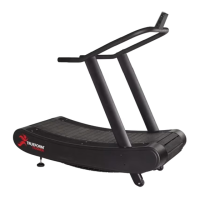
The TrueForm Trainer is a non-motorized treadmill designed for running, training, and gait retraining. It is a lighter-weight and user-friendly version of the TrueForm Runner, suitable for all skill levels, from beginners to professional athletes. The Trainer is presented as an affordable, rugged, and quality-built solution for both commercial training facilities and home gyms.

Function Description:

The TrueForm Trainer operates as a non-motorized treadmill, meaning the belt is propelled by the user's own movement rather than an electric motor. This design is intended to naturally correct running form through what the manufacturer calls "Responsive Belt Technology™." This technology reacts to subtleties in the user's movement, including balance, posture, hip position, and foot strike, to encourage optimal running form for walking, jogging, and sprinting. The treadmill includes a display that provides real-time information on pace, speed, distance, and time. This display is also compatible with Polar heart rate monitors, allowing users to track their heart rate during workouts.

Important Technical Specifications:

  • Type: Non-motorized treadmill.
  • Weight Capacity: The TrueForm Runner (a similar model mentioned for comparison) is built to handle runners weighing up to 750 pounds at speeds between 0-4 MPH and 550 pounds at speeds up to 18 MPH. While specific weight capacity for the Trainer isn't explicitly stated, it's implied to be robust.
  • Display: Integrated display showing pace, speed, distance, and time.
  • Heart Rate Monitoring: Display is compatible with Polar heart rate monitors.
  • Units of Measure: The display's default unit of measure is set to the standard (km or miles) for the region, but can be changed by the user.
  • Power Source: The display requires four AA batteries (included).

Usage Features:

  • Responsive Belt Technology™: This proprietary technology is a core feature, designed to improve running form by reacting to the user's movement dynamics.
  • User-Friendly: Described as user-friendly for all skill levels, making it accessible for a wide range of individuals.
  • Interval Training: The display allows users to set time or distance intervals for countdown workouts.
  • Heart Rate Tracking: Users can monitor their heart rate using compatible Polar heart rate monitors, with guidance provided on measuring heart rate manually and understanding target heart rate zones (Beginner 60%-70%, Intermediate 70%-80%, Advanced 80%-90% of maximum heart rate). The manual includes a detailed heart rate chart based on age.
  • Safety Precautions:
    • Consult a physician before starting any exercise program, especially if you have pre-existing health conditions.
    • Discontinue use and consult a physician if experiencing dizziness, chest pains, nausea, or other abnormal symptoms.
    • Keep loose clothing, shoelaces, and towels away from the running surface.
    • Always use handrails when mounting or dismounting.
    • Never enter or exit while the belt is moving.
    • Assemble and operate on a solid, level surface.
    • As it's non-motorized, there is no emergency stop lanyard; the treadmill will stop on its own.
    • Never leave children unsupervised around the treadmill.
    • Wear proper athletic shoes with rubber or high-traction soles; avoid heels or leather soles.
    • Allow for warm-up and cool-down periods.

Maintenance Features:

  • Cleaning: Weekly cleaning is recommended, including wiping down the handrail, display, and covers, checking overall condition, and vacuuming underneath and inside the treads. A damp cloth or sprayer should be used; avoid soaking the surface or using abrasive cleansers.
  • Lubrication: The belts are pre-lubricated at the factory and do not require any additional lubrication, simplifying maintenance for the user.
  • Transport: The treadmill is heavy and should be lifted carefully to avoid injury. A lifting bar is inserted into the rear bottom corner for this purpose. The handrail can be removed for easier transportation if disassembly is required.
  • Assembly: The manual provides detailed, step-by-step instructions for assembly, including unpacking, attaching handrails, connecting display cables, and inserting batteries. This process involves loosening and tightening bolts with an Allen wrench and connecting various cables.
  • Service: A service center is available for support. Users are advised to have the model and serial number, a description of the problem, and any contributing circumstances ready when calling.

The TrueForm Trainer is positioned as a durable and effective tool for improving running performance and form, suitable for a wide range of users and environments.

TRUEFORM Trainer Specifications

General IconGeneral
BrandTRUEFORM
ModelTrainer
CategoryFitness Equipment
LanguageEnglish