
EasyManua.ls Logo

TSI Instruments AIRFLOW Instruments ProHood PH720 - User Manual

TSI Instruments AIRFLOW Instruments ProHood PH720
64 pages
Print Icon
To Next Page IconTo Next Page
Loading...
OWNER’S MANUAL
Alnor
®
Electronic Balancing Tool
Models EBT720/EBT721
and
AIRFLOW Instruments ProHood
Capture Hood Models PH720/PH721
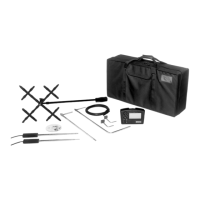
EBT720/PH720 Shown with all
accessory options
EBT721/PH721 Shown with
all accessory options

Table of Contents

Questions and Answers

  • G
    gtownsendSep 15, 2025
    What does Error Code 16 mean on a TSI Instruments Power Tool?
    • J
      Julie PetersonSep 15, 2025
      If your TSI Instruments Power Tool displays Error Code 16, it indicates an accessory temperature probe calibration checksum error. You can try performing user calibration.
  • A
    ashley25Aug 25, 2025
    What to do if the TSI Instruments Power Tool has a flashing symbol on the display?
    • D
      David NewmanAug 25, 2025
      If you see a flashing symbol on the display of your TSI Instruments Power Tool, it typically indicates: * Low battery charge. You should replace or recharge the batteries. * Dirty battery contacts. Cleaning the battery contacts might resolve the issue.
  • L
    Linda BurnsAug 25, 2025
    What does Error Code 43 mean on a TSI Instruments Power Tool?
    • W
      wperezAug 26, 2025
      If your TSI Instruments Power Tool shows Error Code 43, it means the device couldn't send RS232 data because the receiving device was busy for more than 10 seconds. To resolve this: * Ensure that the printer or computer is ready to receive data. * Check the RS232 interface cable for any issues.
  • K
    Katelyn MooreAug 26, 2025
    Why is '888888' flashing on the display of my TSI Instruments Power Tool?
    • A
      alvaradostevenAug 26, 2025
      If your TSI Instruments Power Tool displays “888888” flashing, it indicates that the pressure is too high to measure, or if measuring velocity or flow, the pressure at that velocity is too high. Refer to the specifications page to check the maximum pressure.
  • J
    Jennifer JohnsonSep 16, 2025
    What does Error Code 17 mean on a TSI Instruments Power Tool?
    • R
      Richard RiddleSep 16, 2025
      If your TSI Instruments Power Tool displays Error Code 17, it indicates a hood temperature probe calibration checksum error. You can try performing user calibration.
  • C
    Curtis LeeSep 23, 2025
    What does Error Code 52 mean on a TSI Instruments Power Tool?
    • L
      lee30Sep 23, 2025
      If your TSI Instruments Power Tool displays Error Code 52, it means the lithium battery voltage is too low. Consider replacing the lithium battery.
  • G
    Gina PhillipsSep 8, 2025
    What does Error Code 61 mean on a TSI Instruments Power Tool?
    • N
      Nicole HernandezSep 8, 2025
      If your TSI Instruments Power Tool displays Error Code 61, it means the humidity sensor voltage at 80% RH is out of range. You can try performing user calibration.
  • M
    Michelle TorresSep 9, 2025
    What does Error Code 62 mean on a TSI Instruments Power Tool?
    • K
      Kenneth NguyenSep 9, 2025
      If your TSI Instruments Power Tool displays Error Code 62, it indicates that the pressure sensor gain factor A is out of range. Try performing user calibration.
  • D
    Debra RileySep 2, 2025
    What does Error Code 31 mean on a TSI Instruments Power Tool device?
    • J
      Judy WilliamsSep 2, 2025
      If your TSI Instruments Power Tool displays Error Code 31, it means the pressure calibration voltage at 5 in. H2O must be less than the pressure calibration voltage at 15 in. H2O. Make sure calibration pressures are correct.
  • C
    Connor JacksonAug 31, 2025
    What does Error Code 36 indicate on a TSI Instruments Power Tool?
    • S
      Sandra BergerSep 1, 2025
      If your TSI Instruments Power Tool displays Error Code 36, it means the flap closed pressure was less than the flap open pressure, or the flap open versus flap closed pressure ratio exceeds allowed limits. Try taking the data again.

Summary

Chapter 1. Introduction

Instrument Description

Overview of the Alnor EBT720/EBT721 and AIRFLOW PH720/PH721 instruments and their features.

Standard Tools

Descriptions of essential tools like Pitot tubes and static pressure probes for measurements.

Optional Tools

Descriptions of accessories like capture hoods and probes for enhanced measurements.

Chapter 2. Unpacking and Setting Up

Unpacking the Instrument

Instructions for unpacking the instrument and checking components against the packing list.

Preparing the Instrument for Use

Guidance on powering the micromanometer using AC adapter or batteries.

Connecting the Pitot Tube

Procedure to connect the pitot tube to the micromanometer's pressure ports.

Connecting the Static Pressure Port

Procedure to connect the static pressure probe to the micromanometer.

Attaching the Micromanometer to the Capture Hood Base

Steps for securely mounting the micromanometer onto the capture hood base.

Connecting the Velocity Matrix

Procedure to connect the velocity matrix to the micromanometer's positive and negative ports.

Connecting the Air Flow Probe

Procedure to connect the air flow probe to the micromanometer.

Connecting Temperature;Humidity Probes

Steps for connecting temperature or temperature/humidity probes to the micromanometer.

Chapter 3. Getting Started

Keypad Operation

Explanation of the function and use of each key on the micromanometer keypad.

Common Terms

Definitions of key terms used in the manual, such as Sample, Logging Interval, and Test ID.

Step-By-Step Example Operation

A practical guide to taking sample pressure readings with the instrument.

Chapter 4. How To

Select Measurement Tool

Guide to selecting the appropriate measurement device or tool for the task.

Configure Instrument Operation and Data

Set time, date, units, parameters, logging, display modes, and manage sample data.

Configure Communication and Data Transfer

Set RS232 output, baud rate, format, and download data to printers or computers.

Perform Instrument Calibration

Guide to user and factory calibration procedures for accurate measurements.

Chapter 5. Changing Flow Hoods

Flow Hood Parts Identification

Identification and description of the components of the capture hood assembly.

Hood Assembly and Installation

Instructions for assembling and installing different sizes of capture hoods.

BSC Hood Assembly

Detailed steps for assembling the direct inflow measurement hood for biological safety cabinets.

Chapter 6. Flow Measurements Using the Capture Hood

Non-Backpressure Compensated Measurements

Methods for taking flow measurements without backpressure compensation.

Backpressure Compensated Measurements

Procedure for taking flow measurements with backpressure compensation enabled.

Error Display and Handling

Explanation of error messages and how to handle them during measurements.

Chapter 7. Maintenance and Troubleshooting

Component Cleaning Procedures

Guidelines for cleaning the fabric hood, micromanometer, manifold, and cases.

Instrument Calibration Services

Information on recommended annual calibration and shipping procedures.

Troubleshooting the Instrument

Lists symptoms, possible causes, and corrective actions for instrument malfunctions.

Understanding Error Codes

Explanation of error codes, their causes, and recommended actions.

Appendix A. Back Pressure

Understanding Back Pressure Effects

Explanation of how capture hood placement affects air flow and measurement.

Verifying Flow Measurements

Recommended practices for validating capture hood measurements using velocity traverses.

Appendix B. Actual vs. Standard Air Velocity and Flow Measurements

TSI Instruments AIRFLOW Instruments ProHood PH720 Specifications

General IconGeneral
ModelProHood PH720
Storage Temperature-4 to 140°F (-20 to 60°C)
TypeAirflow Instruments
Measurement Range25 to 2500 CFM
Accuracy±3% of reading
Operating Temperature40 to 122°F (4 to 50°C)
Battery Life10 hours
Battery TypeFour AA-size batteries (alkaline or rechargeable)
DisplayDigital LCD
Weight2.2 lb (1 kg)
Dimensions12.5 x 12.5 x 3.5 in (318 x 318 x 89 mm)
Probe LengthNot applicable
Probe DiameterNot applicable
Airflow Range85 to 2, 550 m3/h (50 to 1, 500 cfm)

Related product manuals
