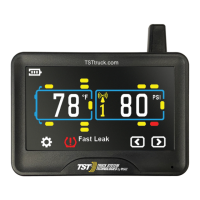
Pressure unit: BAR or PSI, user-selectable.
Temperature unit: °C or °F, user-selectable.
Icon
Description
Tire
Warning
Temperature unit (Selectable)
Pressure unit (Selectable)
Sensor low battery
Display battery indicator
PROGRAMMING SENSOR CODES INTO THE DISPLAY
Or use your own numbering pattern:
Red LED indicator
Antenna
TST-Doc-507FT-RV WSD-C Manual-(D)
Light Sensor
S1
S2
Repeater active
Note: Your sensors will begin reading as soon as they are coded into the display.
Returning to the Main Screen by pushing the"BACK"button twice, you
may hear an alarm and see a pressure reading of"0". This is"normal".
Once the high/low settings are in place and set up is complete, these
alarms will not sound. Simply press the (+) button quickly to silence the
alarm.
Note: It is recommended to label each sensor first with the provided numbering
code stickers, similar to the following pattern, before you code the sensors.
This allows you to know which sensor is programmed to which tire position.
You can also write in your sensor number pattern.



 To Next Page