Installation
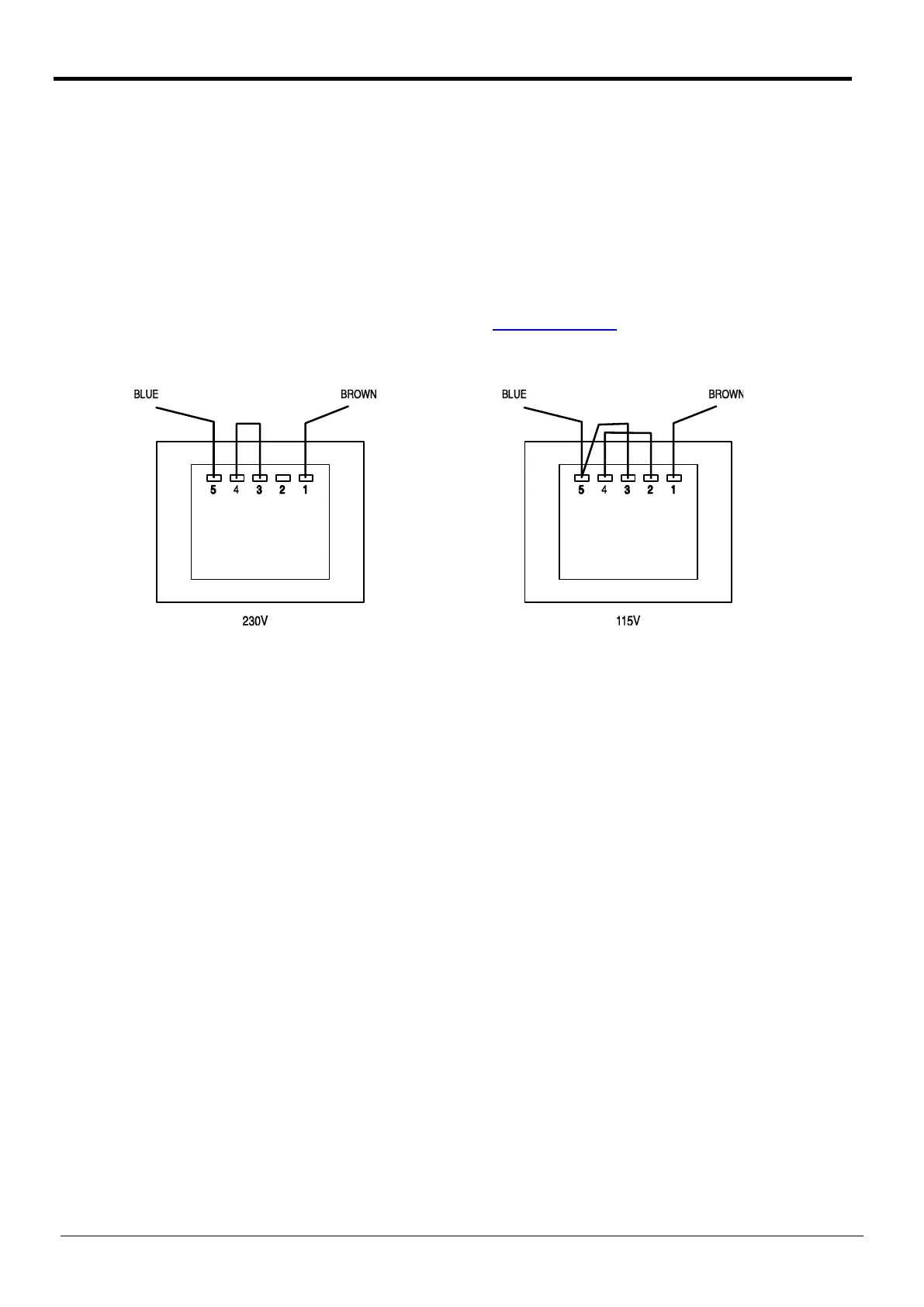
Mains Operating Voltage
Check that the instrument operating voltage marked on the rear panel is suitable for the local
supply. Should it be necessary to change the operating voltage, proceed as follows:
1) Disconnect the instrument from all voltage sources.
2) Unclip the front bezel by gently pulling the centre of each long edge up and forward.
The case halves are held together by 4 plastic push-rivets. Use the blade of a small
screwdriver in the slot beside each rivet to first ease out the rivet head and then fully remove
the rivet body. Separate the case halves. Visit www.tti-test.com
for further details.
3) Change the transformer connections following the diagrams below:
4) Reassemble in the reverse order.
5) To comply with safety standard requirements the operating voltage marked on the rear panel
must be changed to clearly show the new voltage setting.
Mains Lead
When a three core mains lead with bare ends is provided it should be connected as follows:-
Brown - Mains Live
Blue - Mains Neutral
Green / Yellow - Mains Earth
WARNING! THIS INSTRUMENT MUST BE EARTHED WHEN OPERATED FROM AN AC LINE SUPPLY
Any interruption of the mains earth conductor inside or outside the instrument will make the
instrument dangerous. Intentional interruption is prohibited. The protective action must not be
negated by the use of an extension cord without a protective conductor.
Battery Operation
To fit or replace the six ‘C’ cells, slide off the battery cover at the rear of the instrument and
remove the battery tray. For safety reasons the battery cover can only be slid off after first
removing the security screw with a screwdriver. Always refit the security screw after changing the
batteries.
10
Telemeter Electronic GmbH | Joseph-Gaensler-Str. 10 | Phone +49 906 70693-0 | Fax +49 906 70693-50 | www.telemeter.info 11



 To Next Page