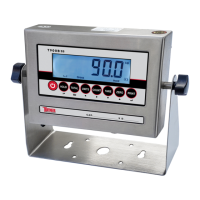
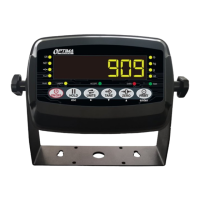
The Tufner T900 Series Indicator is a versatile weighing system designed for various industrial applications. It comes in two main series: the T900A (LED) and T900B (LCD), with options for a rechargeable battery, stainless steel enclosure, washdown enclosure, computer connection, relay output, and analog output.
Function Description:
The T900 indicator serves as the central control unit for weighing scales, offering a wide range of functions beyond basic weight measurement. It supports multiple weighing units (kg, lb, g, oz, lb:oz on LCD versions), allowing for flexible application in different regions and industries. Key functions include Gross/Tare/Pre-Set Tare/Zero, which enables users to accurately measure net weights by taring out container weights or applying pre-set tare values. The indicator also features multiple Hold functions (Peak Hold, Manual Hold, Auto Hold, Average Hold) to capture and display specific weight readings, such as the highest weight recorded during a test or the average weight of moving animals. Counting weighing allows for the rapid counting of identical parts based on a sample weight, while accumulation weighing enables users to sum multiple individual weights for a total. Overload and underload indications provide crucial safety warnings, preventing damage to the load cell and ensuring accurate measurements. The indicator can connect to multiple printers for data logging and to a remote display or scoreboard for enhanced visibility. It also includes a power-saving mode to conserve battery life and the ability to adjust gravity settings for different geographical locations, ensuring precise calibration.
Important Technical Specifications:
- Accuracy Class: 5000 e
- Resolution: Display: 30,000; ADC: 2,000,000
- Zero Stability Error: TK0 < 0.1μV/K
- Span Stability Error: TKspn < ± 6 ppm/K
- Sensitivity (internal): 0.3 μV / d
- Input Voltage: -30 to +30mV DC
- Excitation Circuit: 5 VDC, 4-wire connection, capable of supporting up to 6 load cells of 350ohm max.
- AC Power: AC 100-250V (requires the included 9V adapter)
- Operation Temperature: -10 °C ~ +40 °C
- Operation Humidity: ≤90%RH
- Storage Temperature: -40 °C ~ +70 °C (32-104°F)
- NTEP Approval: Approved for 5,000 divisions.
- Output Options: RS232 serial output (standard), Relay output (optional), and 4-20mA analog output (optional).
Usage Features:
The T900 indicator is designed for ease of use with a splash-proof keyboard and display.
- Power On/Off: Pressing the power button for 2 seconds turns the indicator on or off. It performs an auto-check and counts down before entering weighing mode.
- Zeroing: The ZERO key resets the scale to zero when empty or within the manual zero range.
- Unit Selection: The UNITS key allows switching between various measuring units (kg, g, lb, oz, lb:oz).
- Tare Function: The TARE key enables users to tare out container weights to measure net weight. A pre-set tare weight can also be entered and confirmed.
- Counting Function: Users can set a sample weight and then add or remove items to count the quantity. The sample number can be adjusted, and the PRINT key confirms the selection.
- Accumulation Function: Multiple weights can be added together. The indicator displays the number of accumulated weights and the total accumulated weight, which can be printed.
- Hold Functions:
- Peak Hold: Captures and displays the highest weight recorded.
- Manual Hold: Holds the current weight on the screen until released.
- Auto Hold: Automatically holds stable weights above 20 divisions for 3 seconds.
- Average Hold: Calculates and displays the average weight over a 3-second sample, useful for animal weighing.
- Printing: When connected to a printer, the PRINT key sends current weight data. In accumulation mode, holding the PRINT key prints the total accumulated weight.
- Parameter Settings: A comprehensive menu (C01 to C45) allows users to configure various settings, including weighing unit, decimal setting, graduation, maximum capacity, zero calibration, hold function type, alarm limits, communication settings (RS232, 4-20mA, Relay), baud rate, zero ranges, digital and noise filters, and print formats.
- Calibration: The T900 supports both single-point and linear calibration methods, allowing for precise adjustment with one or multiple known weights.
Maintenance Features:
- Battery Management: For models with a rechargeable battery, it's recommended to fully charge before first use. To maintain battery health, fully discharge and recharge monthly. The T900A uses flashing red for low battery, solid red for charging, and green for fully charged. The T900B uses a battery symbol to indicate charge level and a flashing symbol for low battery.
- Troubleshooting: The manual provides a detailed list of error codes (e.g., "uuuuuu" for overload, "nnnnnn" for calibration issues, "Err 1" for weight above max capacity, "Err 6" for exceed zero range) with corresponding reasons and solutions. These solutions often involve checking load cell connections, ensuring the scale is level, recalibrating, or contacting support for potential hardware issues.
- Anti-static Precautions: Users are advised to discharge any static charge on their body before opening the indicator's protective container, ideally by wearing a grounded anti-static wrist strap and using an anti-static mat, to prevent damage to sensitive electronic components.
- Load Cell Connection: The indicator supports both 4-wire and 6-wire load cell connections, with clear diagrams and wiring color codes provided for proper installation.
- Seal Switch: Access to calibration settings (C01-C07) requires the seal switch on the PCB to be OFF. Breaking the official seal for this purpose may require recertification.



 To Next Page
 General