Operation
Power on
- Press any key to power on the console when being
in sleep mode..
- Start pedaling to power on the console when being
in sleep mode.
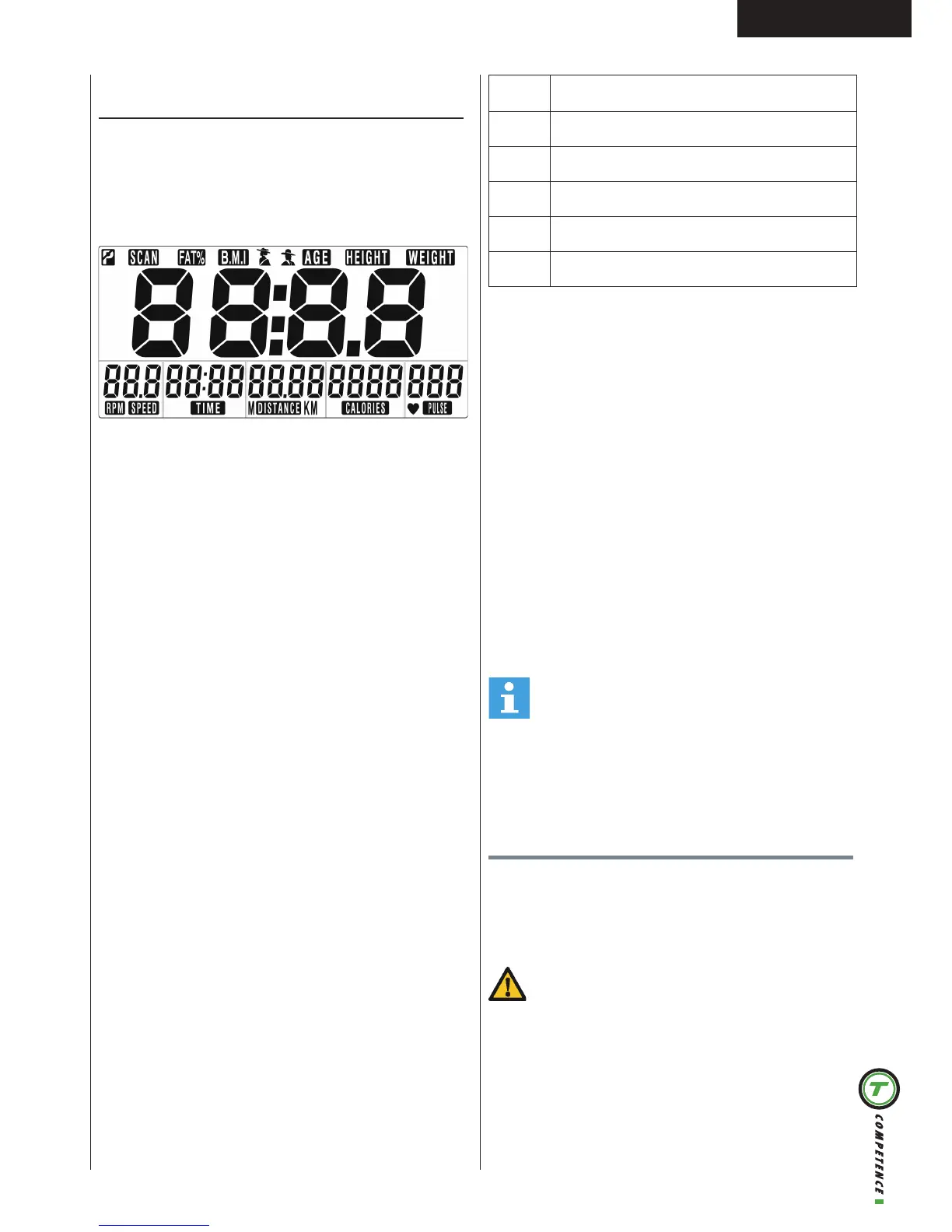
LCD will display all segments as Drawing.
Power off
Without any signal being transmitted into the monitor
for 4 minutes the monitor will enter SLEEP mode
automatically.
User Profile setting
- Use UP or DOWN (Dail) to set SEX, HEIGHT,
WEIGHT and AGE.
- Press MODE/ENTER to confirm.
Workout setting
- Press MODE/ ENTER key to select the function
of TIME, DISTANCE, CALORIES, and PULSE. Use
UP or DOWN (DAIL) for setting and press MODE/
ENTER key for confirmation.
- For instance the time set-up, when the time value
is blinking, you can use UP and DOWN (DAIL) to
adjust the number. Press MODE/ENTER key for
confirmation and skip to next set-up. The set-up of
DISTANCE, CALORIES and PULSE is the same as
TIME set-up.
- Once the workout begins and the console picks up
the exercise signal, the value of SPEED/RPM, TIME,
DST and CAL will count up on the display.
Recovery
- The RECOVERY key will only be valid if pulse is
detected.
- TIME will show „0:60“ (seconds) and counts down
to 0.
- Computer will show F1 to F6 after the countdown
to test heart rate recovery status. User can find the
heart rate recovery level based on the chart below.
- Press RECOVERY key again to return to the
beginning.
F1 Outstanding
F2 Excellent
F3 Good
F4 Fair
F5 Below average
F6 Poor
Body Fat
- Press the BODY FAT key to start body fat
measurement.
- During measuring, users have to hold both hands
on the hand grips. LCD display “-” “- -” “- - -” “- - -
-” for 8 seconds until computer finish measuring.
- LCD will display BMI and FAT %.
Body fat mode error codes
- *E-1
There is no heart rate signal input detected.
- *E-4
Occurs when FAT% and BMI result is below 5 or
exceeds 50.
Trouble shooting:
- When the display of LCD is dim, it means the
batteries need to be changed.
- If there is no signal when you pedal, please check if
the cable is well connected.
NOTE
• When stop training for 4 minutes, the main
screen will be off.
• If the computer displays abnormally, please re-
install the batteries and try again.
Cleaning and maintenance
The equipment does not require special maintenance.
The equipment does not require recalibration when
it is assembled, used and serviced according to the
instructions.
WARNING
• Do not use solvents to clean the equipment.
• Clean the equipment with a soft, absorbent cloth
after each use.
• Regularly check that all screws and nuts
are tight.
• If necessary, lubricate the joints.


 To Next Page