15
16
PS3 Bluetooth Setup / Configuration PS3 Bluetooth / PS3-Bluetooth Setup
FRANÇAIS
1. Paramètres > Paramètres accessoires > Gérer les périphériques
Bluetooth
®
(casque Delta Bluetooth éteint).
2. Démarrer la recherche de périphériques Bluetooth.
3. Appuyer sur la touche BT MFB pendant 5 secondes. Le voyant
passe du bleu au rouge. Relâcher la touche.
4. Sélectionner Turtle Beach COD EFD Headset dans la liste.
5. Entrer la clé d’identification « 0000 ».
6. Régler le volume des communications vocales PSN avec la
touche de volume Bluetooth de l’écouteur de droite.
DEUTSCH
1. PS3 Einstellungen > Peripheriegeräte-Einstellungen > Bluetooth-
Geräte verwalten. (Delta Bluetooth AUS).
2. Nach Bluetooth-Geräten scannen.
3. Drücken Sie BT MFB für 5 Sekunden. LED wechselt von blau
zu rot. Lassen Sie die Taste los.
4. Wählen Sie "Turtle Beach COD EFD Headset" aus der Liste.
5. Geben Sie "0000" als Hauptschlüssel ein.
6. Stellen Sie die PSN-Chat-Lautstärke mit der Bluetooth-Laut-
stärkentaste auf der rechten Ohrmuschel ein.
12/14 12:15 PM
0
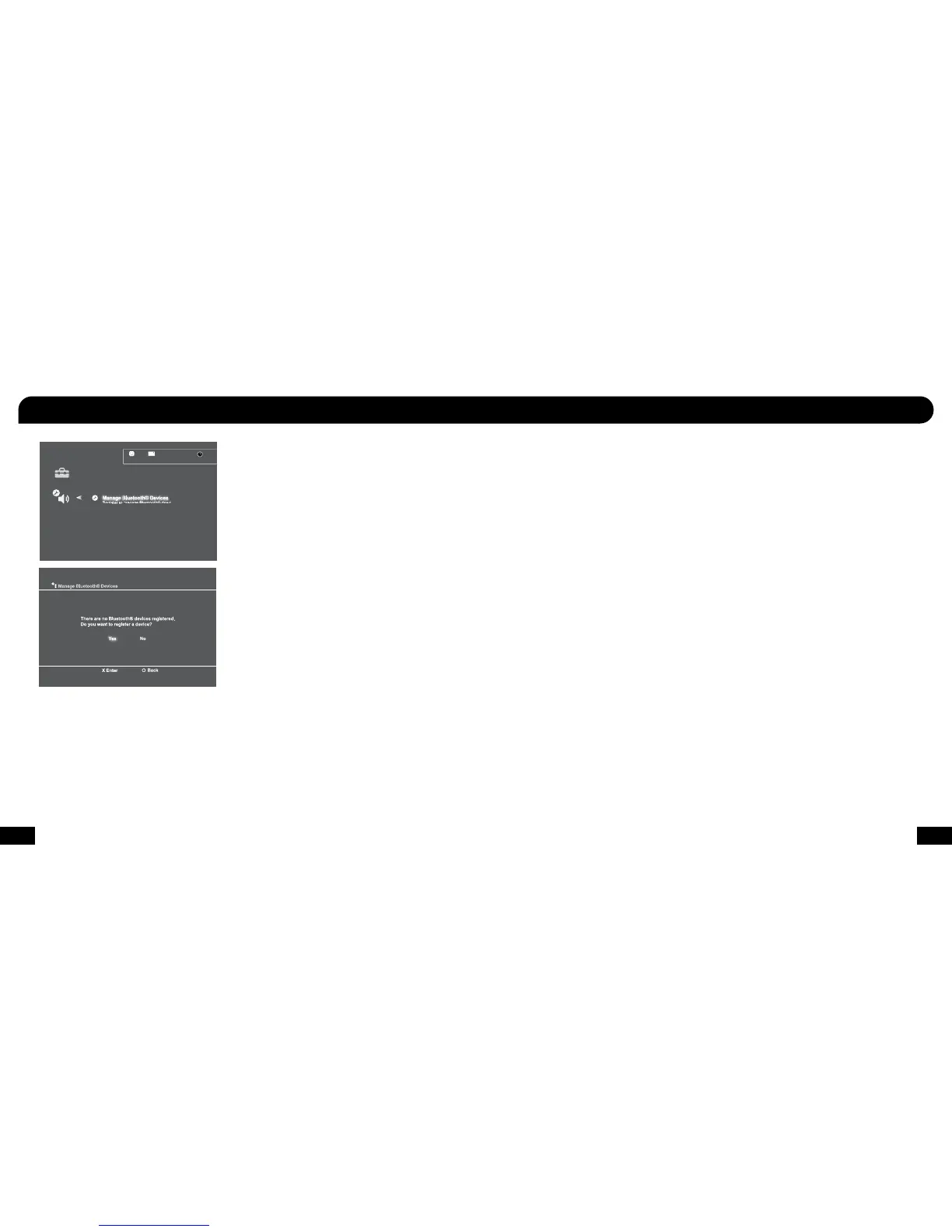
Register to manage Bluetooth® devices such as
headsets, keyboards and mouse devices.
1. PS3 Settings > Accessory Settings > Manage Bluetooth Devices.
(Delta Bluetooth OFF).
2. Scan for Bluetooth devices.
3. Press and hold BT MFB for 5 seconds. LED changes from blue
to red. Release the button.
4. Select “Turtle Beach COD EFD Headset” from the list.
5. Enter “0000” as the Pass Key.
6. Adjust PSN chat volume with the Bluetooth Volume button
on the right ear cup.
ITALIANO
1. PS3 Impostazioni > Impostazioni degli accessori > Gestisci
dispositivi Bluetooth. (Delta Bluetooth OFF).
2. Eseguire la scansione per dispositivi Bluetooth.
3. Premere il pulsante BT MFB per 5 secondi. Il LED cambia da blu
a rosso. Rilasciare il pulsante.
4. Selezionare “Turtle Beach COD EFD Headset” dalla lista.
5. Inserire “0000” come Pass Key.
6. Regolare il volume della chat PSN con il tasto Volume Bluetooth
sulla cuffia destra.
PORTUGUÊS
1. Configurações PS3 > Definições de Acessórios > Gerenciar
Dispositivos Bluetooth. (Delta Bluetooth OFF).
2. Verificar se há dispositivos Bluetooth.
3. Pressione BT MFB durante 5 segundos. O LED muda de azul
para vermelho. Solte o botão.
4. Selecione “Turtle Beach COD EFD Headset” da lista.
5. Digite “0000” como a chave-mestra.
6. Ajuste PSN chat volume com o botão Volume Blueto oth no copo
orelha direito.
ESPAÑOL
1. Configuración de PS3 > Configuración de accesorios > Control
de dispositivos Bluetooth. (Delta Bluetooth apagado).
2. Buscar dispositivos Bluetooth.
3. Oprimir BT MFB 5 segundos. El LED cambiará de azul a rojo.
Suelte el botón.
4. Seleccione “Turtle Beach COD EFD Headset” en la lista.
5. Use “0000” como contraseña.
6. Ajuste el volumen PSN con el botón de Volumen de Bluetooth
en el audífono derecho.
SVENSK
1. PS3 Inställningar > Tillbehörsinställningar > Hantera Bluetooth-
enheter (håll Delta Bluetooth avstängd).
2. Skanna efter Bluetooth-enheter.
3. Tryck och håll inne BT MFB-knappen i 5 sekunder.
Lampan ändrar då färg från blått till rött. Släpp knappen.
4. Välj “Turtle Beach COD EFD Headset” ur listan.
5. Ange “0000” som lösenord.
6. Justera chattvolymen för PSN med volymknappen för Bluetooth
på höger öronkåpa.
DANSK
1. PS3 Indstillinger > Tilbehørsindstillinger > Administrer Bluetooth-
enheder. (Delta Bluetooth slukket).
2. Scan efter Bluetooth-enheder.
3. Tryk og hold BT MFB knappen nede i 5 sekunder. LED skifter fra
blåt til rødt. Slip knappen.
4. Vælg “Turtle Beach COD EFD Headset” fra listen.
5. Indtast “0000” som adgangsnøgle.
6. Juster PSN chattens lydstyrke med Bluetooth Volume knappen
på højre øre kop.
NEDERLANDS
1. PS3 Instellingen > randapparatuurinstellingen > Bluetooth-
apparaten beheren. (Delta Bluetooth uit).
2. Zoek naar Bluetooth-apparaten.
3. Druk 5 seconden op BT MFB. De LED verandert van blauw in
rood. Laat de knop los.
4. Selecteer Turtle Beach COD EFD Headset uit de lijst.
5. Voer 0000 in als de wachtwoordsleutel.
6. Regel het PSN-chatvolume met de Bluetoothvolumeknop op de
rechteroorschelp.










 To Next Page