18
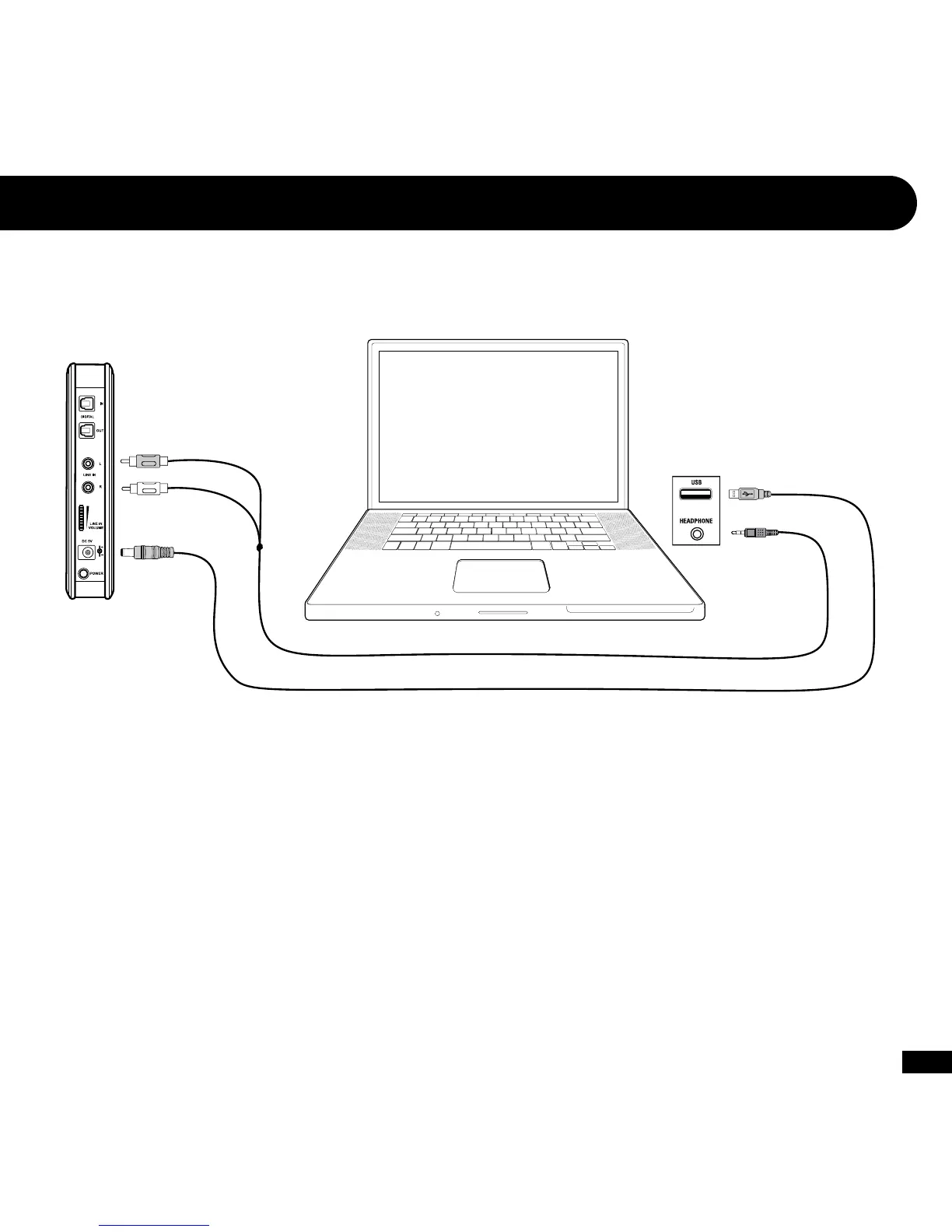
RCA Stereo Audio Splitter Cable
(sold separately)
PC/Mac with Analog Audio Output and Bluetooth
3, 4
Bluetooth Setup
3
USB Power Cable
(included)
1. Power on the PX5 and make the Bluetooth discoverable by pressing and holding the BT MFB for 5 seconds until the flashing LED
changes from blue to red—then release the button. A voice prompt in the earpiece will indicate that the PX5 is in pairing mode.
2. Enable the Bluetooth on your PC or Mac to discover the PX5:
Windows: Start > Control Panel > Hardware and Sound > Bluetooth Devices > click “Add” and then follow the instructions.
Mac OS: System Preferences > Bluetooth > click the “Set up New Device” and then follow the instructions.
After pairing successfully to your computer, the PX5 will announce “Bluetooth Paired” in the headset. The PX5 will automatically
pair itself to your computer each time it’s powered on so you will only need to complete the pairing process during initial setup.














 To Next Page