17
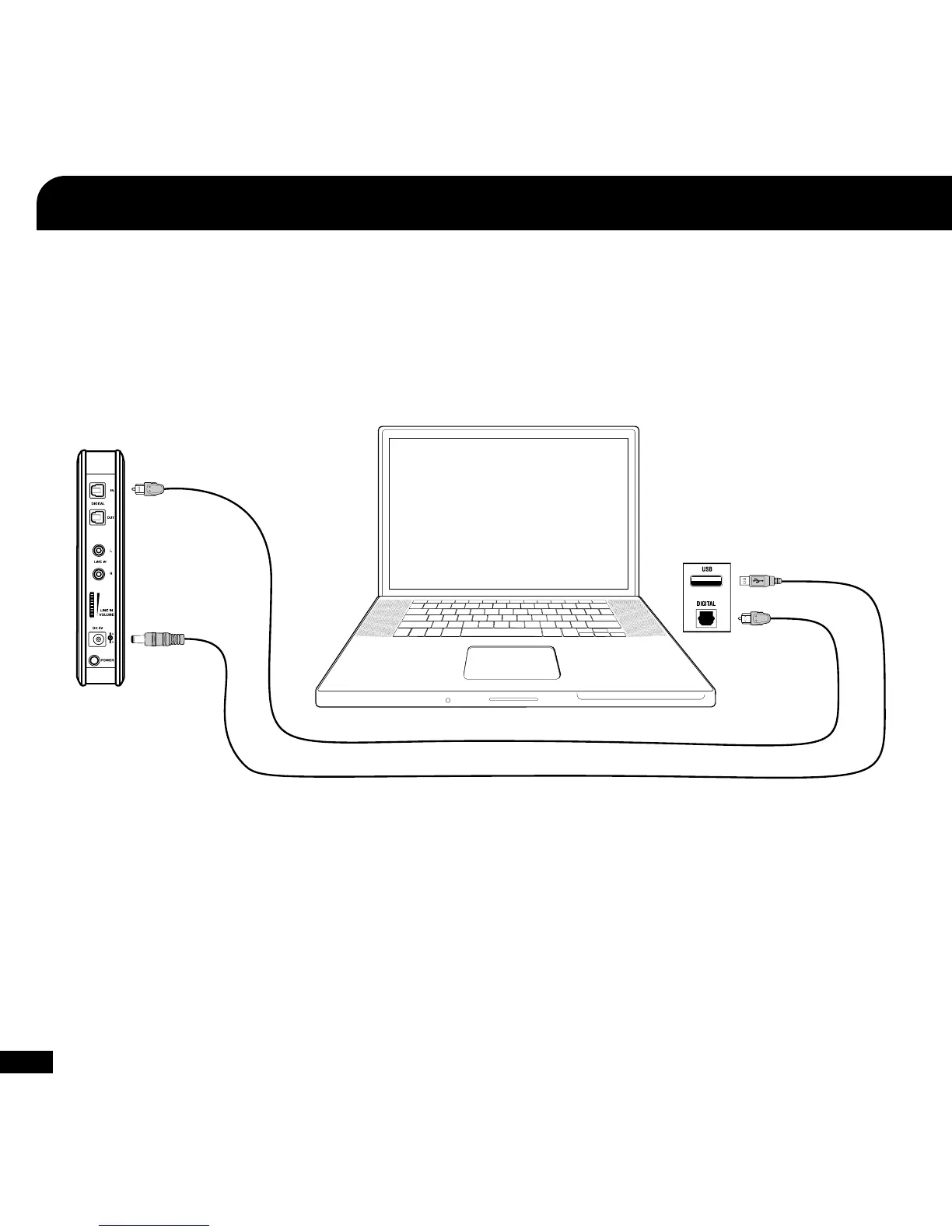
USB Power Cable
(included)
Digital Optical Cable
(included)
PC/Mac
®
Setup
1,2,3
The PX5 can be setup for PC gaming (Windows or Mac) in 2 different ways depending on your system specifications. In order
to hear surround sound, your computer must have a digital (optical) connection and Dolby
®
Digital Live installed. For wireless
chat functionality, your computer must have Bluetooth
®
built in or you must purchase a separate USB Bluetooth adapter.
PC/Mac with Digital (optical) Audio Output and Bluetooth
1, 2, 3
1. If your PC or Mac does not include a digital optical output, then you will need to purchase an “Optical S/PDIF Adapter”.
Turtle Beach offers the “Audio Advantage
®
Micro II” which is available on our website.
2. Most games will not output Dolby 5.1 unless your computer is running Dolby Digital Live. You will hear enhanced stereo
audio unless Dolby Digital Live is installed.
3. Requires a PC or Mac with built in Bluetooth or a USB Bluetooth Adapter.
4. In this configuration you will only hear enhanced stereo audio. To hear surround sound, you need to use the digital
optical cable as shown in the first diagram and have Dolby Digital Live installed.














 To Next Page