EasyManua.ls Logo

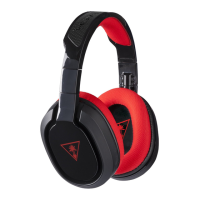
Turtle Beach EAR FORCE RECON 320 - User Manual

Turtle Beach EAR FORCE RECON 320
22 pages
Print Icon
To Next Page IconTo Next Page
Loading...
For: PC | Mobile
USER GUIDE
7.1 CHANNEL SURROUND SOUND
AMPLIFIED PC GAMING HEADSET
Question and Answer IconNeed help?

Do you have a question about the Turtle Beach EAR FORCE RECON 320 and is the answer not in the manual?

Summary

About the Recon 320

Parts and Controls

Connections

Windows PC Setup

Skype Setup

Connecting Mobile Devices

Adjusting Sound

Troubleshooting Tips

Troubleshooting No Sound

Covers possible causes and solutions for no audio output from the headset, including volume checks.

Troubleshooting Voice Chat Drops

Addresses intermittent voice chat, often related to network conditions and connection stability.

Troubleshooting Microphone Issues

Provides solutions for microphone problems, such as it not being selected as input or being muted.

Important Safety Information

Summary

About the Recon 320

Parts and Controls

Connections

Windows PC Setup

Skype Setup

Connecting Mobile Devices

Adjusting Sound

Troubleshooting Tips

Troubleshooting No Sound

Covers possible causes and solutions for no audio output from the headset, including volume checks.

Troubleshooting Voice Chat Drops

Addresses intermittent voice chat, often related to network conditions and connection stability.

Troubleshooting Microphone Issues

Provides solutions for microphone problems, such as it not being selected as input or being muted.

Important Safety Information

Turtle Beach EAR FORCE RECON 320 Specifications

General IconGeneral
BrandTurtle Beach
ModelEAR FORCE RECON 320
CategoryHeadsets
LanguageEnglish

Related product manuals