5
Assembly
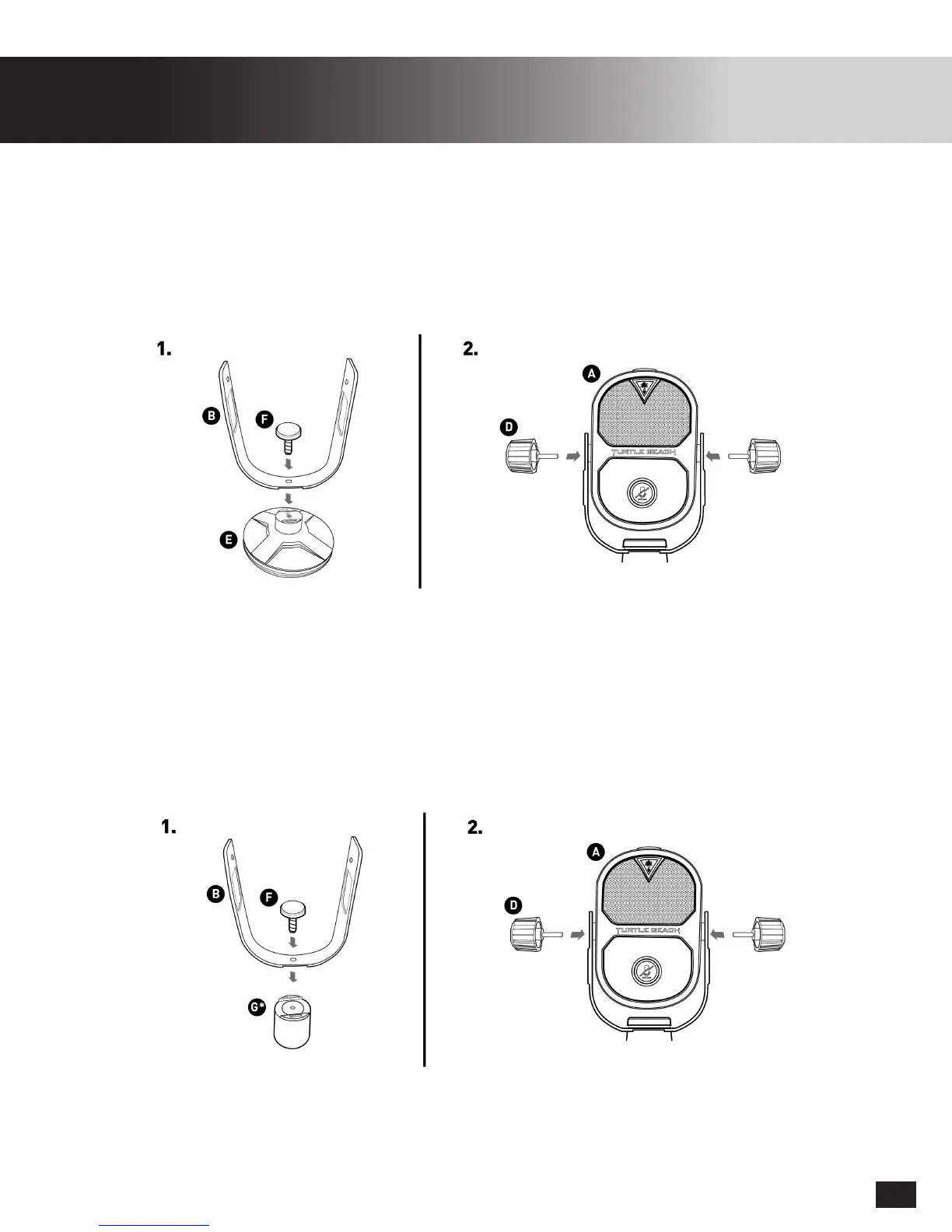
Table Top Setup
Boom Mount Setup
1. PositiontheFrame(B)ontotheStand(E),theyshouldtushagainsteachother.Securethem
using the Locking Cap(F). This should be hand tightened until there is no play between the
Frame(B) and the Stand(E).
2. Position the Microphone(A) into the Frame(B) such that the Adjustment Knobs(D) can be used
to fasten the microphone into position. They should be hand tightened until Microphone(A)
can maintain positioning.
1. PositiontheFrame(B)ontotheMicBoomAdapter(G),theyshouldtushagainsteachother.
Secure them using the Locking Cap(F). This should be hand tightened until there is no play
between the Frame(B) and the Mic Boom Adapter(G).
2. Position the Microphone(A) into the Frame(B) such that the Adjustment Knobs(D) can be used
to fasten the microphone into position. They should be hand tightened until Microphone(A)
can maintain positioning.
3. TheMicBoomAdapter(G)isdesignedtoconnecttostandard⅝”microphonemounts/stands
(SoldSeparately).Whenpurchasingmicrophonestands,ensurethattheyusethe⅝”standard.
Video demonstrations at
turtlebeach.com/streammic
*The Mic Boom Adapter(G) is only used when connecting the Turtle Beach Stream Mic to a Mic Boom (Sold Separately).
It is NOT needed when using the included Stand.


 To Next Page