9
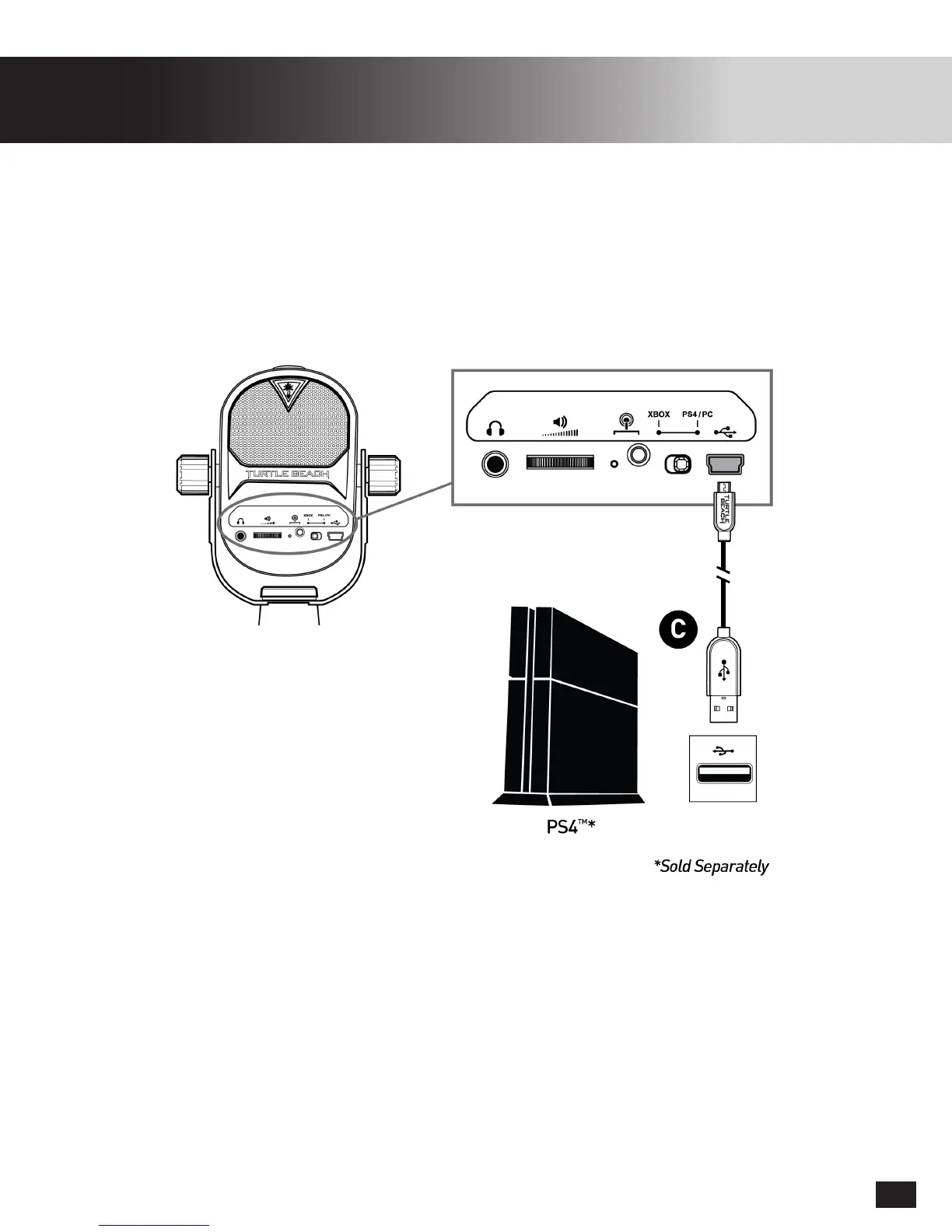
PS4
™
Setup
Twitch Streaming
YouTube Streaming
Twitch.tv has a guide to streaming from your PS4
™
available: click here
PlayStationhasaguidetostreamingthroughYouTubefromyourPS4
™
available: click here
1. SetConsoleModeSwitchtoPS4/PC
2. Go to Settings >> Devices >> Audio Devices
3. SelectUSBHeadsetforInput&OutputDevice**
4. SetOutputtoHeadphonestoAllAudio**
5. Set Volume Control (Headphones) level to maximum
6. Select Adjust Microphone Level and follow the on-screen instructions to calibrate your microphone
**IfthereisnoheadphoneconnectedtotheStreamMic,theOutputDeviceSettingswillnotbeavailable
TheTurtleBeachStreamMiccanbeusedforallyourgaming/chat/streamingaudioneedsonPS4
™
.
The Stream Mic can be used in sync with another USB or Controller connected audio device when the
Stream Mic’s Headset Jack is not in use.


 To Next Page