13
Surround Sound Settings
Surround Sound Set Up
Turtle Beach XP510 headsets have a surround sound feature bringing
additional realism to your gaming experience.
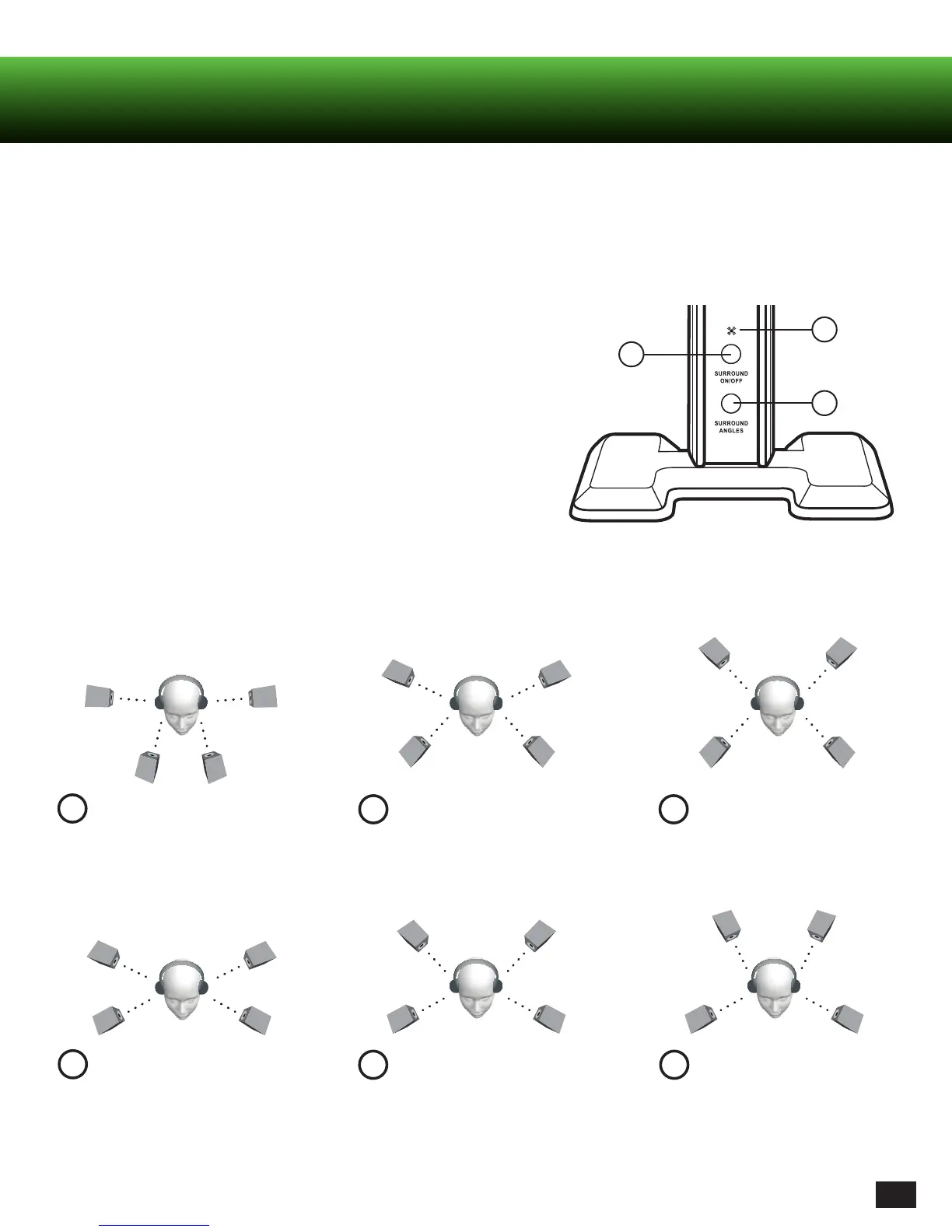
1. Press SURROUND ON/OFF to turn ON the surround sound function.
2. Press the SURROUND ANGLES button on the transmitter to scroll
through six (6) different presets.
3. The LEDs on the transmitter will blink in sequence to indicate which
preset was selected. (The number of blinks indicates which number
Surround Sound Angle is Selected.)
1
2
3
Front Angle; 30 degrees
C
RL
FL
30
o
105
o
C
FR
105
o
RR
30
o
1
60
o
FR FL
60
o
RR
RL
120
o
120
o
Front Angle; 60 degrees
Rear Angle; 120 degrees
4
RR
RL
45
o
120
o
45
o
120
o
FR
FL
Front Angle; 45 degrees
2
135
o
RR
135
o
RL
60
o
FR FL
60
o
Front Angle; 60 degrees
5
135
o
RR
135
o
RL
45
o
45
o
FR
FL
Front Angle; 45 degrees
3
150
150
RL
60
o
FR FL
60
o
RR
Front Angle; 60 degrees
6
Surround Sound Settings














 To Next Page