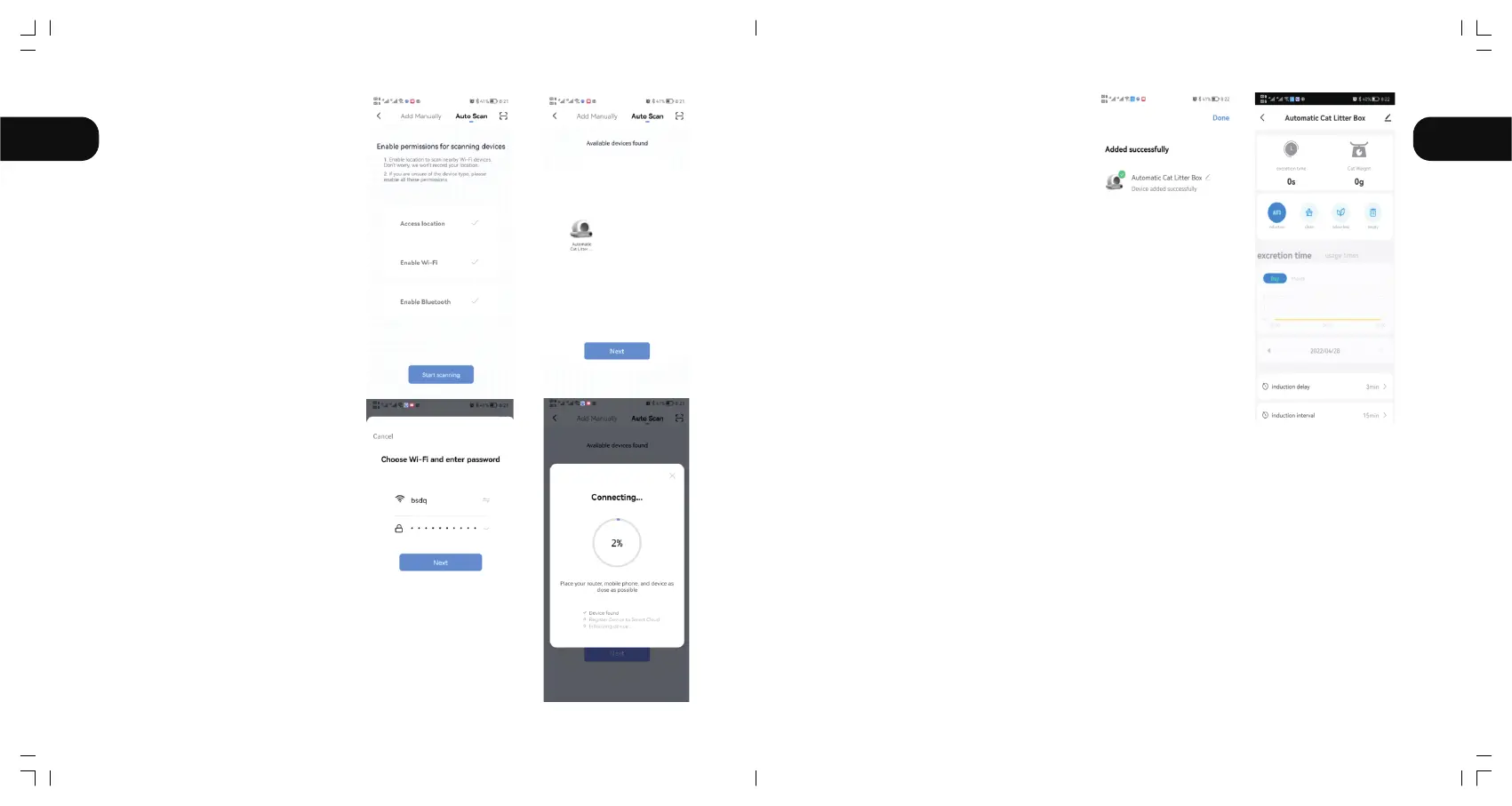
2.2.4 Continue “Next”after
scanning the machine.
2.2.5 Continue “Next" after
inputting WiFi code and wait
to connect.
2.2.6 Enter APP after connecting.
Notice:
If the network configuration fails or a timeout message is displayed, check the following
possibilities:
①Whether WiFi, Bluetooth, and Location switch are enabled at the same time.
②Whether the WiFi is in 2.4G band and whether the phone is connected to 2.4G band WiFi
network.(The product cannot recognize the 5G band network.)
③Whether the WiFi indicator on the panel is flashing during network configuration.
④Whether the WiFi network in your home is faulty or down, please check whether other devices
can use the network normally.
⑤Whether the WiFi password is correct.
⑥Whether the WiFi signal is too bad, please move the machine to a nearby router and
reconnect.
⑦The router connects to many wireless devices, causing IP address conflicts.
⑧For dual-frequency routers,the network cannot be configured directly. Users need to
separate 2.4G and 5G into independent channels in router Settings, and then select 2.4G
channel for network configuration.
EN EN
09 10



 To Next Page