EN EN
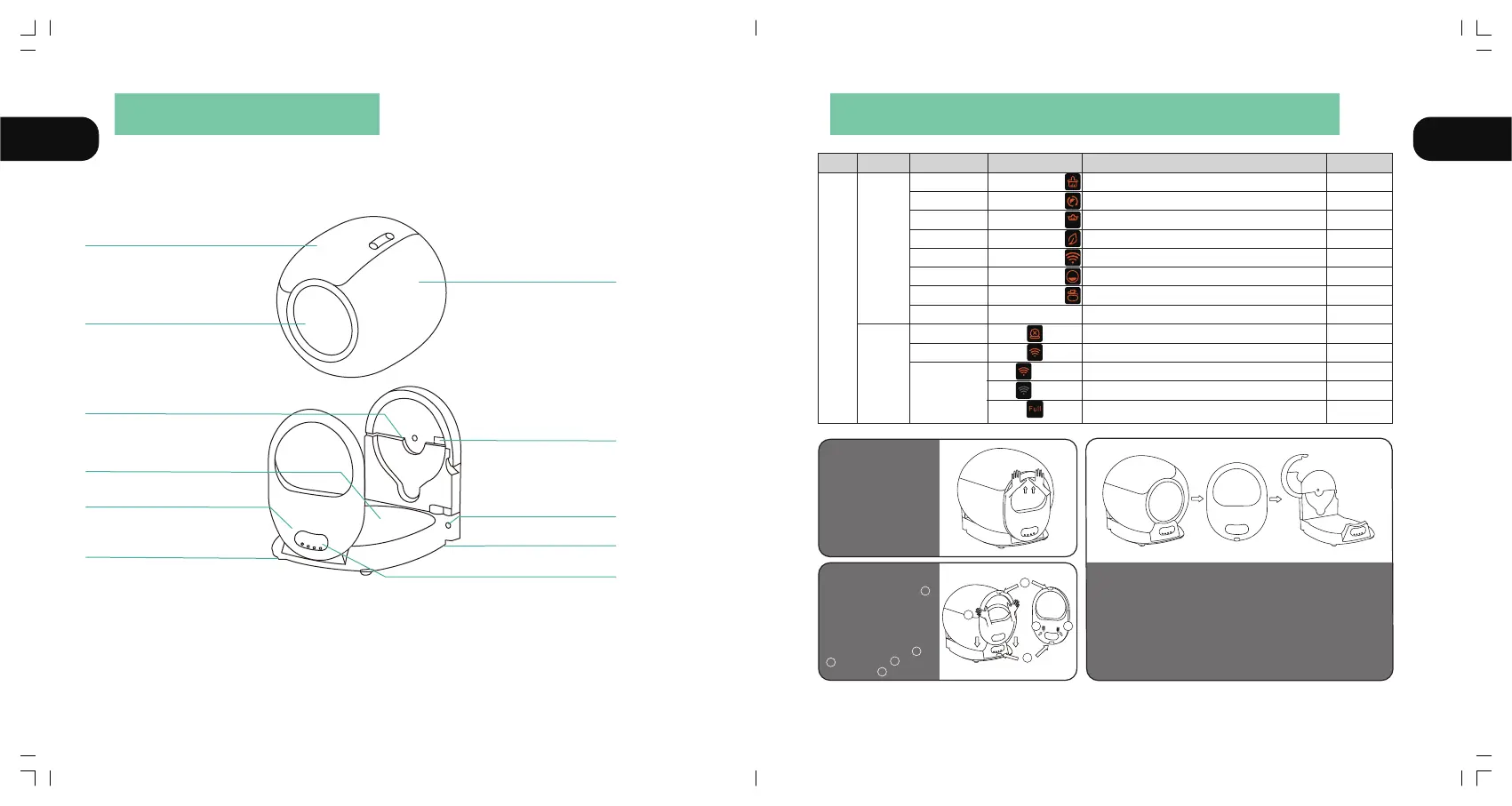
Host
Waste bin
Barrel
Entrance
Barrel shaft Fixed groove
Infrared sensor
4 Weight sensors
Ion Purification module
Power socket
Clasp
Display and Control Panel
Click the button "②"
Click the button "①"
Click the button "③"
Lighting
Lighting
Flash
Unlit
Lighting
wifi
Start cleaning immediately
Start replacing cat litter
Start Auto cleaning
Start purifying the air
Reset WiFi to start join network
Leveling the cat litter
Adjust the barrel angle to the bag changing position
Locked/Unlock
Barrel is not installed or it cannot run
The device is connected
The device is trying to connect to the network
The device is not connected
one ring
Long ring for 1"
one ring
one ring
Long ring for 1 "
Long ring for 1"
Long ring for 1"
Long ring for 3"
Clean
Replace litter
Auto cleaning
Remove odor
Join network
Leveling
Change garbage bag
Lock/Unlock
Fault lamp (left)
WiFi lamp (middle)
Waste full lamp (right)
Host Key
Indicator
Remind users to replace garbage
bag when the waste bin is almost full
Press the button
"④" for 2 seconds
Press the button
"①" for 2 seconds
Press the button
"③" for 2 seconds
Press the button
"②" for 2 seconds
Press the button "②"
+ "③" for 2 seconds
Category Function Operation Status Prompt tone
AUTO
②
③
①
A
B
C
E
D
三. Install the panel cover
①Hold the middle of the panel
cover, as shown in position
②Place the panel cover against
the upper position of the barrel
mouth.
③While aligning the position,
slide down to load the panel,
and pay attention to the and
positions, load normally
and notice the position
A
B
C
E
D
一. Remove the panel cover
As shown in the picture
①put the hand on the
corresponding top position
of the barrel bin
②Thumbs up to push the
panel cover
二. Take out the barrel bin for cleaning
As shown in the picture
①After removing the panel cover
②Unlock the lock hook at the back of the barrel bin
③Take out the barrel bin for cleaning
3231
VI PRODUCT LIST VII INTRODUCTION OF CONTROL PANEL



 To Next Page