3. Note for using.
1.) The device is powered by rechargeable lithium batteries. With fully
charged, the battery life approx be six months. The mobile device APP will be
prompted while the battery is low. Please charge the device after received the
reminder.
2.) Keep the camera in range of your router.
Make sure to pick a place within range of your network. Thick or insulated
doors can greatly reduce the strength of your WIFI signal even if your router is
close by, so you should try streaming video before you mount your camera.
3.) The device is a low power consumption inntelligent products, can support
remote wake up from the APP, PIR human detection, press doorbell wake up.
The device will be works for 30 seconds after wake up then be in the resting
state automatically and until to next waking up.
Note:
In crowded environment, it is recommended to close or set the device to low
sensitivity to reduce device arousal and call times to extend battery life.
Be sure to turn on push notifications on your phone:
(1). Navigate to Settings --> Notinfications --> ON
(2). Alist of APPs that support push notifications will appear.
(3). Tap the Tuya Smart app and enable the notification.
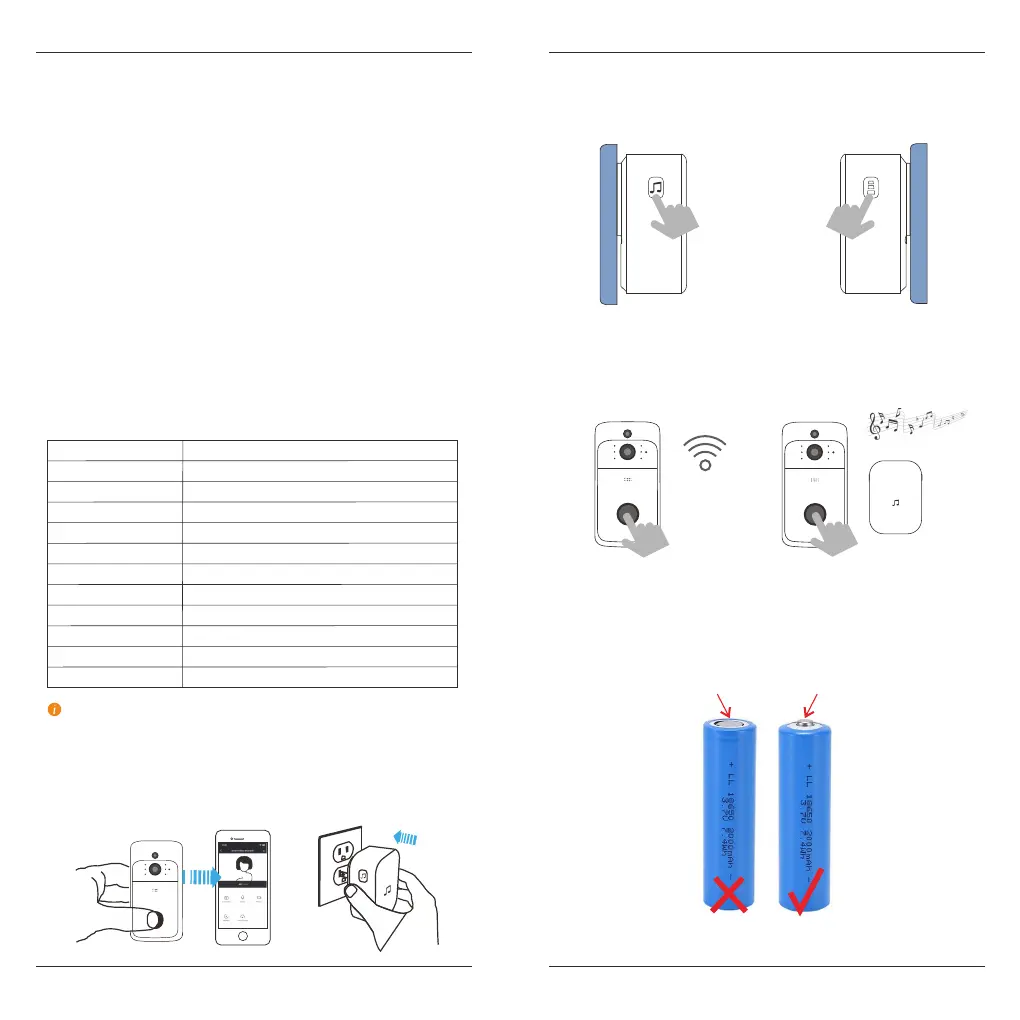
Please choose the correct 18650 batteries
to use with the smart doorbell !!!
Technical Specification
Step 1
NOTE
Resolution
1920*1080 / 1280*720 (Matching)
View angle
166 degree
IR LED 6*850nm
WIFI
IEEE 802 11 b/g/n
Audio
Two-way talk without noise
Recording
Device SD card recording (20 seconds)
Storage
Support 8GB/16GB/32GB/64GB class 10
Battery
18650 battery (LI-Ion, 2600mAh)
Monitoring
Device button, Motion detection, Remote live view
Notifications
Push notifications quickly
Device wakeup
Fast wake up and push notification
Power consumption
Standby 200 uA, Working 170mA
Two 18650 specification batteries (total 6800mAh), work regularly for
8-12 months.
Before the setup process, be sure your video doorbell has connected to
your pone and plug in your chime.
Flat head
Shart head
(If not included, need to be purchased separately.)
English English
5 6
Set up chime with the video doorbell
Press the tune button to cycle
through 52 different tunes and
select a tune.
Press and hold the Volume button
for 5 seconds until t h e b l ue
indicator is ON.
Press the Call button again, the
chime will automatically play the
tune you selected.
Press the Call button.
Step 2
Step 4
Step 3
Step 5



 To Next Page