C210 Controller & C680RF thermostats
13
NOTE:
Open the back side of thermostat #2 and insert the batteries at
thermostat 2, “ID code” of the thermostat will be #2, and do so on all
other thermostats.
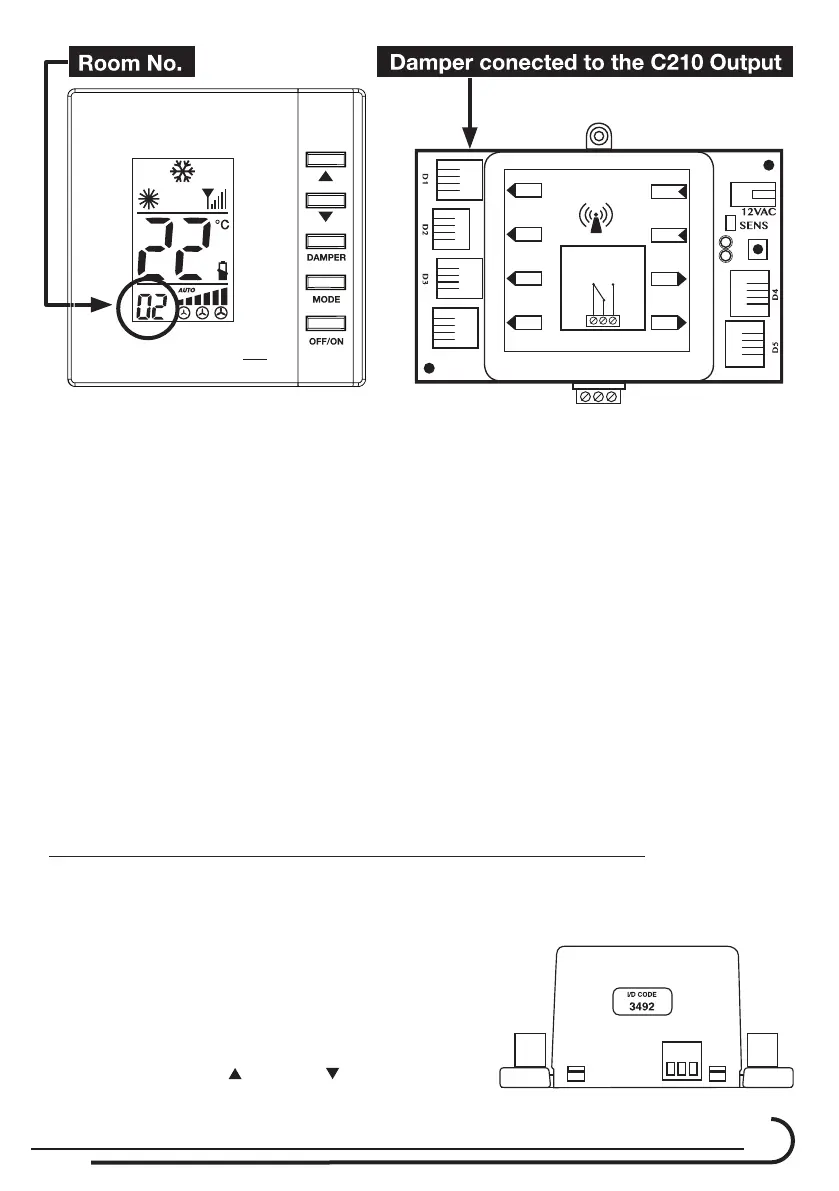
The remote address 2 should drive the damper at channel 2 of the C210
controller.
The remote address 3 should drive the damper at channel 3 of the C210
controller And so on up to channel 5.
1.11. In the event that a thermostat does not display the correct ID code on
the LCD screen, Manual adjustment is necessary. (See paragraph 2.
ManualcongurationofC680-RFthermostat).
1.12. AfternalizingtheIDcodesettingofallthermostats,installeach
thermostat at the corresponding room per the damper number.
2. Manual ID Code conguring of the C680-RF thermostats.
2.1. ThemanualIDCodecongurationmodeisusedincasethatthe
automatic mode can’t set ID Code or when new thermostat should be
added or replaced in the system.
2.2. Look at the label at the side of the C210
controller. (4 digits – Example- 3492)
2.3. At the back side of the C680RF thermostat,
press the switch.
2.4. By pressing the
Up and Down buttons
RFPR
O
N.O
12 VAC
N.C
D1
D2
D3
B.P
D5
D4
SENS.
PWR
RF ZONE
DRY CONTACT



 To Next Page