EasyManua.ls Logo

TYAN S5630 - Page 23

TYAN S5630
152 pages
Print Icon
To Next Page IconTo Next Page
To Previous Page IconTo Previous Page
Loading...
http://www.tyan.com
23
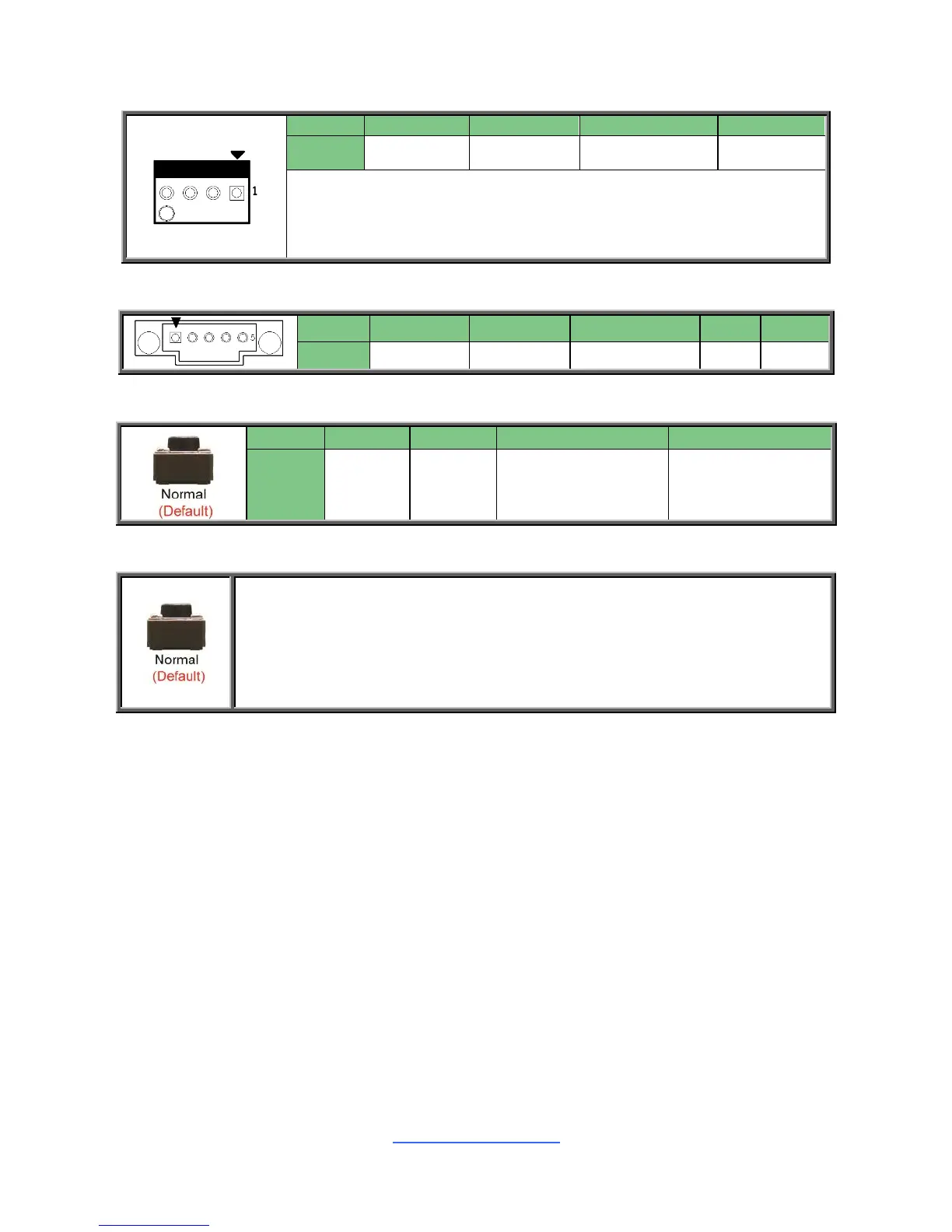
CPU FAN/ SYS FAN1~6: 4-pin CPU Fan Connector
Pin
1
2
3
4
Signal
GND
VCC12
FAN_TACH
PWM
Use this header to connect the cooling fan to your motherboard to
keep the system stable and reliable.
Note: A 4-pin fan is required for fan support 4pin Control
PSMI_HD1: PSMI Connector
Pin
1
2
3
4
5
Signal
SMB_CLK
SMB_DAT
SMB_ALERT#
GND
VCC3
RST_BTN1: Reset Button
Pin
1
2
3
4
Signal
GND
GND
FP_RST_BTN_N
FP_RST_BTN_N
CLEAR_BTN1: CMOS Clear Button
You can reset the CMOS settings by using this Button. This can be useful if
you have forgotten your system/setup password, or need to clear the system
BIOS setting.
1. Power off system and disconnect power connectors from the motherboard.
2. Press the button.
3. Reconnect power connectors to the motherboard and power on system.

Related product manuals