Need help?
Do you have a question about the TYAN S5515 and is the answer not in the manual?
Details the technical specifications of the motherboard, including CPU, chipset, memory, and expansion slots.
Provides information on OS support and other software-related specifications relevant to the motherboard.
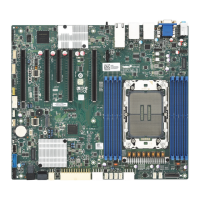
Illustrates the physical layout of the motherboard, identifying key components and connectors.
Presents a schematic diagram showing the interconnection of major components and interfaces on the motherboard.
Identifies and describes physical parts, jumpers, and connectors on the motherboard for installation and configuration.
Step-by-step guide for safely installing the CPU and its associated heat sink onto the motherboard socket.
Explains the types and proper application of thermal interface materials for CPU cooling.
Provides essential tips and considerations for mounting the motherboard securely within the computer chassis.
Detailed instructions on how to correctly install RAM modules into the motherboard's memory slots.
Guides on connecting serial ATA (SATA) cables for storage drives to the motherboard.
Explains how to install expansion cards into the motherboard's various slot types.
Illustrates how to connect external peripherals to the motherboard's I/O ports.
Details the connection of power supply connectors to the motherboard for system operation.
Covers final checks and considerations before closing the computer chassis after hardware setup.
Provides an overview of the BIOS, its function, and how to access the setup utility.
Describes the options and functions available within the Main BIOS setup screen.
Details the advanced configuration options available for system settings within the BIOS.
Covers configuration settings related to the motherboard's chipset, including South and North bridge parameters.
Explains the settings for system boot order, boot devices, and boot-related options.
Describes how to set up administrator and user passwords for system security within the BIOS.
Outlines the procedures for saving BIOS changes, discarding them, or restoring default settings.
Information on using the BIOS flash utility for updating or managing the system BIOS.
Explains POST (Power-On Self-Test) codes and their meanings for system diagnostics.
 General
| Form Factor | ATX |
|---|---|
| CPU Socket | LGA 3647 |
| Chipset | Intel C621 |
| LAN Ports | 2 |
| Supported Memory Types | DDR4 |
| Networking | Dual Gigabit Ethernet |
| Audio | Realtek ALC888S |
| RAID Support | RAID 0, 1, 5, 10 |


 To Next Page