http://www.tyan.com
22
2.4 Installing the Processor and Heat sink
The S5515 supported Intel
®
processors are listed in section Hardware
Specifications on page 5. Check our website at http://www.tyan.com
for latest
processor support.
NOTE: MiTAC TYAN is not liable for damage as a result of operating an
unsupported configuration.
Processor Installation (SNB-DT Socket H2 LGA1155 for Intel CPU)
Follow the steps below to install the processors and heat sinks.
Please note that the illustrations are based on a SNB-DT Socket H2 LGA1155
which may not look exactly like the motherboard you purchased. Therefore, the
illustrations should be held for your reference only.
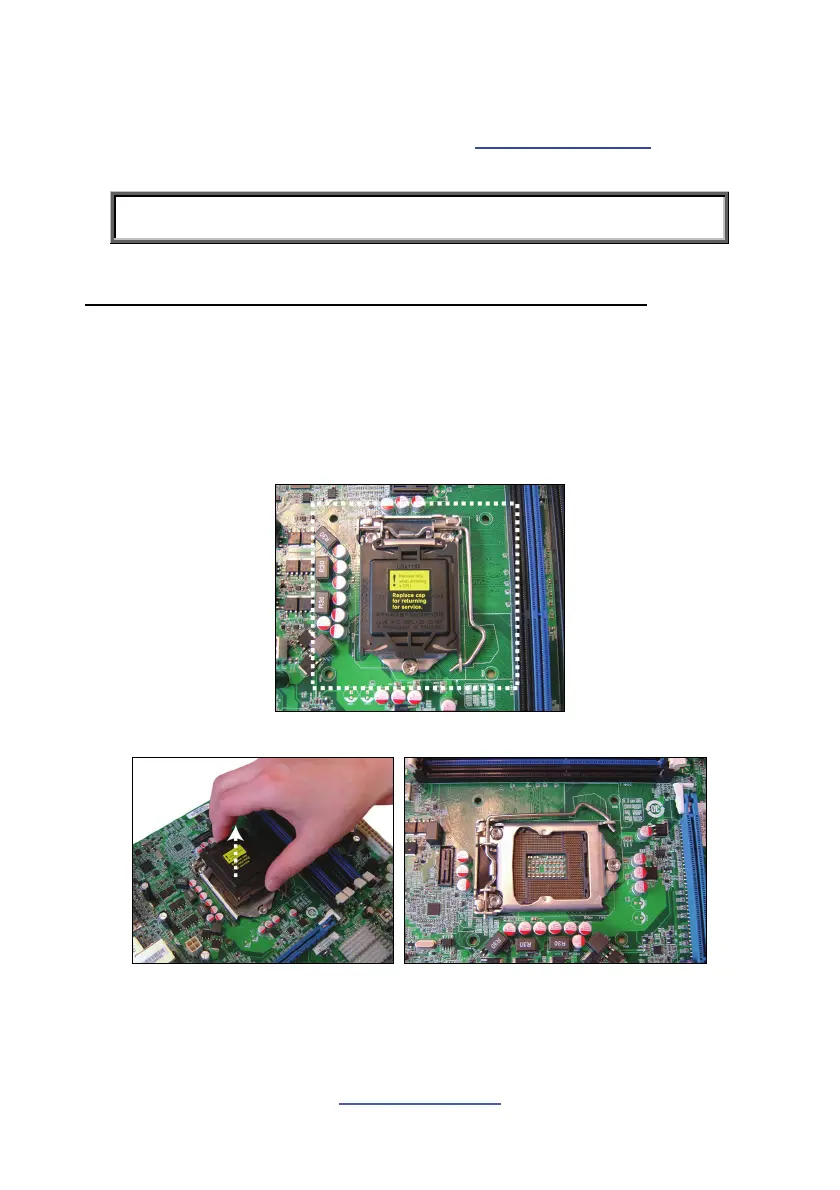
NOTE: Please save and replace the CPU protection cap when returning for service.
1. Locate the CPU socket.
2. Take off the CPU protection cap.



 To Next Page