First select the specified speed for the PTO by using the PTO shifter on the LHS, below the driver seat.
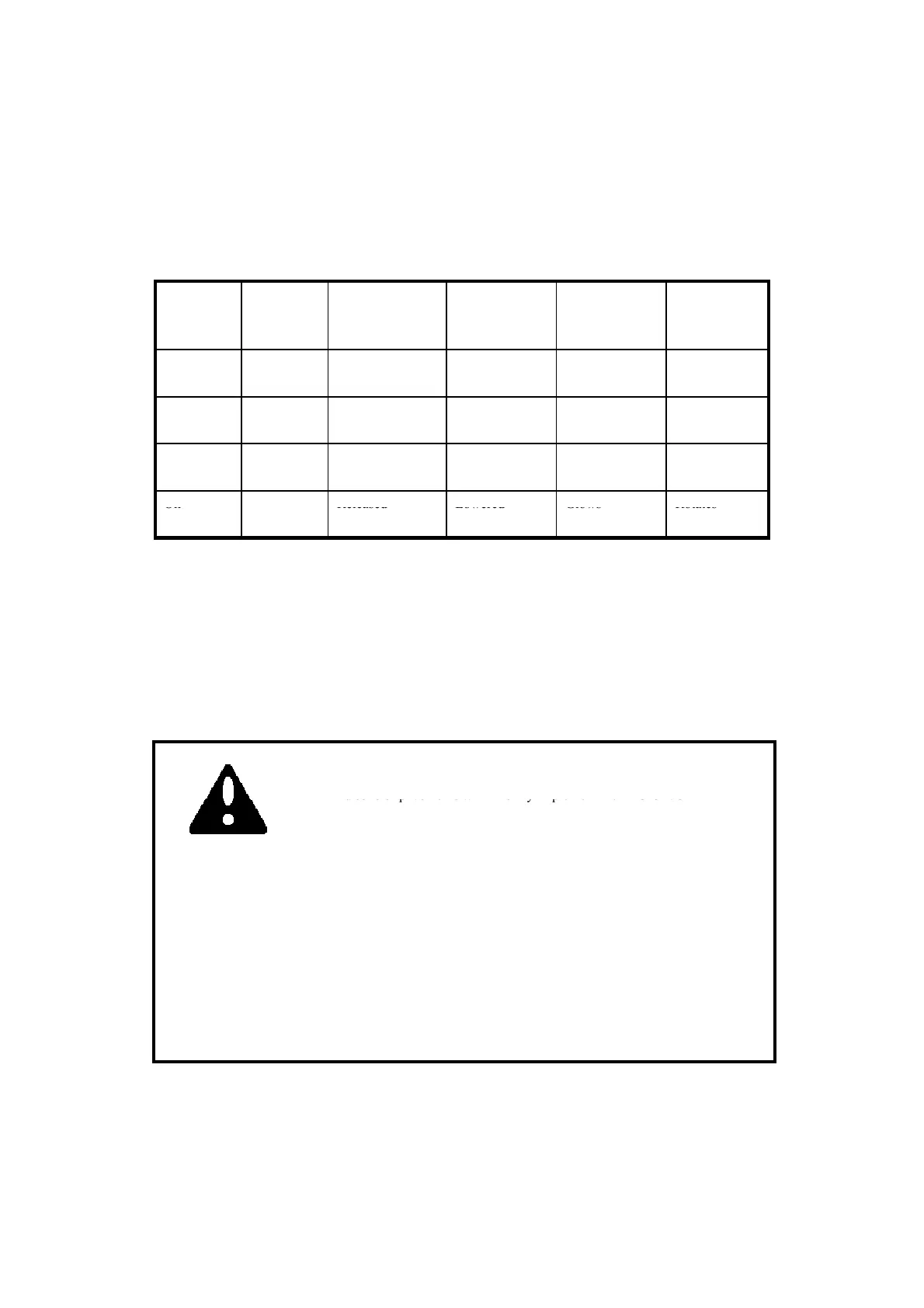
PTO
ON/OFF
Switch
PTO
Control
Switch
Clutch Pedal. Hydraulic
Position
Control Lever.
PTO Monitor
Lamp on the
dash panel
PTO SHAFT
Mode
released
lowered
On Auto
Mode
Pressed Either raised or
lowered
Blinks Stationary
On Auto
Mode
Either pressed or
released
Raised Blinks Stationary
Mode
■ From the table above we learn about the safety features of the PTO. When the monitor on the dash
panel is blinking it indicates to the operator that the PTO is in the on position but temporarily not
rotating either because the clutch pedal is pressed or the implement is lifted off the ground or both.
The PTO will start rotating instantaneously when either the clutch pedal is released and/or the
implement is lowered to the ground.
■ The operator must use this blinking signal to clear the area around the tractor off bystanders/onlookers
h i bl d f i i l id ll i j i h di
1.When the PTO control switch is in manual position the PTO does
not stop rotating even if the clutch pedal is pressed. If working on
har
il
r
a
m
nt
ith a r
tar
im
l
m
nt th
PT
N
FF
as t
e rotat
ng
a
es o
certa
n
mp
ements can acc
enta
y cause
n
ur
es to t
e persons stan
ng nea
the tractor.
■ The stopping of the PTO when the implement is lifted off the ground with the position control
prevents damage to the implement or the PTO shaft.
d so s o p ve e s w o y p e e e O O /O
switch must be put to the OFF position to stop the PTO from rotating , If
this is not done the rotating blades of the implement will push on the
hard ground and in turn push the tractor forward causing an accident
which can lead to serious injuries or death.
2. Extra precautions must be taken to clear the area of bystanders/onlookers when using PTO driven
implements. The rotating blades of the implements can cause serious injuries on contact. The
warning that is indicated by the blinking PTO monitor is to make the operator aware that the
Warning
36
PTO is in ON position and will instantly start rotating if the clutch pedal is released or implement
is lowered or both.
3.In no case should the specified rotating speeds indicated by the implement manufacturer be crossed
as the same can lead to serious damage to the tractor/equipment and can lead to serious injuries to
persons nearby.



 To Next Page