
 Need help?
Do you have a question about the Tymate TM527M and is the answer not in the manual?
Introduces the tire pressure monitoring system, its components, and benefits for vehicle comfort and performance.
Provides crucial safety precautions for monitor installation and driving to prevent accidents and ensure safe operation.
Details wireless connection, thermal expansion effects on tire pressure, natural air leaks, and troubleshooting contact information.
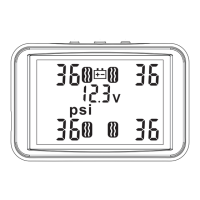
Details the monitor's buttons, LCD layout, and explains various icons used for tire status, alarms, and battery.
Provides instructions on mounting the monitor in the car, connecting power, and important notices for placement and safety.
Explains how to install sensors on tires, including pairing, tire position indication, and anti-theft features.
Lists the default factory settings for pressure unit, high/low pressure alarm values, and temperature unit/alarm value.
Outlines the sequence for setting pressure and temperature units on the monitor.
Explains how to select between PSI and BAR units using the monitor's buttons.
Explains how to select between °C and °F units using the monitor's buttons.
Details setting the high pressure alarm threshold for front tires using the monitor's adjustment keys.
Details setting the low pressure alarm threshold for front tires using the monitor's adjustment keys.
Details setting the high pressure alarm threshold for rear tires using the monitor's adjustment keys.
Details setting the low pressure alarm threshold for rear tires using the monitor's adjustment keys.
Details setting the high temperature alarm threshold for all tires using the monitor's adjustment keys.
Explains the monitor display and audio alerts for high tire pressure conditions, including example readings.
Explains the monitor display and audio alerts for low tire pressure conditions, including example readings.
Explains the monitor display and audio alerts for high tire temperature conditions, including example readings.
Explains the monitor display and audio alerts for sudden air leaks in tires, including example readings.
Explains the monitor display and audio alerts for low sensor battery voltage, including example readings.
Explains the process for re-coding sensors to the monitor, including sensor installation and ID matching for tire positions.
This document outlines the features and usage instructions for the Tymate Tire Pressure Monitoring System (TPMS), Item No. TM527M. This system is designed to enhance vehicle safety and performance by providing real-time monitoring of tire pressure and temperature.
The Tymate TPMS is a comprehensive system composed of sensors and a monitor. Its primary function is to detect and display the air pressure and temperature of each tire in real time. The sensors, installed on each tire, collect pressure and temperature data and transmit it wirelessly via radio frequency to the monitor. The monitor then processes this data and displays it on its screen, alerting the user to any abnormal situations.
The system is equipped to issue various alarms based on user-defined standard pressure and temperature alarm values. These alarms are crucial for preventing traffic accidents, such as those caused by tire blowouts or underinflation. By providing continuous monitoring, the TPMS helps improve vehicle comfort, reduce fuel consumption, and minimize vehicle wear, ultimately enhancing dynamic performance.
Key functions include:
The Tymate TPMS is designed for ease of installation and user-friendly operation.
Monitor Installation: The monitor should be installed in a location that does not obstruct the driver's vision. It can be affixed to the dashboard using double-sided tape or attached to the windshield with a suction cup. Power is supplied by connecting the CLA power adaptor to the car's cigarette lighter. It's important to ensure the monitor is securely reinforced to prevent it from falling during driving. The system automatically detects tire abnormalities and sounds an alarm, reducing the need for constant driver attention to the display.
Sensor Installation: The sensors are external valve sensors, making installation straightforward. Before installation, ensure the monitor is turned on so that data can be received immediately.
Parameter Settings: The monitor allows users to customize various parameters:
Alarm Status: When any tire pressure or temperature exceeds the user-defined safety range, the monitor will display the corresponding tire icon, parameter, and fault icon flashing, accompanied by an audible warning. Pressing any key will silence the alarm sound, but the visual indicators will continue to flash until the fault is resolved. This applies to high pressure, low pressure, high temperature, sudden air leak, and low sensor battery voltage alarms.
Display Conversion: The monitor can switch between pressure and temperature displays. A single press of the "SET" key converts the pressure display to temperature. The temperature display will automatically revert to pressure after 10 seconds.
Backlight Adjustment: The backlight brightness can be manually adjusted by short-pressing the "-" or "+" keys. These keys can also be used to turn off the monitor interface.
User Code (Inflatable Code): Sensors are pre-coded at the factory. If tires are exchanged, a sensor position is forgotten, or a wrong code occurs, the "inflatable code" function allows re-coding:
The Tymate TPMS is designed with maintenance in mind to ensure longevity and reliable performance.
Sensor Battery Replacement: The sensor batteries are replaceable, extending the lifespan of the sensors.
Troubleshooting Tips:
Customer Support: The product comes with a 2-year warranty and 24/7 customer service. Users can contact support via email or phone for assistance, including issues with device accuracy or replacement sensors. It is advised to have an experienced tire installation technician handle product installation and any subsequent tire disassembly to avoid damaging the sensors.
 General
| Model | TM527M |
|---|---|
| Type | Tire Pressure Monitoring System (TPMS) |
| Display | LCD |
| Sensor Type | External |
| Waterproof Rating | IP67 |
| Battery Capacity | 500mAh |
| Pressure Unit | PSI, Bar |
| Power Source | Rechargeable Battery |
| Operating Temperature | -20°C to 80°C |
| Storage Temperature | -30°C to 85°C |
| Alarm Volume | 85dB |
| Detection Range | 0-116 PSI |
| Standby Time | About 30 days |

 To Next Page