5.1 Factory Settings
5.2 Setting Order
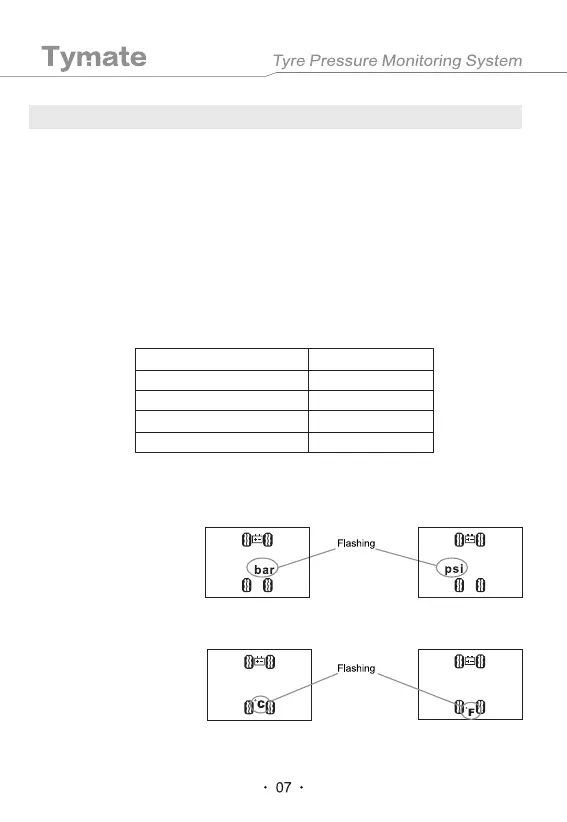
5.2.1 Pressure Unit setting
5.2.2 Temperature Unit Setting
In the standby mode, press and hold the "SET" key on the monitor. Release it after the
first beep sound, and the monitor will enter the first setting interface, and the correspond-
ing LCD symbol will flash. Then press the "SET" key to select the parameter item that
needs to be set, and press "-" or "+" to set specific parameter values. After the setting is
completed, press and hold the "SET" key and release it when you hear a beep sound. In
this way, you can save the parameters and exit to the normal standby state. When
entering the setting state, press "-" or "+" at the same time to exit the setting mode without
saving the setting data. If there is no operation within 1 minute in the setting state, the
system will automatically exit the setting mode and return to the normal standby state. The
setting order of parameter 1-7 is as follows.
When the "PSI" or "BAR"
icon is flashing, press the
"-" or "+" key to select the
pressure unit of "PSI" or
"BAR" as desired.
When the "˫" or "˭" icon
is flashing, press the "-" or
"+" key to select the
temperature unit of "˫" or
"˭" as desired.
5. Parameter Settings
Pressure Unit
High Pressure Alarm Value
Low Pressure Alarm Value
Temperature Unit
High Temperature Alarm Value
PSI
3.0BAR (44PSI)
2.0BAR (29PSI)
°C
70°C


 To Next Page