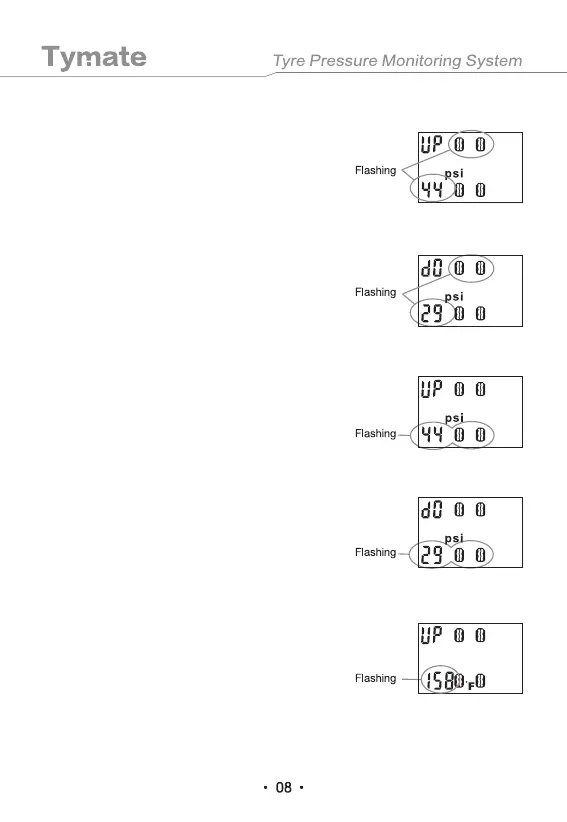
5.2.3 High Pressure Alarm Value Setting of the Front Tire (UP)
5.2.4 Low Pressure Alarm Value Setting of the Front Tire (DO)
When the high pressure parameter and the front
tire icon are flashing, press the "-" or "+" key to
select the high pressure alarm value required by
the user.
When the low pressure parameter and the front
tire icon are flashing, press the "-" or "+" key to
select the low pressure alarm value required by
the user.
5.2.5 High Pressure Alarm Value Setting of the Rear Tire (UP)
When the high pressure parameter and the rear
tire icon are flashing, press the "-" or "+" key to
select the high pressure alarm value required by
the user.
5.2.6 Low Pressure Alarm Value Setting of the Rear Tire (DO)
When the low pressure parameter and the rear
tire icon are flashing, press the "-" or "+" key to
select the low pressure alarm value required by
the user.
5.2.7 High Temperature Alarm Value Setting (UP)
When the high temperature parameter is
flashing, press the "-" or "+" key to select the
high temperature alarm value required by the
user.


 To Next Page