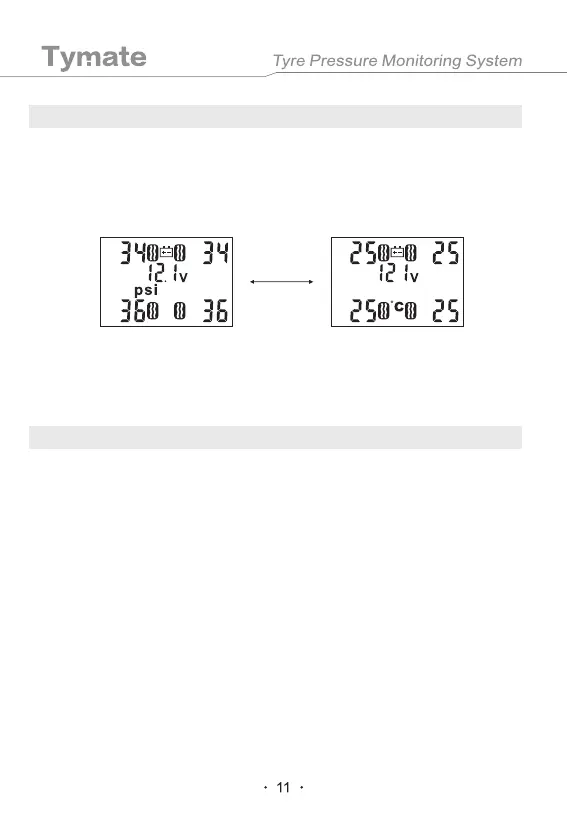
Pressure display converts to temperature display.
Inflatable Code
7. Other Functions
8. User Code
When the pressure interface is displayed, press the "SET" key once to switch to the
temperature display interface. The temperature display interface will automatically switch
to the pressure display interface after 10 seconds.
The monitor diagram is as follows.
The 4 sensors have been coded and marked with the tire positions before leaving the
factory. The user only need to install the corresponding sensors to the corresponding tires.
When the user needs to exchange the tires, or there is a wrong code, or the position of the
sensor is forgotten during the assembly process, the following "inflatable code" is
available for the user to re-code.
In the standby mode, press and hold the "+" button on the monitor and release it after a
beep sound. The system will enter the inflatable code interface, and the LCD current tire
icon flashes, showing the "Id" and 6-digit ID code of the current tire. Short press the "-"
key to select the tire position that needs to be coded, and then install the sensor on the
corresponding tire (external sensor), or install the built-in sensor and then inflate the
corresponding tire (built-in sensor). When the sensor senses the inflation, it will alarm with
a beep sound and then the ID code of the sensor will be displayed (as shown in the figure
below), which indicates that the tire ID code has been aligned. Use the same method to
match the code with other sensors. When all the required ID codes have been
successfully received, press and hold the "SET" key on the monitor. Release the key after
a beep sound, save the ID code to the monitor and exit to normal working state. Press the
"-" and "+" keys at the same time to exit to the normal working state without saving the ID
code.
Manually adjust the backlight and turn off the monitor interface.
Short press the "-" or "+" key to adjust the brightness of the backlight or turn off the
monitor interface.
10s


 To Next Page