5
6. CONTROLLING THE CAMERA
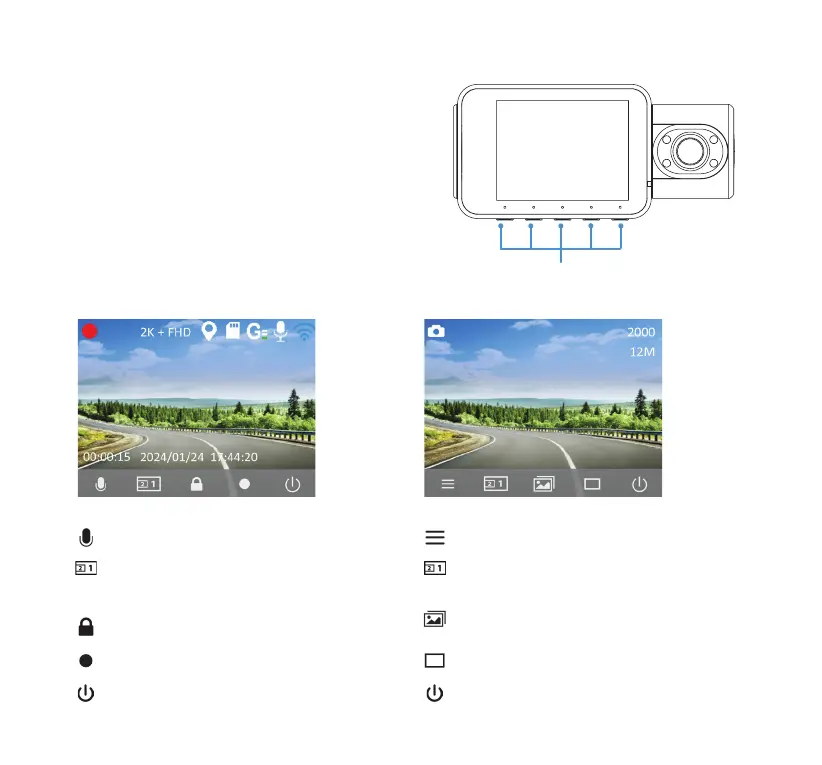
Apply conguration and settings to the camera
using the 5 function buttons. Please refer to
the section below for the functions of each
button under dierent modes.
Function Buttons
Audio Recording On/O (click once)
Switch between Front/Interior/PIP view
(click once)
Lock/Unlock Video (click once)
Record/Stop Recording (click once)
Power On/O (press & hold)
Video ModeVideo Mode
Open Menu (click once)
Switch between Front/Interior/PIP view
(click once)
Open Gallery (click once)
Snapshot (click once)
Power On/O (press & hold)
Camera ModeCamera Mode



 To Next Page