19
Auto-sync with the Camera
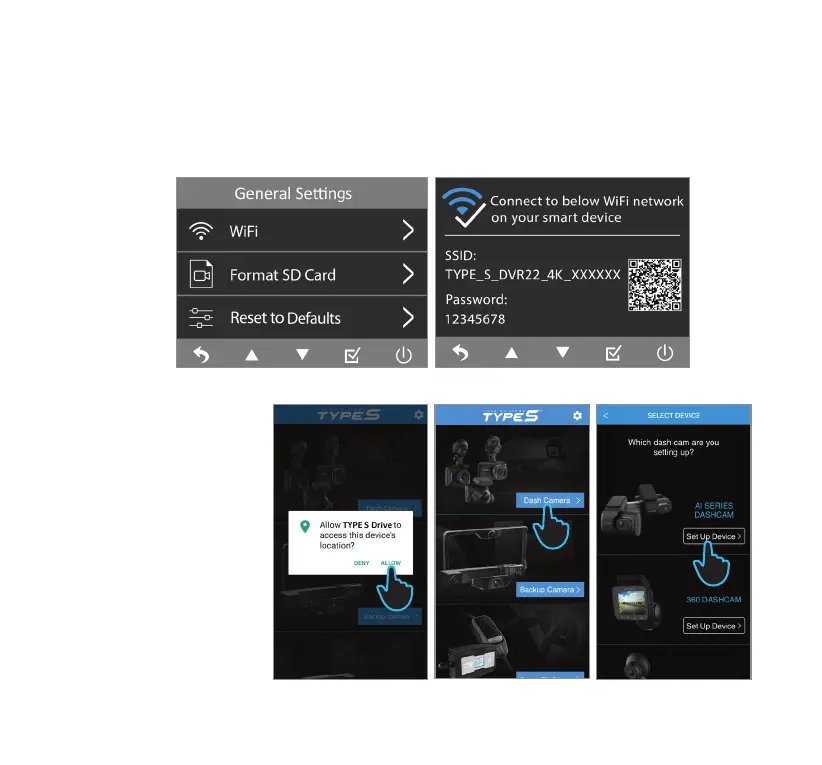
1. Open the camera’s menu and navigate to General Settings.
2. Go to WiFi. The designated QR code will appear.
NOTE: Make sure that WiFi is ON.
14. SETTING UP THE APP
Android Device
3. Run the TYPE S Drive App.
Click Allow in the pop-up
message when prompted
to allow the App to access
your location.
4. Select the Dash Camera
category.
5. Select AI SERIES DASHCAM
from the list of devices.
Click Set Up Device.
3
4
5



 To Next Page