Ubee Interactive Using the Advanced Settings Options
Ubee UBC1301-AA00 Advanced Wireless Voice Gateway Subscriber User Guide • March 2017 59
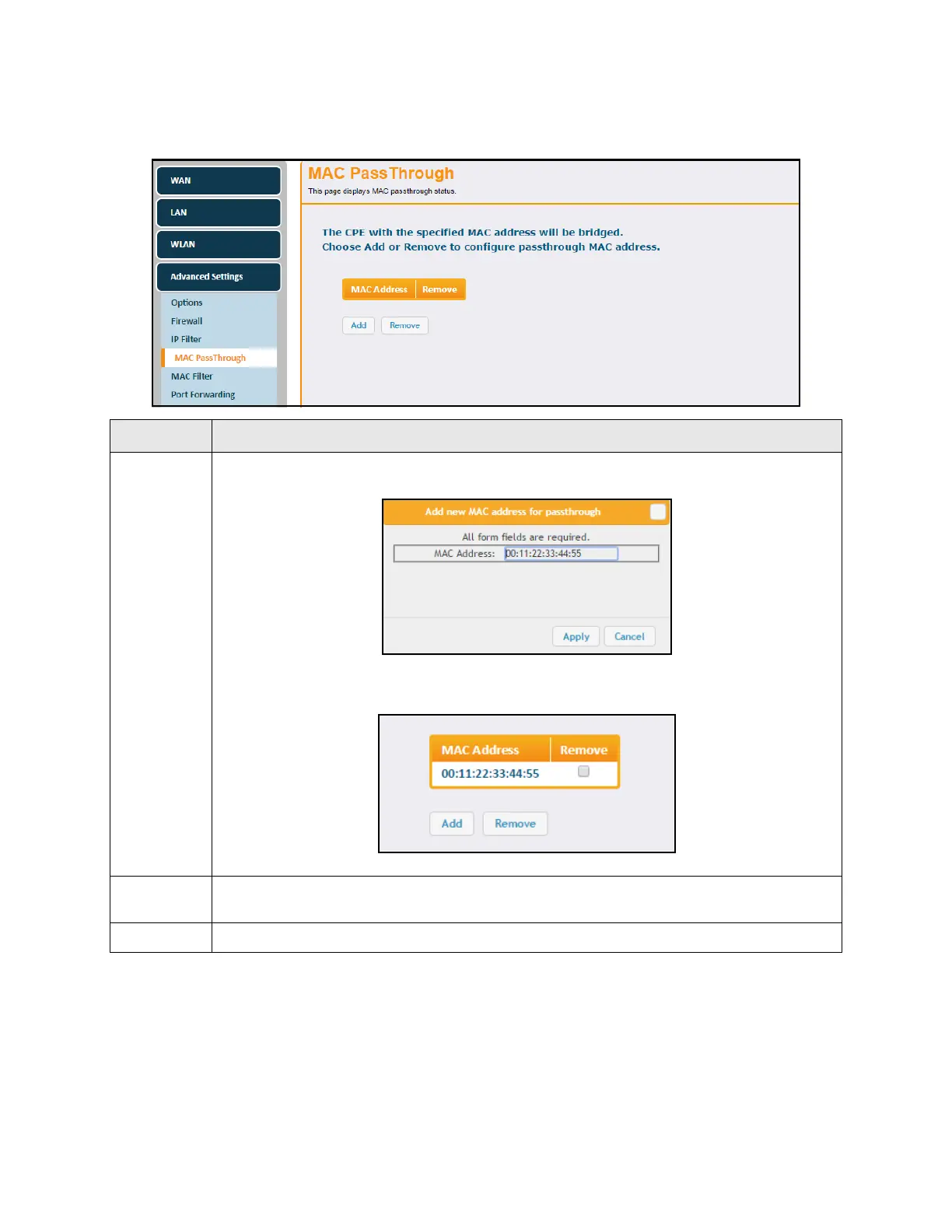
Field descriptions are listed below the screen example.
6.4.5 Using the MAC Filter Option
Use the MAC Filter option to filter MAC addresses to block Internet traffic from specific
network devices on the LAN. MAC filtering establishes a list and any host on this list is not
able to access the network through the UBC1301-AA00.
Label Description
Add
Click the Add button to add MAC Addresses to the pass through table. The pop-up window
below appears.
Enter the desired MAC Address in the field provided and click Apply. The added MAC address
then appears in the table on the MAC PassThrough screen.
Remove
To re m ov e a M A C addr e s s fr o m the passthrough table, check the “Remove” box to the right of
the MAC address, then click the Remove button at the bottom of the screen.
Apply Saves changes.


 To Next Page