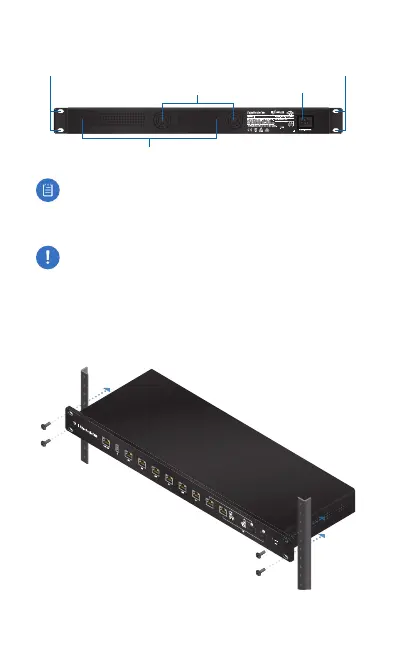
Back Panel
Mounting Holes
Power
Ventilation Holes
Mounting Holes
Fans
Note: There are additional ventilation holes on the sides
of the EdgeRouter PRO.
Hardware Installation
WARNING: FAILURE TO PROVIDE PROPER VENTILATION
MAY CAUSE FIRE HAZARD. KEEP AT LEAST 20 MM OF
CLEARANCE NEXT TO THE VENTILATION HOLES FOR
ADEQUATE AIRFLOW.
1. Attach the EdgeRouter PRO to the rack using the four
Mounting Screws. (If the rack has square slots, then use the
Cage Nuts with the Mounting Screws.)







 To Next Page