
 Need help?
Do you have a question about the Ubiquiti EdgeSwitch 8 and is the answer not in the manual?
Explains the function and status of LEDs for System, RJ45, and SFP ports.
Explains the two methods to reset the EdgeSwitch to factory defaults.
Covers warnings about ventilation clearance and restrictions on stacking the unit.
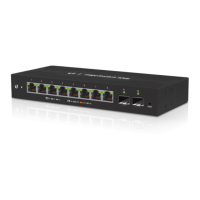
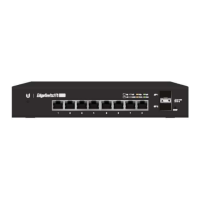
The Ubiquiti EdgeSwitch 8 150W is a versatile, managed Gigabit switch designed for robust network deployments, offering both AC and DC power options. This device is engineered to provide reliable Power over Ethernet (PoE+) and Gigabit connectivity with SFP ports, making it suitable for a wide range of applications, from small office networks to more demanding industrial environments.
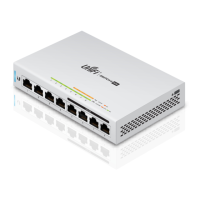
The EdgeSwitch 8 150W serves as a central hub for network connectivity, facilitating high-speed data transfer and power delivery to connected devices. It features eight RJ45 Gigabit Ethernet ports, each capable of supporting 10/100/1000 Mbps connections. These ports are equipped with configurable Power over Ethernet (PoE) capabilities, allowing for either auto PoE+ (IEEE 802.3af/802.3at) or 24V Passive PoE. This flexibility enables the switch to power a variety of PoE-compatible devices, such as IP cameras, wireless access points, and VoIP phones, directly through the Ethernet cable, simplifying network infrastructure and reducing the need for separate power adapters.
In addition to the RJ45 ports, the EdgeSwitch 8 150W includes two hot-swappable SFP ports, which support 1 Gbps fiber optic connections. These SFP ports are crucial for extending network reach over longer distances or for connecting to other fiber-enabled network devices, offering enhanced bandwidth and immunity to electromagnetic interference. The combination of Gigabit Ethernet and SFP fiber connectivity provides a powerful and flexible solution for diverse networking needs.
The switch is a managed device, meaning it offers advanced configuration and monitoring capabilities through a web-based interface or a Command Line Interface (CLI). This allows network administrators to precisely control network traffic, implement security policies, and optimize performance. The management interface provides detailed insights into port status, PoE usage, and overall system health, enabling proactive network management.
For system status at a glance, the EdgeSwitch features several LED indicators. A System LED provides information on the device's operational state, such as initialization, factory reset, and readiness for use. Each RJ45 port has dedicated LEDs to indicate PoE status (Off for No PoE, Amber for IEEE 802.3af/802.3at, Green for 24V Passive) and Link/Speed/Activity (Off for No Link, Amber for 10/100 Mbps link with flashing for activity, Green for 1000 Mbps link with flashing for activity). Similarly, the SFP ports have LEDs to show Link/Speed/Activity (Off for No Link, Green for 1 Gbps link with flashing for activity). These visual cues are essential for quick troubleshooting and monitoring of network connections and power delivery.
The EdgeSwitch 8 150W is designed for ease of installation and deployment in various settings. It can be placed on a desktop, mounted on a shelf, or securely attached to a wall, offering flexibility in physical placement. The package includes all necessary mounting hardware, such as mount brackets, bracket screws, mounting screws, and screw anchors, to facilitate these installation options.
Connecting the device is straightforward. For AC power, users simply connect the provided power cord to the AC power port on the back of the switch and then plug it into a power outlet. For environments requiring redundant power or stand-alone DC power, the EdgeSwitch supports an optional 42 to 56VDC power source, such as the EdgePower EP-54V-150W. The DC input terminal block features self-correcting polarity, simplifying the connection process for DC power cables. This dual-power capability ensures continuous operation, even in the event of an AC power interruption, as the switch automatically prioritizes the power source with the highest voltage.
Network connectivity begins by connecting an Ethernet cable from a DHCP server or LAN to any RJ45 port on the EdgeSwitch. Subsequent devices, such as computers, servers, or other network equipment, can then be connected to the remaining RJ45 ports. For fiber optic connections, users first remove the dust plug from an SFP port, insert a compatible fiber SFP module, and then connect the fiber optic cable to the module. This modular approach allows for customized fiber deployments based on specific network requirements.
Accessing the configuration interface is intuitive. By default, the EdgeSwitch attempts to obtain an IP address via DHCP. If a DHCP server is not available, it defaults to a fallback IP address of 192.168.1.2. Users can access the web-based interface by typing the assigned or fallback IP address into a web browser. The default login credentials are "ubnt" for both username and password. After logging in, users are presented with a comprehensive interface to configure network settings, PoE options, VLANs, and other advanced features. The CLI, accessible via the console port, offers an alternative method for configuration, providing detailed control for experienced network administrators. The console port uses an RJ45 serial connection, requiring an RJ45-to-DB9 serial console cable and specific serial port settings (Baud rate 115200, Data bits 8, Parity NONE, Stop bits 1, Flow control NONE).
The EdgeSwitch 8 150W incorporates several features to ensure reliable operation and ease of maintenance. Proper ventilation is critical for the device's longevity and performance. The side panels of the switch are equipped with ventilation holes, and it is essential to maintain at least 20 mm of clearance around these holes to ensure adequate airflow and prevent overheating. The device is not designed for stacking, and nothing should be placed on top of it to avoid obstructing ventilation.
The device includes a reset button on the front panel, offering two methods for restoring factory defaults:
These reset options are valuable for troubleshooting or reconfiguring the device from a clean slate.
The managed nature of the EdgeSwitch allows for remote monitoring and configuration, reducing the need for physical access for routine maintenance tasks. The web interface provides real-time status updates and diagnostic tools, enabling administrators to identify and resolve issues efficiently. Firmware upgrades can also be performed through the management interface, ensuring the device benefits from the latest features, security patches, and performance improvements.
For robust network protection, Ubiquiti recommends using industrial-grade, shielded Ethernet cable for outdoor applications. This helps to protect networks from harmful outdoor environments and destructive ESD (Electrostatic Discharge) events. While the cabling can be located outdoors, the EdgeSwitch itself should be housed inside a protective enclosure to shield it from rain and moisture.
The dual AC/DC power input provides a critical maintenance advantage by offering power redundancy. In the event of an AC power failure, the DC power source automatically takes over, ensuring uninterrupted network operation. This "hot backup" capability minimizes downtime and enhances the overall reliability of the network infrastructure.
The EdgeSwitch 8 150W is a robust and feature-rich device designed for high performance and reliability in diverse network environments, with user-friendly installation and comprehensive management capabilities.
 General
| Model | ES-8-150W |
|---|---|
| Total Non-Blocking Throughput | 10 Gbps |
| Switching Capacity | 20 Gbps |
| Forwarding Rate | 14.88 Mpps |
| Max. Power Consumption | 150W |
| PoE Budget | 150W |
| Power Method | 100-240VAC/50-60 Hz, Universal Input |
| Networking Interfaces | 8 x 10/100/1000 Mbps RJ45 Ethernet Ports |
| PoE Interfaces | 8 |
| PoE | 802.3af/at |
| Dimensions | 204 x 235 x 43 mm (8.03 x 9.25 x 1.69") |
| Weight | 1.7 kg (3.75 lb) |
| Rackmount | Yes |
| Management Interface | Web UI |



 To Next Page