
 Need help?
Do you have a question about the Ubiquiti U-LTE and is the answer not in the manual?
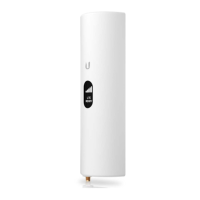
Connect an optional external LTE antenna or cover the connector with the RP-SMA Cap.
The Reset Button serves two functions: quick restart or factory reset by holding.
This Gigabit Ethernet port is used for bridging and can provide passive PoE to a device.
This Gigabit Ethernet port connects power, LAN, and DHCP server, supporting 802.3at PoE+.
Displays status information, including the LTE signal strength.
Learn the steps for adopting the U-LTE in UniFi Controller and setting up your LTE account.
Details on configuring the U-LTE, including WAN failover and remote access.
Device compliance with Part 15 of FCC Rules, covering interference and operational conditions.
Device compliance with ISED Canada licence-exempt RSS standards and conditions.
 General
| Model | U-LTE |
|---|---|
| Category | Wireless Access Point |
| Certifications | CE, FCC, IC |
| Antenna Gain | 2 dBi |
| Manufacturer | Ubiquiti |
| Wireless Standards | LTE |
| Power Method | PoE |
| Operating Humidity | 5 to 95% Noncondensing |
| Mounting | Wall, Pole |
| Button | Reset |
| LEDs | Power |
| LTE Categories | LTE Category 4 |










 To Next Page
