
 Need help?
Do you have a question about the Ubiquiti UniFi USW-Flex-Mini and is the answer not in the manual?
Explains the different states of the system LED indicator.
Describes the LEDs for network link and activity on RJ45 ports.
Details the functionality of the PoE input port.
How to reset the device to factory defaults.
FCC rules, conditions, and interference guidelines.
Statement for ISED Canada regulatory compliance.
Mentions compliance for Australia and New Zealand regions.
Indicates product compliance with applicable EU directives.
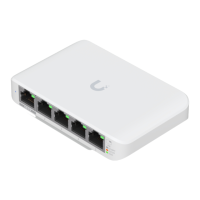
The UniFi Switch Flex Mini is a compact and versatile network switch designed for small-scale deployments, offering essential networking capabilities in a sleek, unobtrusive form factor. Its primary function is to expand network connectivity by providing multiple Ethernet ports, allowing users to connect various wired devices to their network. This device is particularly well-suited for home users, small offices, or specific areas within larger networks where additional wired connections are needed without the complexity or cost of a larger, more feature-rich switch.
One of the key usage features of the UniFi Switch Flex Mini is its simplicity in deployment. It operates on a plug-and-play principle for basic connectivity, meaning you can simply connect it to your existing network and power it on to start using it. For more advanced management and integration into a UniFi ecosystem, the switch is designed to be managed by the UniFi Controller software. This software provides a centralized interface for configuring, monitoring, and troubleshooting UniFi devices, offering a unified experience across your network infrastructure. The UniFi Controller allows for easy adoption of the switch into your network, where it can then be managed alongside other UniFi access points, routers, and switches. This centralized management is a significant advantage for users who want to maintain a cohesive and easily manageable network environment.
The switch offers five RJ45 Ethernet ports, supporting 10/100/1000 Mbps speeds, which means it can handle a wide range of network devices, from older 100 Mbps devices to modern Gigabit Ethernet devices. One of these ports also supports Power over Ethernet (PoE) input, specifically 802.3af/at PoE. This feature is particularly useful as it allows the switch itself to be powered by a compatible PoE injector or a PoE-enabled switch, eliminating the need for a separate power adapter and simplifying cable management, especially in locations where power outlets are scarce or inconvenient. For scenarios where PoE input is not available, the switch can also be powered by a standard 5V, 1A USB-C power adapter, which is included in single-pack versions of the product. This dual power option provides flexibility in deployment, allowing users to choose the most suitable power method for their specific setup.
Status LEDs on the device provide immediate visual feedback on its operational status and the activity of its ports. The System LED, for instance, indicates whether the device is initializing, waiting for adoption, busy with a firmware upgrade, or successfully adopted and working properly. Different flashing patterns and colors communicate these states clearly. For example, a flashing white LED indicates initialization, while a steady blue LED signifies successful adoption. An alternating white/blue pattern suggests the device is busy, perhaps undergoing a firmware upgrade, and should not be unplugged. This visual feedback is invaluable for quick troubleshooting and understanding the device's current state without needing to access the management software. Similarly, each RJ45 port has its own Link/Speed/Activity LED. These LEDs use different colors (amber for 10/100 Mbps and green for 1000 Mbps) and flashing patterns to indicate link establishment and network activity, allowing users to quickly ascertain the connection status and speed of each connected device.
For maintenance and troubleshooting, the UniFi Switch Flex Mini includes a reset button. This button allows users to restore the device to its factory default settings, which can be useful in situations where the configuration needs to be cleared or if the device is unresponsive. The reset process involves pressing and holding the button for approximately 10 seconds until the System LED flashes and then becomes solidly lit, after which the device will automatically reboot. This feature provides a straightforward way to recover the device from misconfigurations or other issues that might prevent it from functioning correctly.
The UniFi Controller software, which is essential for managing the switch, offers a comprehensive set of features for network administration. It allows users to view network statistics, monitor device performance, and configure various network settings. The software is compatible with Linux, Mac OS X, and Microsoft Windows operating systems and requires Java Runtime Environment 1.8 or above. Google Chrome is recommended as the web browser for accessing the controller interface, ensuring optimal functionality. The controller software also facilitates firmware upgrades, ensuring that the UniFi Switch Flex Mini always runs the latest software with the most recent features and security enhancements. This proactive approach to firmware management helps maintain the stability and security of the network.
The design of the UniFi Switch Flex Mini emphasizes ease of use and integration into various environments. Its compact size and minimalist aesthetic make it suitable for placement on a desk, shelf, or mounted discreetly. The device is designed for indoor use and requires proper ventilation to prevent overheating, with a recommended clearance of at least 20 mm around its ventilation holes. Safety notices provided with the device highlight important considerations, such as avoiding exposure to rain or moisture, not using it in submerged locations, and refraining from using it during electrical storms to prevent electric shock. These guidelines ensure the safe and reliable operation of the device over its lifespan.
In summary, the UniFi Switch Flex Mini is a user-friendly, compact, and versatile network switch that simplifies network expansion and management. Its plug-and-play nature for basic connectivity, coupled with the advanced management capabilities of the UniFi Controller software, makes it an excellent choice for users seeking a reliable and easily manageable solution for their wired networking needs. The intuitive LED indicators, flexible power options, and straightforward reset mechanism further enhance its usability and maintainability, ensuring a smooth and efficient networking experience.
 General
| Max. Power Consumption | 2.5W |
|---|---|
| Switching Capacity | 10 Gbps |
| Forwarding Rate | 7.44 Mpps |
| Operating Temperature | -5 to 45° C (23 to 113° F) |
| Certifications | CE, FCC, IC |
| Total Non-Blocking Throughput | 5 Gbps |
| Jumbo Frame | 9216 bytes |
| MAC Address Table | 2000 |
| Management Interface | UniFi Network Application |
| Ports | 5 x 10/100/1000 Mbps RJ45 Ports |
| Operating Humidity | 10 to 90% Noncondensing |
| Supported Voltage Range | 5V DC |
| Power Method | 802.3af PoE or 5V, 1A USB-C Power Adapter (Not Included) |
| Enclosure Characteristics | Polycarbonate |






 To Next Page