
 Need help?
Do you have a question about the Ubiquiti USW-Flex-Mini and is the answer not in the manual?
Describes the status indicator for device operations and adoption.
Explains port status indicators for network link and activity.
Details the Ethernet port's capabilities for PoE input.
Provides crucial warnings about ventilation, moisture, and storm usage.
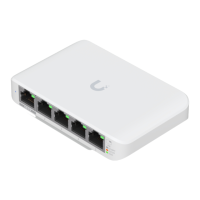
The UniFi Switch Flex Mini is a compact and versatile network switch designed for small-scale deployments, offering essential networking capabilities within the UniFi ecosystem. Its primary function is to expand network connectivity by providing multiple Gigabit Ethernet ports, allowing users to connect various wired devices such as computers, access points, and other network-enabled equipment. The device is managed through the UniFi Controller software, which provides a centralized platform for network configuration, monitoring, and management. This integration with the UniFi Controller is a core aspect of its functionality, enabling seamless adoption, firmware upgrades, and status monitoring within a broader UniFi network.
One of the key usage features of the UniFi Switch Flex Mini is its simplicity in deployment. For standalone use or in environments where PoE is not available, it can be powered by the included 5V, 1A power adapter. Alternatively, for greater flexibility and reduced cable clutter, it supports 802.3af/at PoE input, allowing it to draw power from a compatible PoE source, such as a PoE injector or a PoE-enabled switch. This dual power option makes it adaptable to various installation scenarios. The switch features five RJ45 ports, all supporting 10/100/1000 Mbps Ethernet connections, ensuring high-speed data transfer for connected devices.
The device's System LED serves as a crucial indicator of its operational status. When flashing white, it indicates that the switch is initializing. A steady white light signifies that the device is at factory defaults and awaiting adoption into a UniFi network. An alternating white/blue light indicates that the device is busy, often during processes like firmware upgrades, and users are advised not to unplug it during this state. Once successfully adopted and operating correctly within a network, the System LED will display a steady blue light. A flashing blue light is a unique feature used for device location; when the "Locate" function is activated in the UniFi Controller software, the LED flashes blue, and the software highlights the switch's position on a network map, aiding in physical identification in larger deployments.
Each RJ45 port on the UniFi Switch Flex Mini also has its own Link/Speed/Activity LED, providing immediate visual feedback on the status of individual connections. If the LED is off, it means there is no link established on that port. An amber light indicates that a link has been established at 10/100 Mbps, with flashing amber signifying activity on the port. A green light denotes a link established at 1000 Mbps (1 Gbps), and flashing green indicates active data transfer. These per-port LEDs are invaluable for quick troubleshooting and monitoring network traffic at a glance.
Connecting the UniFi Switch Flex Mini to a network is straightforward. Users first connect the power source, either the power adapter or a PoE input, to the designated port. Then, Ethernet cables are connected from network devices to the RJ45 ports on the switch. Once physically connected, the device needs to be adopted into the UniFi Controller software. This involves downloading and installing the UniFi Controller (version 5.12.5 or newer), running the installation wizard, and then logging into the management interface. Within the Controller, users navigate to the "Devices" screen, locate the UniFi Switch Flex Mini (which will typically show a "PENDING ADOPTION" status), and click "Adopt." Upon successful adoption, the System LED will turn steady blue, confirming its integration into the UniFi network.
Maintenance features for the UniFi Switch Flex Mini are primarily managed through the UniFi Controller software. Firmware upgrades, which are essential for security and performance enhancements, are handled centrally via the Controller. The Controller also provides comprehensive network statistics and monitoring tools, allowing administrators to keep track of device performance, connected clients, and overall network health. In case of issues or the need to reset the device to its original settings, a reset button is provided. To perform a factory reset, the device should be fully booted up. The user then presses and holds the reset button for approximately 10 seconds until the System LED starts flashing and then becomes solidly lit. After a few seconds, the LED will turn off, and the device will automatically reboot, returning to its factory default state, ready for re-adoption.
The UniFi Switch Flex Mini is designed with safety in mind, and users are advised to follow specific guidelines. Proper ventilation is crucial to prevent fire hazards, requiring at least 20 mm of clearance around the ventilation holes. The device should not be exposed to rain or moisture to reduce the risk of fire or electric shock, nor should it be used in locations where it could be submerged in water. Additionally, it is recommended to avoid using the product during an electrical storm due to the remote risk of electric shock from lightning. These precautions ensure the longevity and safe operation of the device within its intended environment. The device's robust design and integration with the UniFi Controller make it a reliable and easy-to-manage solution for extending wired network connectivity in various settings.
 General
| Management | UniFi Network Controller |
|---|---|
| Operating Temperature | -5 to 45° C (23 to 113° F) |
| Max. Power Consumption | 2.5W |
| Total Non-Blocking Throughput | 5 Gbps |
| Switching Capacity | 10 Gbps |
| Forwarding Rate | 7.44 Mpps |
| Certifications | CE, FCC, IC |
| Enclosure Characteristics | Plastic |
| Power Consumption | 2.5W |
| VLAN Support | Yes |
| Ports | 5 x 10/100/1000 Mbps RJ45 |
| Power Method | USB Type-C, 802.3af PoE |
| Operating Humidity | 10 to 90% Noncondensing |
| Supported Voltage Range | 44-57V DC (PoE) |






 To Next Page