12/11/2020 USW-Flex-Mini Quick Start Guide
dl-origin.ubnt.com/qsg/USW-Flex-Mini/USW-Flex-Mini_EN.html 2/8
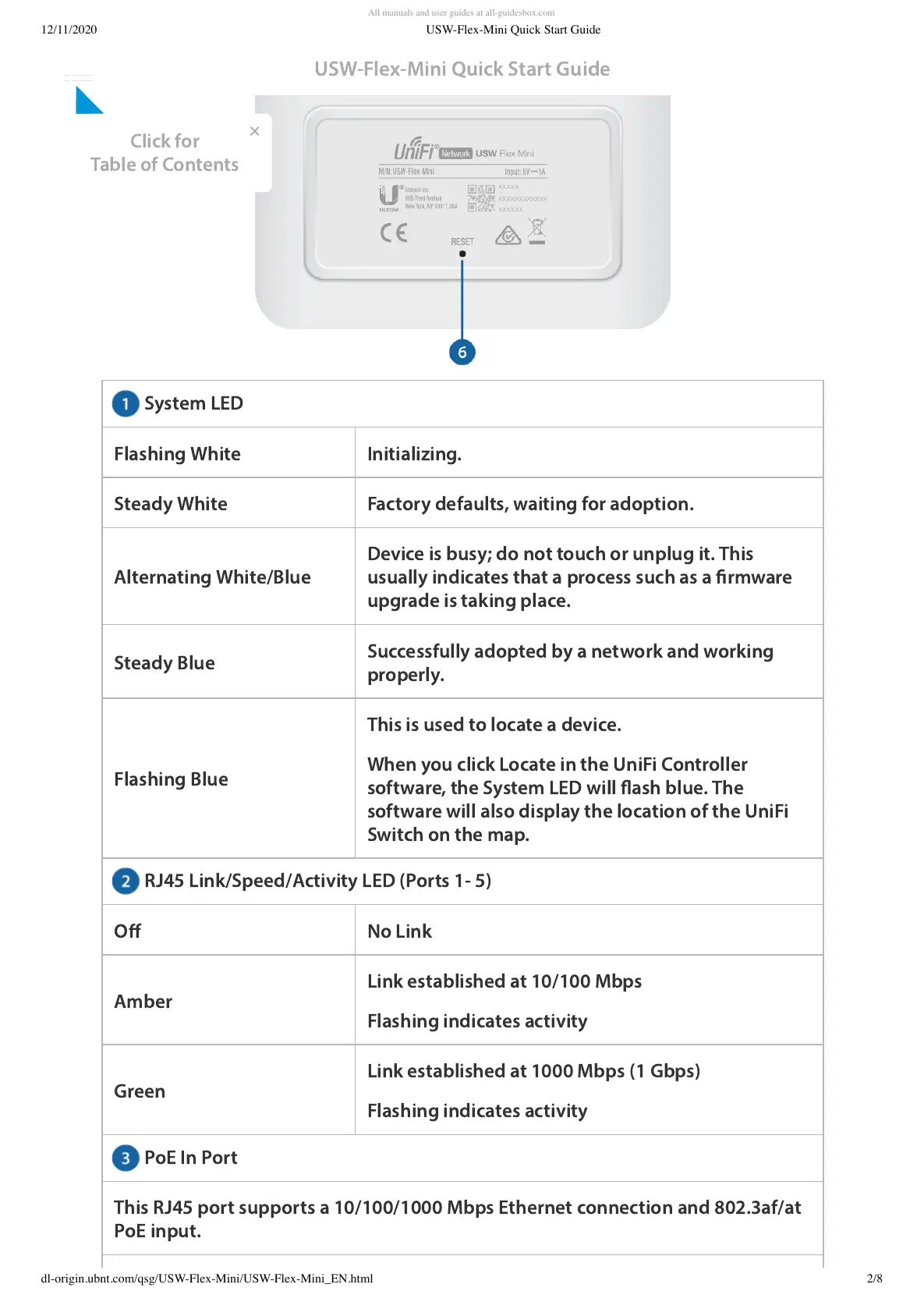
System LED
RJ45 Link/Speed/Activity LED (Ports 1- 5)
PoE In Port
Flashing White Initializing.
Steady White Factory defaults, waiting for adoption.
Alternating White/Blue
Device is busy; do not touch or unplug it. This
usually indicates that a process such as a rmware
upgrade is taking place.
Steady Blue
Successfully adopted by a network and working
properly.
Flashing Blue
This is used to locate a device.
When you click Locate in the UniFi Controller
software, the System LED will ash blue. The
software will also display the location of the UniFi
Switch on the map.
Off No Link
Amber
Link established at 10/100 Mbps
Flashing indicates activity
Green
Link established at 1000 Mbps (1 Gbps)
Flashing indicates activity
This RJ45 port supports a 10/100/1000 Mbps Ethernet connection and 802.3af/at
PoE input.
USW-Flex-Mini Quick Start Guide
×
Click for
Table of Contents







 To Next Page