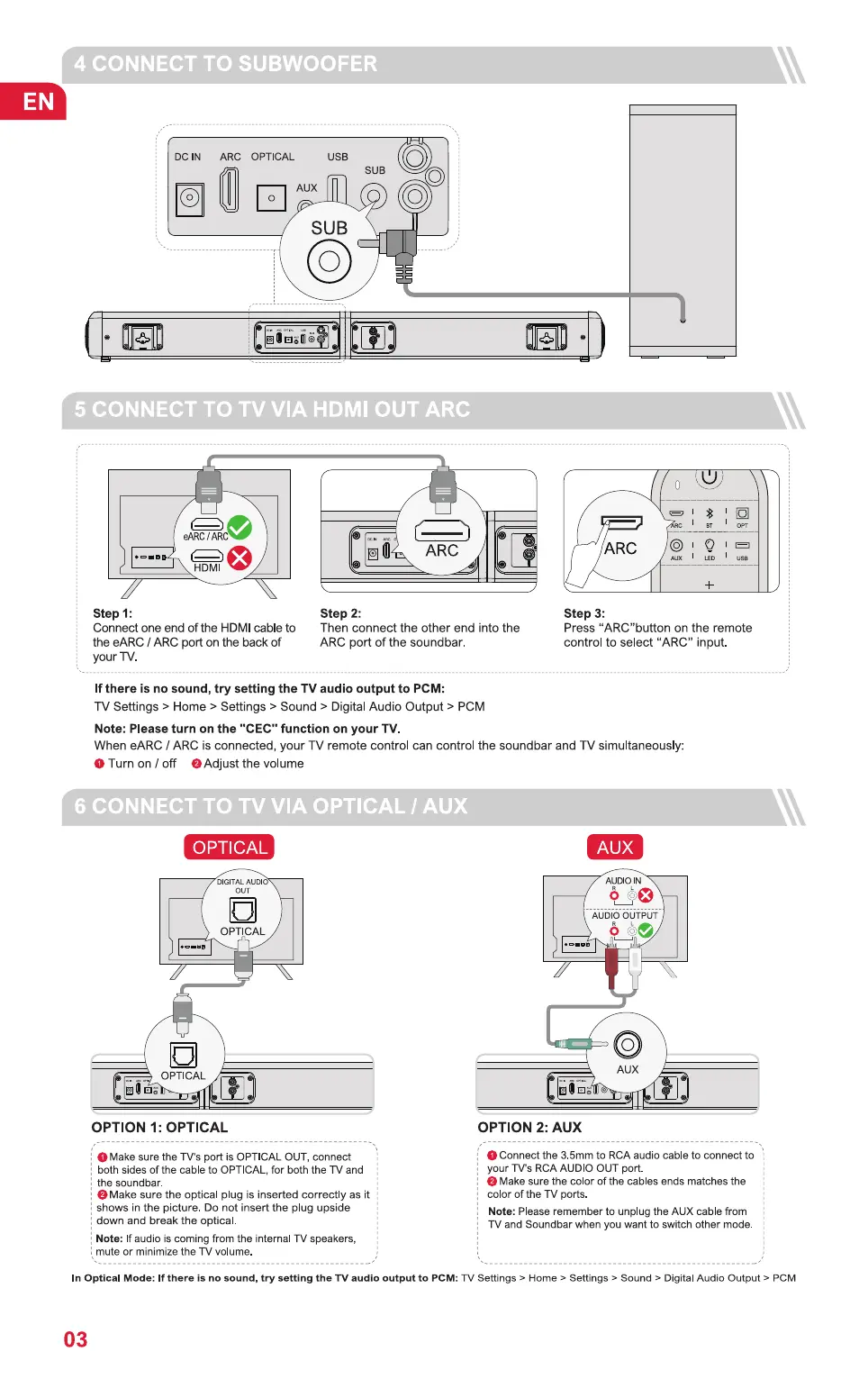
4 CONNECT TO SUBWOOFER
EN
DC IN
o
ARC OPTICAL
AUX
o
USB
SUB
o
SUB
O
5 CONNECT TO TV VIA HDMI OUT ARC
ARC
ARC
ARC
Step 3:
o
O
Step 1:
Connect one end of the HDMI cable to
the eARC / ARC port on the back of
your TV.
step 2:
Then connect the other end into the
ARC port of the soundbar.
Press "ARC"button on the remote
control to select "ARC" input.
If there is no sound, try setting the TV audio output to PCM:
TV Settings > Home > Settings > Sound > Digital Audio Output > PCM
Note: Please turn on the "CEC" function on your TV.
When eARC / ARC is connected, your TV remote control can control the soundbar and TV simultaneously:
O Turn on / off O Adjust the volume
6 CONNECT TO TV VIA OPTICAL 1 AUX
OPTICAL
DIGITAL AUDI
OPTICAL
OPTICAL
OPTION 1: OPTICAL
O Make sure the TV's port is OPTICAL OUT, connect
both sides of the cable to OPTICAL, for both the TV and
the soundbar.
Make sure the optical plug is inserted correctly as it
shows in the picture. Do not insert the plug upside
down and break the optica
Note: If audio is coming from the internal TV speakers,
mute or minimize the TV volume.
AUX
AUDIO IN
AUDIO OUTPUT
o
AUX
OPTION 2: AUX
O Connect the 3.5mm to RCA audio cable to connect to
your TV's RCA AUDIO OUT port.
O Make sure the color of the cables ends matches the
color of the TV ports
Note: Please remember to unplug the AUX cable from
TV and Soundbar when you want to switch other mode.
In Optical Mode: If there is no sound, try setting the TV audio output to PCM: TV Settings > Home > Settings > Sound > Digital Audio Output > PCM
03


 To Next Page