EasyManua.ls Logo

Ultra Start PRO Series - User Manual

Default Icon
2 pages
Print Icon
To Next Page IconTo Next Page
Loading...
The manufacturer warrants to the original purchaser of their remote starters and alarms, that the product shall
be free from defects in material and workmanship. However, should this product be proven to be defective,
within a one year period from the original date of purchase, the manufacturer will, without charge to the
purchaser (excluding any charges incurred to have the product delivered to the manufacturer) , repair or
replace any part of the remote starters and alarms which the manufacturer agrees to be defective. Thereafter
this warranty applies only to the main computer control module which will be warranted for life to the original
purchaser and the vehicle in which it is originally installed. Repairs or replacement of defective modules shall
remain at the discretion of the manufacturer. All other parts, components, accessories and/or optional
equipment pertaining to the remote starter and alarm are not included in the extended warranty. This warranty
is non-transferable. Request for warranty service from any Factory Authorized Dealer must be accompanied
with the original purchase receipt. This warranty does not cover the following: removal and reinstall labor
charges, shipping charges, abuse, misuse, or accidental damages to the remote starter and alarm,
automobile, and/or parts there of. This warranty is void upon modification, repairs, or alterations of any part of
the System. The manufacturer does not guarantee or insure against theft of the vehicle or its contents. Alarm
models are designed only to act as a deterrent against possible theft. This alarm may qualify for auto insurance
discounts, contact your Insurance Agent for further information . The manufacturer shall not be held liable for
any consequential damages due to breach of this or any other warranty, expressed, or implied. This warranty
gives you specific legal rights. Your specific legal rights may vary for each region.
CERTAIN DAMAGES EXCLUDED
The manufacturer expressly disclaims any liability or responsibility for incidental damages caused by the
product, including economic loss, loss of use of the product, car rentals, or any other costs relating to the care
and custody of the product. The manufacturer disclaims liability or responsibility for any consequential
damages caused by the product or resulting from its use, including the cost of repairing or replacing other
property damaged by the product or caused by its use, whether or not the product is working properly. The
product is intended to deter unauthorized use of the vehicles in which it is installed. The manufacturer does
not warrant that the product is fool-safe against theft and/or vandalism and/or human error or misuse. The
manufacturer accepts no liability or responsibility for any damage of any kind whatsoever caused to any
vehicle in which the product is installed or any resulting damage from its use. The manufacturer accepts no
responsibility or liability for any damage resulting to or theft of the vehicle or its contents, caused or alleged to
be caused, directly or indirectly, by failure of the product.
Installation Center
OPTIONS Ask your installation center about these and other options
Dome-light Supervision Additional Transmitters
Parking Light Supervision Driver’s Door Unlock
Starter Kill Trunk Release Kit
Radar Sensor Window Roll-up
Pager Satellite Activation
Your Professional
RS-1000
Pro Series
Remote Vehicle Starter
Owners Guide
Limited Lifetime
Warranty
Rev.112700
HORN HONK
This advanced remote starter has a built in horn
honk output which can be connected to the
vehicle’s factory horn to give an audible
conformation of locking , unlocking and the
remote starting of the vehicle.
The horn honk option will also provide the user
with a remote panic option.
STARTER DISABLE
The system has an optional starter disable
output that can be connected by your dealer to
a starter disable relay.
When the starter disable relay is installed and
connected to the system, the vehicle’s starter
will be disabled when the lock button is
pressed and the LEDS are flashing steady.
To re-activate starter, press the unlock button
and the LEDS will stop flashing and the starter
will be re-enabled.
Disabled
Automatic Transmission
CAR FINDER MODE
1. Press and hold the # button for 2 seconds.
2.System flashes lights and honks the
horn(optional) 5 times to help find your vehicle
in a crowded parking lot.
2
sec.
WWW.ULTRASTARTERS.COM
CUSTOM FEATURES

Other manuals for Ultra Start PRO Series

Question and Answer IconNeed help?

Do you have a question about the Ultra Start PRO Series and is the answer not in the manual?

Summary

Custom Features

Horn Honk

Audible confirmation of locking, unlocking, and remote starting, plus panic option.

Starter Disable

Optional starter disable output for security, activated by lock button and flashing LEDs.

Car Finder Mode

Locates vehicle in parking lots by flashing lights and optional horn honks.

Warranty Information

Limited Lifetime Warranty

Covers defects in material and workmanship for the original purchaser, with lifetime on control module.

Excluded Damages

Manufacturer disclaims liability for incidental or consequential damages and does not insure against theft.

Basic Operation

Lock Doors

Locks vehicle doors and flashes park lights once.

Unlock Doors

Unlocks vehicle doors and flashes park lights twice.

Trunk Release

Releases the vehicle trunk after unlocking doors, confirmed by one light flash.

Panic Mode

Activates park lights and optional horn honk for security or attention.

Panic Mode Disable

Disables the panic mode function.

Remote Starting Functions

Remote Start Vehicle

Starts the vehicle remotely, with optional horn and light signals.

Remote Stop Vehicle

Stops the remote-started vehicle.

Quick Stop Mode

Allows vehicle to continue running after ignition off by pressing brake pedal.

Turbo Stop Mode

Keeps engine running after ignition off for turbo cooling.

Cold Start Mode

Starts vehicle automatically at set intervals for up to 24 hours.

Cancel Cold Start Mode

Cancels the automatic cold start function by starting with ignition key.

Advanced Operations

Emergency Valet Mode

Disables remote start functions for security or system malfunction.

Ignition Lock;Unlock

Optional feature for automatic door locking/unlocking based on ignition status.

Overview

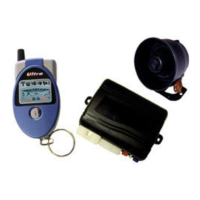
This document describes the Ultra Start RS-1000 Pro Series Remote Vehicle Starter, designed for automatic transmission vehicles. It covers custom features, basic operation, remote starting, and advanced operations, along with warranty information.

Function Description:

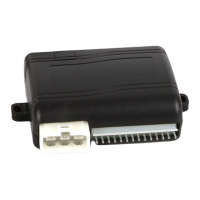
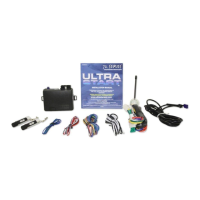
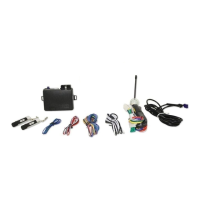
The Ultra Start RS-1000 Pro Series is a remote vehicle starter system that allows users to start, stop, lock, and unlock their vehicle remotely. It includes features for enhanced security, convenience, and vehicle location. The system is designed to integrate with the vehicle's existing electrical system to provide remote control over various functions.

Important Technical Specifications:

The manual does not provide specific technical specifications such as operating frequency, range, or power consumption. However, it implies certain operational parameters:

  • Runtime: The remote start function typically runs the vehicle for a programmed runtime, usually 15 minutes. The Quick Stop Mode also allows the vehicle to run for up to 15 minutes (default run time).
  • Cold Start Mode: This mode allows the system to start the vehicle every 4 hours for up to 24 hours, suggesting a timer-based operation.
  • Ignition Lock/Unlock: Doors will lock 3 seconds after ignition is turned to the "on" position and unlock upon turning ignition "off."
  • Horn Honk Output: Built-in output for audible confirmation and panic function.
  • Starter Disable Output: Optional output for connecting to a starter disable relay.

Usage Features:

Custom Features:

  • Horn Honk: Provides audible confirmation for locking, unlocking, and remote starting. It also includes a remote panic option.
  • Starter Disable: An optional feature that disables the vehicle's starter when the lock button is pressed and the LEDs are flashing steady. To re-activate, the unlock button must be pressed.
  • Car Finder Mode: Pressing and holding the "#" button for 2 seconds flashes lights and honks the horn (if installed) 5 times to help locate the vehicle in a crowded parking lot.

Basic Operation:

  • Lock Doors: Press and release the LOCK button. Park lights flash once, doors lock, and the LED starts flashing within 5 seconds.
  • Unlock Doors: Press and release the UNLOCK button. Park lights flash twice, doors unlock, and the LED stops flashing.
  • Trunk Release: Press and hold the UNLOCK button for 3 seconds. Doors unlock, and continued holding for 3 seconds activates the trunk release, confirmed by one light flash. This feature does not activate when the ignition key is in the "on" position.
  • Panic Mode: Press and hold the LOCK button for 3 seconds. Park lights flash and the horn honks (if installed).
  • Panic Mode Disable: Press the LOCK button to disable panic.

Remote Starting:

  • Remote Start Vehicle: Press and release the "*" button (or twice if the optional programmable safety start feature is enabled). Park lights flash once, and the horn (optional) honks once. Once started, the system flashes lights 4 times, and lights remain "on" while the vehicle is running for the programmed runtime (typically 15 minutes).
  • Remote Stop Vehicle: Press the "*" button for 3 seconds while the car is running. Park lights flash twice, and the horn (optional) honks twice. Note that pressing the brake pedal or opening the hood will also stop the vehicle.
  • Quick Stop Mode: While the vehicle is running with the key, press the "*" button while pressing the brake pedal. Lights flash, and the vehicle continues to run for up to 15 minutes.
  • Turbo Stop Mode: While the vehicle is running with the key, press the "*" button twice. The horn (optional) honks once, and parking lights turn "on." Turn the ignition "off," and the vehicle continues to run. Exit the vehicle and lock or unlock doors. The system runs for 2 minutes and then turns off.
  • Cold Start Mode: Press and release the "#" button, then press and hold the "*" button until lights flash 4 times. The system starts the vehicle every 4 hours for up to 24 hours.
  • Cancel Cold Start Mode: Start the vehicle with the ignition key.

Advanced Operations:

  • Emergency Valet Mode: Disables the system if the remote is lost or malfunctions.
    • Entering Valet Mode: While ignition is "on," press and hold the antenna button for 5 seconds until the horn (optional) honks 5 times. Remote start functions are disabled, and the LED is "on" steady. Door locks and trunk release remain operational.
    • Exiting Valet Mode: While ignition is "on," press and hold the antenna button for 5 seconds until the horn (optional) honks twice.
  • Ignition Lock/Unlock (Optional Feature): Doors lock 3 seconds after ignition is turned to the "on" position (will not lock if doors are open). Doors unlock upon turning ignition "off."

Maintenance Features:

The manual does not explicitly detail maintenance features but provides information on warranty and troubleshooting.

Warranty Information:

  • Limited Lifetime Warranty: The manufacturer warrants to the original purchaser that the product is free from defects in material and workmanship.
  • Initial Period (One Year): Within one year from the original purchase date, the manufacturer will repair or replace any defective part of the remote starters and alarms without charge (excluding shipping and delivery charges).
  • Extended Warranty (Lifetime): After the initial year, the warranty applies only to the main computer control module for the life of the original purchaser and the vehicle in which it was originally installed. Repairs or replacement of defective modules are at the manufacturer's discretion.
  • Exclusions: All other parts, components, accessories, and optional equipment are not included in the extended warranty. The warranty is non-transferable.
  • Warranty Service: Requires the original purchase receipt from any Factory Authorized Dealer.
  • Does Not Cover: Removal and reinstall labor charges, shipping charges, abuse, misuse, accidental damages, modification, repairs, or alterations of any part of the system, or damages to the automobile and/or parts thereof.
  • Theft Guarantee: The manufacturer does not guarantee or insure against theft of the vehicle or its contents. Alarm models are designed as a deterrent.
  • Liability Disclaimer: The manufacturer is not liable for consequential damages due to breach of warranty, incidental damages (economic loss, loss of use, car rentals), or damages to other property. The product is intended to deter unauthorized use and is not warranted to be fool-safe against theft, vandalism, human error, or misuse. The manufacturer accepts no liability for any damage to the vehicle or its contents resulting from the product's use or failure.

Installation:

The document refers to an "Installation Center" for professional installation and mentions various options that can be discussed with the installer, such as dome-light supervision, parking light supervision, starter kill, radar sensor, pager, additional transmitters, driver's door unlock, trunk release kit, window roll-up, and satellite activation.

Ultra Start PRO Series Specifications

General IconGeneral
BrandUltra Start
ModelPRO Series
CategoryRemote Starter
LanguageEnglish

Related product manuals