75
20
WALL MOUNTING
IMPORTANT— BEFORE
DRILLING ANY HOLES IN THE
WALL ENSURE YOU ARE NOT
DRILLING WHERE THERE
COULD BE ANY ELECTRIC
WIRES, WATER OR GAS PIPES
THIS TV REQUIRES A VESA
75 WALL MOUNT, OR EQUIVALENT
15/6 Instructions
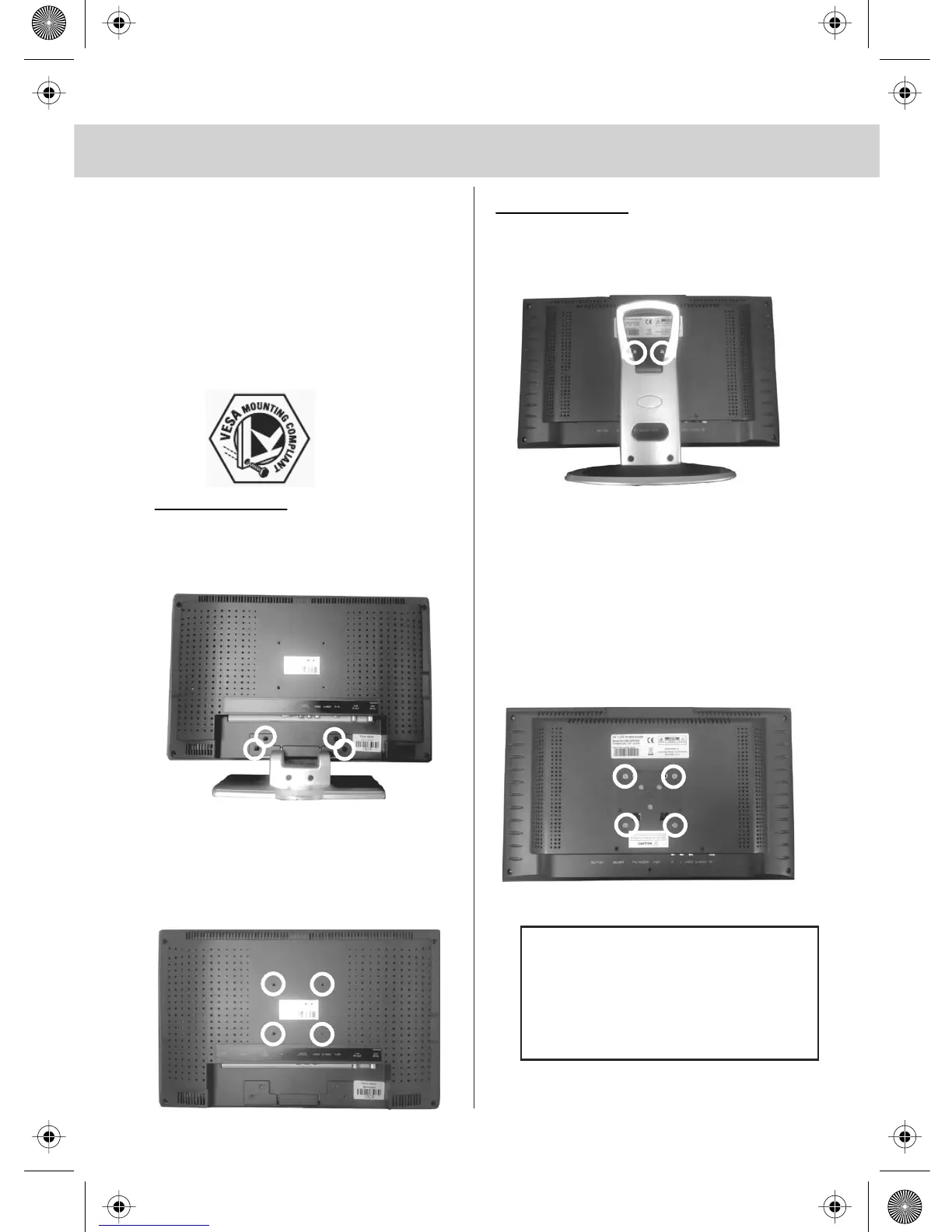
To remove the stand
1) Remove the four screws highlighted
Wall Mounting the TV.
1) The wall mount can now be easily
connected to the mounting holes on the
rear of the TV. These holes
are indicated in the picture below
15/4 Instructions
To remove the stand
1) Remove the two highlighted
2) Slide the stand upwards and the stand will
come off
Wall Mounting the TV.
1) Remove the four screws highlighted
below.
2) The wall mount can now be easily connected
to the mounting holes on the rear of the TV.
These holes are indicated in the picture below
Important - Ensure the length
of screws securing the Wall
Mount to the TV do not
exceed 25mm. Using longer
screws could cause irreparable
damage to the TV.


 To Next Page