6
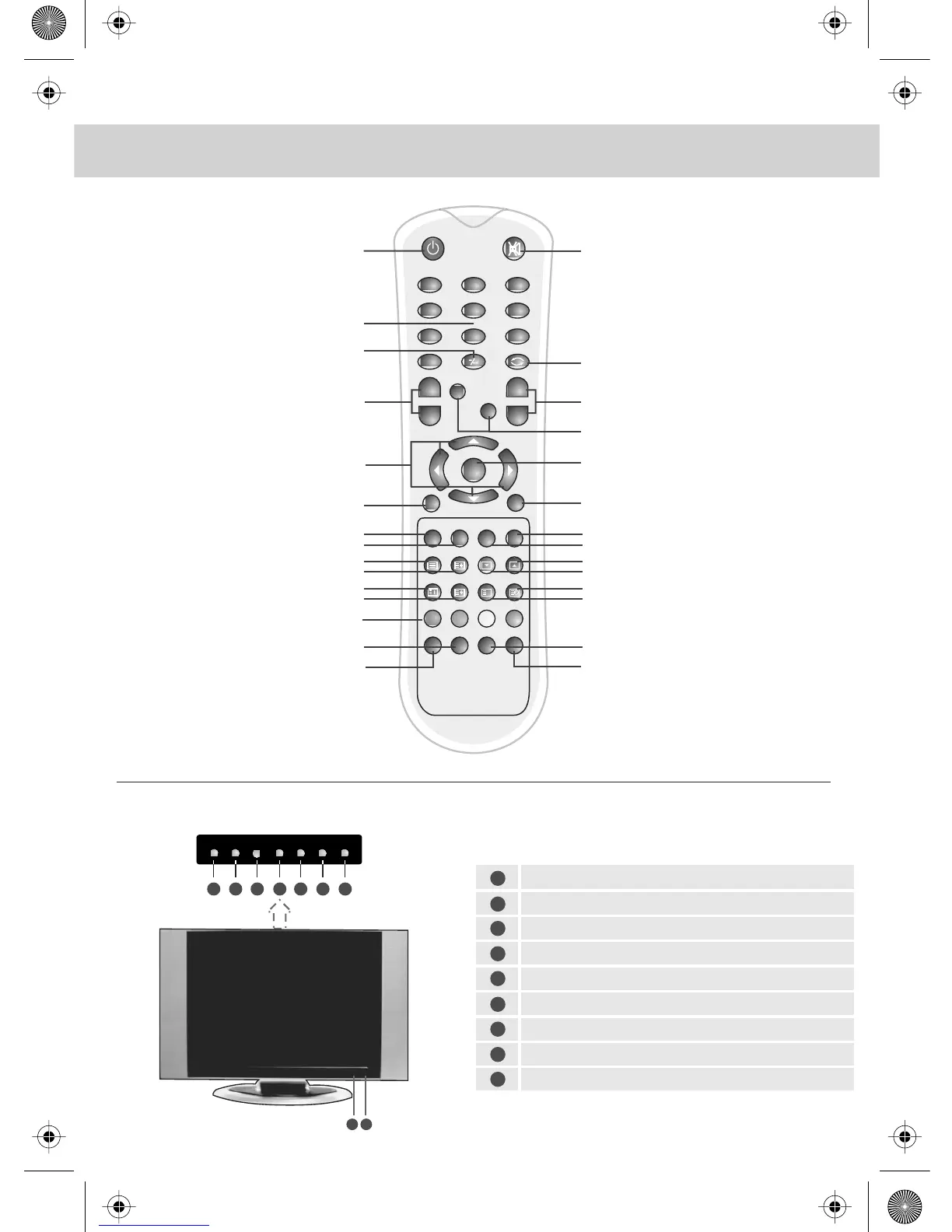
17 TEXT To open the function
of TELETEXT
18 HOLD To hold a current page
on screen
19 PGDN To select TEXT for viewing
the next page
20 PGUP To select TEXT for viewing
the previous page
21 INDEX To select and return to the
main directory of TEXT
22 SIZE To zoom in and out for
the display of the TEXT
23 REVEAL To reveal an answer
or information
24 SUBPAGE To open the TEXT function
of sub-page
RED/GREEN/YELLOW/CYAN
25 To select the corresponsive TELETEXT
page after entering the homepage
of TELETEXT
26 FAV To select and store channels
of favorite program
27 LAST
28 SLEEP Applies sleep timer
29 P-MODE To adjust the picture mode
of the TV
REMOTE CONTROL BUTTONS & TV BUTTONS
TOP PANEL BUTTONS 15/4
1 POWER Turns the TV on and off from
stanby mode
2 MUTE Mute On/Off
3 0 - 9 Number buttons
4 - / -- Press this button to select
channels of two or more numbers
5 VOL+/- Volume up and down buttonss
6 In TV mode, press this button to come
back to the previous TV channel
7 NICAM To select sound modes
8 CH+/- Channel up and down buttons
9 To move the cursor and select
the option needed
10 OK To confirm the selected option
To open the system setting menu
of the LCD Display
11 MENU Opens menu
12 BACK Return to previous screen
13 AV/TV To select the signal sources
like TV, video
14 EPG To open EPG menu
15 SUBT To display subtitles
16 INFO To display system information
Select the input source: DVB/TV/S-VIDEO/AV/SCART/PC-RGB
OSD (On Screen Display) Menu
Volume down/Left orientation
Volume up/Right orientation
Channel down/Scroll down
Channel up/Scroll up
Power ON/OFF
Power LED Indicator
Remote Control Receiver
1
2
3
4
5
6
7
8
9
INPUT MENU VOL- VOL+ PRO- PRO+ POWER
1 2 3 4 5 6 7
8 9
OK
+
-
+
-
VOL CH
NICAM
DVB
MENU
MENU
BACK
AV/TV
EPG
SUBT INFO
TEXT HOLD PGDN
PGUP
INDEX
SIZE
REVEAL SUBPAGE
RED GREEN YELLOW
CYAN
FAV LAST
?
312
5
4
6
8
7
9
0
i
SLEEP P- MODE
1
2
3
4
6
7
8
5
10
11
12
9
13
14
17
18
21
22
25
16
15
20
19
24
23
2726
2928


 To Next Page