User’s Manual UDP6900 Series Digital Control Power Supply
Instruments.uni-trend.com 40 / 44
③ The current output status of power supply (periodic refresh)
④ Power output settings
⑤ Timer shutdown settings
⑥ Power output switch
⑦ Refresh and submit the setting parameters
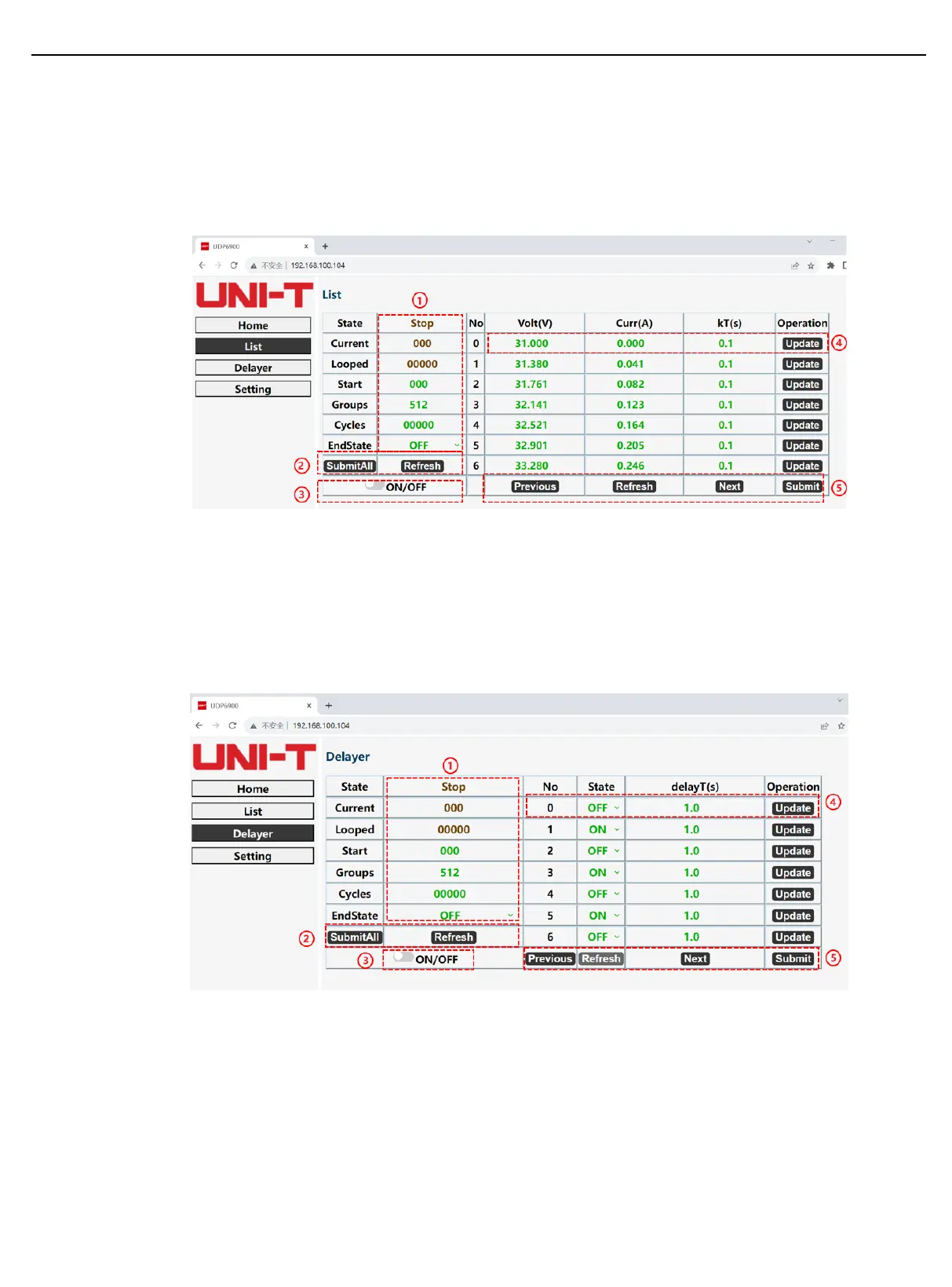
(2) List Output Mode
① List outputs the current parameters (periodic refresh) and user-defined parameters.
② Submit the settings and refresh the setting parameters
③ Turn on/off List function
④ Set and submit the group parameter settings
⑤ Page up/down, refresh group parameter, and submit group parameter in batch.
(3) Delayer
① The delayer outputs the current parameters (periodic refresh) and user-defined parameters.
② Submit the settings and refresh the setting parameters
③ Turn on/off Delayer function
④ Set and submit the group parameter setting
⑤ Page up/down, refresh group parameter, and submit group parameter in batch.
(4) System Settings



 To Next Page
 Loading...