Maintenance (5)
Replacement of the fuses is seldom required. Burning
of a fuse always results from improper operation.
RS232C Serial Port (1)
B. Setting of RS232C Serial Ports
Default of RS232C serial port for communication is set
as:
Baud Rate 2400
Start bit 1 (always 0)
Stop bit 1 (always 1)
Data bits 7
Parity 1 (odd)
The Meter
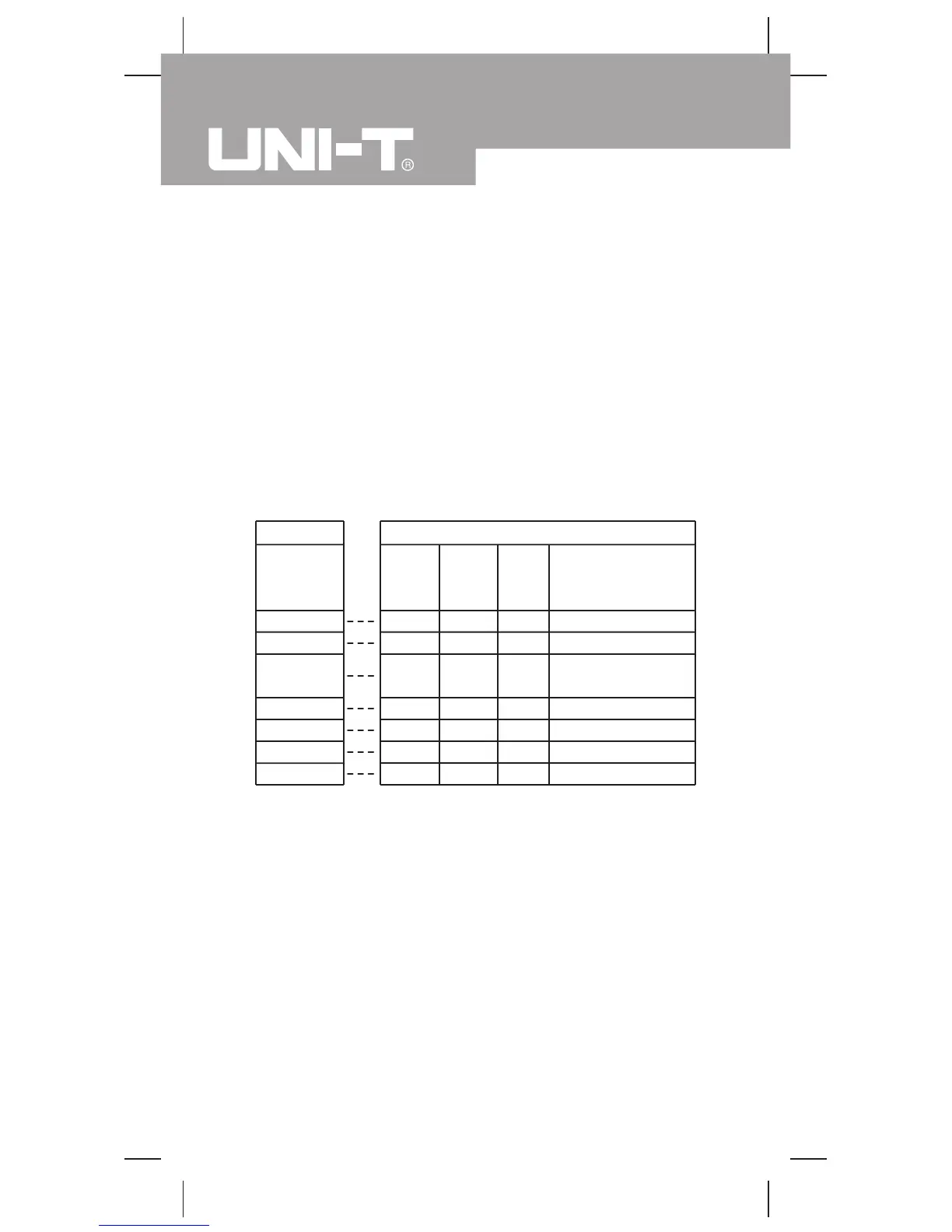
A. RS232C Port Cable
D-sub
9 Pin Male
2
3
4
5
6
7
8
Computer
D-sub
9 Pin
Female
2
3
4
5
6
7
8
D-sub
25 Pin
Female
3
2
20
7
6
4
5
Pin
Name
RX
TX
DTR
GND
DSR
RTS
CTS
Remark
Receiving Data
Transmitting Data
Data Terminal
Ready
Grounding
Data Set Ready
Request To Send
Clear To Send
6. Rejoin the battery compartment and the case top,
and reinstall the screw.
7. Rejoin the case bottom and case top, and reinstall
the 2 screws and 2 rubber feet.
Model UT60D: OPERATING MANUAL
38


 To Next Page