15
• Switch the machine off and on again: switch the main switch
to 0 and then back to 1
• Filling starts again
Group boilers
A small amount of water should flow out of each group.
If not, the light bar above the faulty group flashes:
Check the water supply to the machine
Switch the machine off and on again: switch the main switch to
0 and then back to 1
Filling starts again
F.1.2 Switching on the heating
All the elements start heating automatically if filling is correct.
When the machine reaches its operating temperature it is
ready to work. The steam pressure and the group temper-
atures are displayed on the screen.
We recommend leaving the machine with the heating switched
on all the time, and leaving the filter holders in position on the
machine when they are not in use.
F.2 BTA description
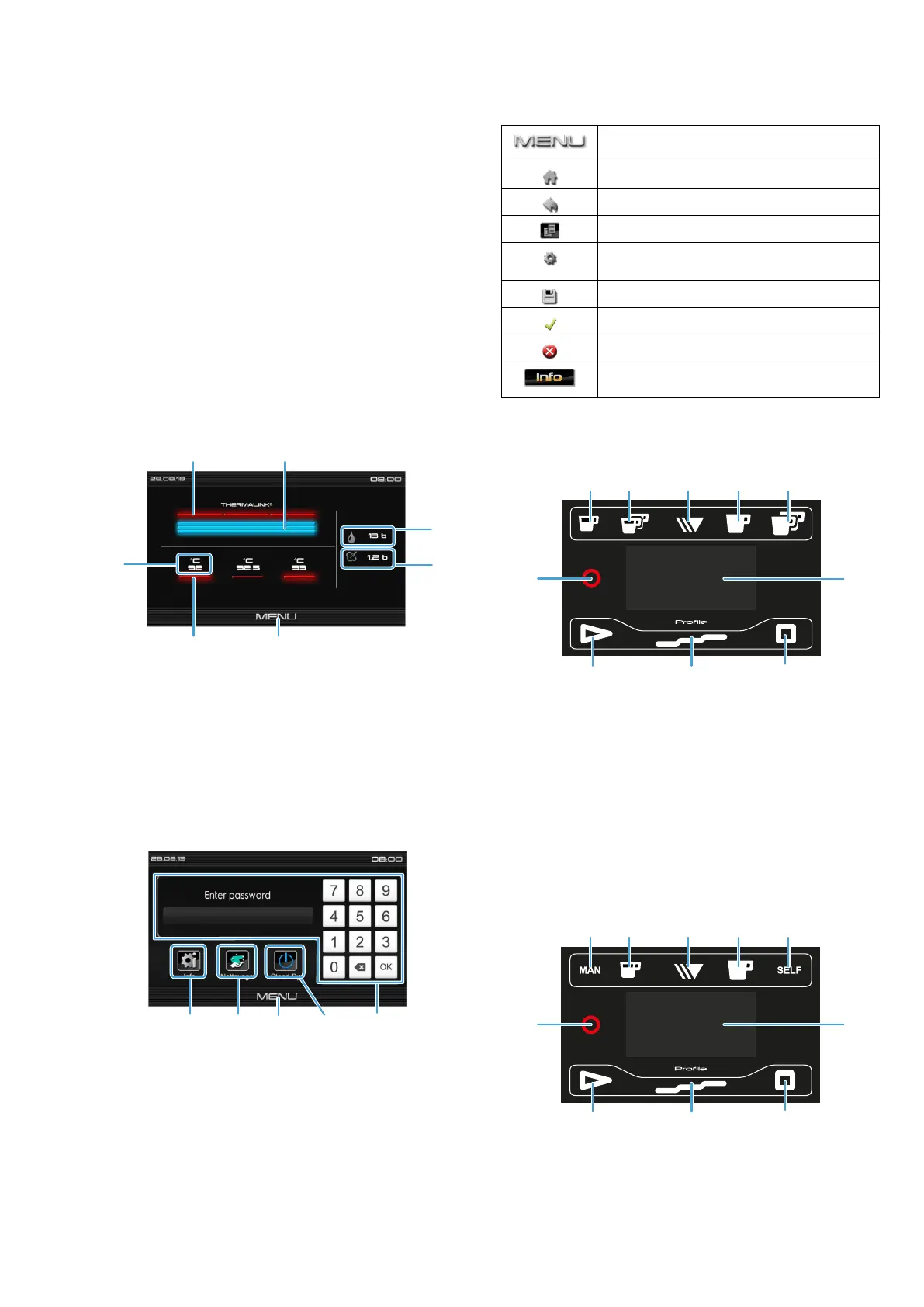
F.2.1 Screen : thermal informations
1. Steam boiler heating element 1 to 3
2. Steam boiler level
3. Machine’s water network pressure
4. Steam pressure
5. Access to F.2.2 Screen : Quick access / code
6. Coffee boiler heating element
7. Coffee heater temperature
F.2.2 Screen : Quick access / code
1. “Info“: Click on this icon to access the page containing a
summary of the information relating to the whole of the
machine in real time
Direct controls for a Level 0 user
2. “Cleaning“ icon: to access all available operations of
cleaning and flushing
3. “Menu“ icon: Comeback to the F.2.1 Screen : thermal
informations
4. “Stand-By“ icon: puts the machine in standby
5. “Password“ To access the main menu, it is necessary to
enter a Level 1 or Level 2 code. If the USB dongle is
inserted: click on “OK“ without entering a code
F.2.3 Various icons
Icon to access the “quick access/code”
screen
Back to the main screen
Back to the previous page
Icon to copy a file and/or data
Icon to indicate parameters (e.g.: steam
settings)
Icon to save data and/or settings
Icon to confirm data and/or settings
Icon to cancel data and/or settings
Icon to access enabled error codes /
alarms
F.3 Keyboards
F.3.1 Coffee keyboards
Fig. 1 4 doses box
1. 1 small cup icon
2. 2 small cups icon
3. Continu/stop icon
4. 1 large cup icon
5. 2 large cups icon
6. Display
7. Stop icon (free mode)
8. Pre-infusion icon (free mode)
9. Start icon (free mode)
10.Selection of an expert profile
Fig. 2 Dosamat box
1. Manual mod icon (manual start of coffee cycle)
2. Small cup(s) icon, number of coffee according to the
engaged filter holder (1 or 2 cups)
3. Continu/stop icon


 To Next Page